

EasyCommandBlocker
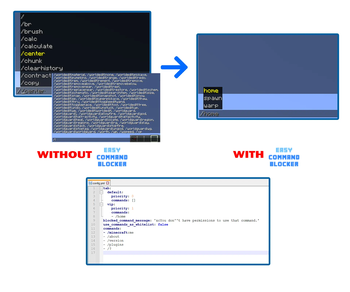
Prevent the use of unwanted commands and hide them from tab completion (the infamous /<tab>).
📖About EasyCommandBlocker

What can I do with EasyCommandBlocker?
This plugin allows you to completely block commands in a fast and easy way. You can even hide these commands from tab completion in the chat, or define a list of permitted commands to show.
There are countless of command blocker plugins, why another? I made this plugin simply because I couldn't find one that manages to work properly in recent Minecraft versions, most of these plugins are outdated or paid.
EasyCommandBlocker has been tested on:
- Paper 1.16.5 with ViaVersion, ViaBackwards, ViaRewind (Command tab completion is hidden for 1.8-1.21 versions)
- Purpur 1.18.2 with ViaVersion, ViaBackwards, ViaRewind (Command tab completion is hidden for 1.8-1.21 versions)
- Spigot 1.8.8 with ViaVersion (Command tab completion is hidden for 1.8-1.21 versions)
- Paper 1.16.5
- Paper 1.21.4+
- Waterfall
- Velocity
- Flamecord
FEATURES
✅ List of commands to block
✅ List of commands to allow
✅ Block tab completion of all commands
✅ Block colon commands
✅ Show only certain commands on tab completion (1.13+)
✅ Multiple actions when using blocked command
- Send message
- Send title message
- Play sound
- Give potion effect
- Execute console command
✅ Certain actions to group of commands.
✅ Works with ViaVersion, ViaBackwards and ViaRewind.
✅ Works on Waterfall and Velocity (blocks bungee commands and hide tab completion)
✅ Works with 1.8+
HOW TO START
SPIGOT/PAPER SERVERS:
Download the plugin and place it on your plugins folder. The plugin will only block spigot commands.
WATERFALL AND VELOCITY SERVERS:
Download the plugin and place it on your plugins folder. The plugin will only block proxy commands.
You can use the plugin in both the proxy and your game servers.
CONFIG.YML
Spoiler# Here you can create different groups to show only certain commands
# in tab completion. You must give the easycommandblocker.tab.<group>
# permission to players for using this option.
# The default group will apply to ALL users that don't have a group permission set.
# Don't remove the default group.
tab:
# Name of the group.
default:
# The priority works to define which group a player must use first if they
# have more than one group permission. A higher priority means the
# group will be selected first.
priority: 0
# A list of commands to show on tab completion. The command must
# include the "/".
commands: []
vip:
priority: 1
# You can add the "extends" option to inherit commands from another
# group. Doing so allows you to not repeat commands.
extends: default
commands:
- "/home"
# Actions to be executed when a user tries to use a blocked command.
# See the next section to understand how to use actions.
blocked_command_default_actions:
- 'message: &8[&b&lECB&8] &cYou don''t have permissions to use that command.'
- 'playsound: BLOCK_NOTE_BLOCK_PLING;10;0.1'
- 'title: 20;40;20;&cWhat are you doing?;&7Don''t use that command!'
# Whether the plugin should send notifications on join to OP
# players if an update is found
update_notify: true
# Option only in backend server
# Set it to true if you are using ECB in both the proxy and the backend.
is_network: false
# Option only in backend server.
# Set it to true if you are using a 1.12- server or want to add compatibility
# with 1.12- versions.
# Requires ProtocolLib.
# For this option to apply you must restart your server.
legacy_support: false
# If you set this option to true, the list below will serve as a whitelist instead,
# meaning the listed commands will be allowed and all others will be blocked.
use_commands_as_whitelist: false
# List of commands to block.
commands:
- "/?"
- "/bukkit:?"
- "/bukkit:ver"
- "/bukkit:version"
- "/bukkit:pl"
- "/bukkit:plugins"
- "/bukkit:help"
- "/bukkit:about"
- "/ver"
- "/version"
- "/plugins"
- "/pl"
- "/minecraft:me"
- "/about"
- "/icanhasbukkit"
# Block all commands that contain ":".
block_colon_commands: false
# Here you can define group of commands that will execute certain actions.
# The example1 section defines that commands like /ver or /version will kick
# the player from the server, instead of using the default actions. You MUST use
# the same commands defined in the previous list.
# If you don't want custom command actions, you can delete this whole section.
custom_commands_actions:
example1:
commands:
- "/ver"
- "/version"
- "/about"
actions:
- "console_command: kick %player% You can't see the version of the server!"
ACTIONS
You can use these actions on the blocked_command_default_actions option. Waterfall and Velocity servers support all actions as well!
message: &8[&b&lECB&8] &cYou don't have permissions to use that command.
console_command: kick %player%
You can find a list of sounds here:
[CLICK](https://hub.spigotmc.org/javadocs/spigot/org/bukkit/Sound.html)
playsound: BLOCK_NOTE_BLOCK_PLING;10;0.1
fadeIn, stay and fadeOut must be in ticks, 20ticks = 1second
If you want just a title, or just subtitle write "none"
title: 20;40;20;&6This is a title;none
title: 20;40;20;&cWhat are you doing?;&7Don't use that command!
You can find a list of potion effects here:
[https://hub.spigotmc.org/javadocs/spigot/org/bukkit/potion/PotionEffectType.html](https://hub.spigotmc.org/javadocs/spigot/org/bukkit/potion/PotionEffectType.html)
give_potion_effect: BLINDNESS;180;1
IMPORTANT INFORMATION
- On the tab option you can only display commands that are registered and players have the correct permissions to use. This is a Minecraft limitation, it's not possible to add custom commands to that list.
- Remember to /deop yourself first when testing the plugin since OP players will bypass all options.
- The plugin doesn't work on BungeeCord, only on Waterfall and Velocity.
API
The plugin has a small API that includes an Event:
Spoiler@EventHandler
public void onBlockedCommand(CommandBlockedEvent event){
Player player = event.getPlayer();
//Detected command from the config
String command = event.getCommand();
//The complete command used by the player
String fullCommand = event.getFullCommand();
}
COMMANDS AND PERMISSION
COMMANDS
(alias: /ecb)
- /easycommandblocker reload (Reloads the config)
PERMISSIONS:
- easycommandblocker.admin (Allows the access to /ecb reload)
- easycommandblocker.tab. (Allows the use of a certain tab completion group)
- easycommandblocker.bypass.tab (Allows to completely bypass tab completion filters)
- easycommandblocker.bypass.commands (Allows to completely bypass blocked commands)