
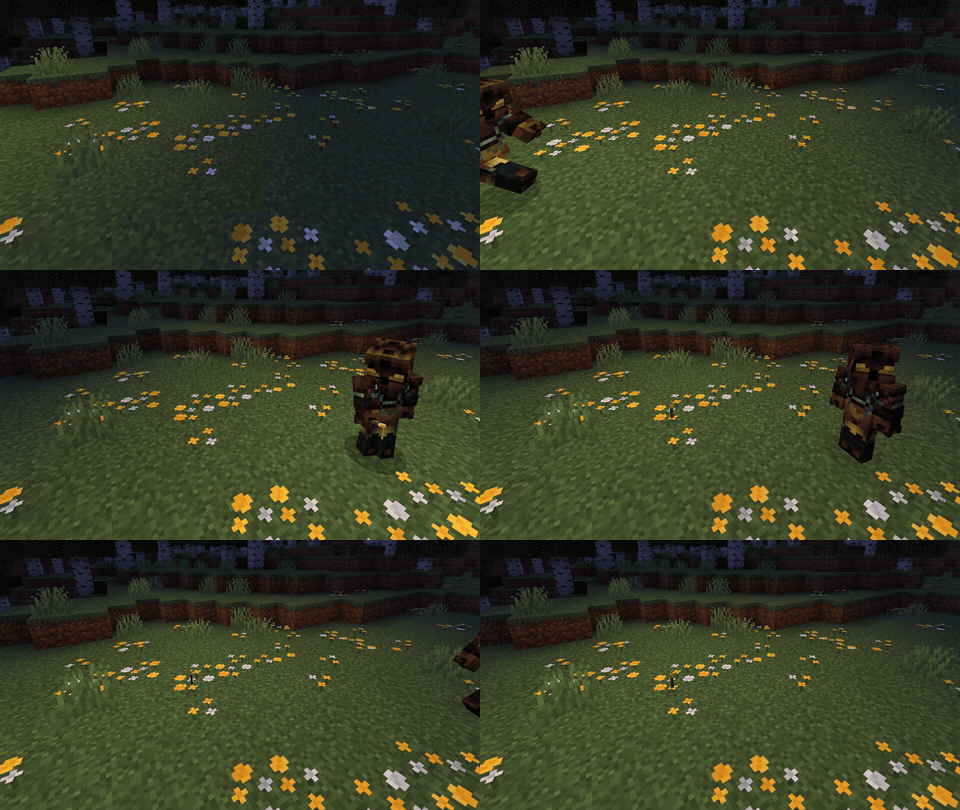

Dynamic Lights
Held items emit dynamic light that follows players AND mobs. Modern Paper 1.21+. No client mod required.
📖About Dynamic Lights
DynamicLights
Held items emit dynamic light that follows players and mobs in real time. Built for modern Paper 1.21+. No client mod, no ProtocolLib, no world modification.
A torch in your hand lights up the cave around you. A jack-o-lantern on a zombie's head lights up the zombie. Drop a lantern on the floor and it lights up the room. Walk away and the world goes dark again — your save file never changes.
Why this plugin
- Built for Paper 1.21+ — most alternatives are stuck on 1.16.
- Mobs emit light — give a zombie a torch in its hand or a jack-o-lantern on its head and it walks around lit up. Configurable per mob type.
- Soft falloff clusters — outer light blocks fade in brightness so motion looks smooth instead of jumpy.
- Zero dependencies — pure Paper API. No ProtocolLib, no PacketEvents.
- Per-player toggle — clients can opt out for performance. Persisted via PDC.
- Per-world disable — skip Nether, End, or any world by name.
- Reload without restart —
/dl reloadreverts all phantom blocks, reloads config, resumes. - Tiny footprint — ~40 KB jar, no shaded dependencies except bStats.
Features
| Feature | Status |
|---|---|
| Player held items (main hand, off hand) | ✅ |
| Player wearable lights (helmet slot) | ✅ |
| Mob held items (zombies, skeletons, piglins, etc.) | ✅ |
| Mob wearable lights (jack-o-lantern on a zombie's head) | ✅ |
| Dropped item lighting (lantern on the ground glows) | ✅ |
| Configurable item → brightness map | ✅ |
| Soft cluster falloff for smooth movement | ✅ |
Per-player toggle (/dl toggle) |
✅ |
| Per-world disable | ✅ |
| Underwater (waterlogged light blocks) | ✅ |
| No world modification — purely packet-based | ✅ |
| Spectator and vanish detection | ✅ |
| Hot reload | ✅ |
| Replaceable-block whitelist (preserves slabs, banners, etc.) | ✅ |
Compatibility
- Server: Paper 1.21.x (built against 1.21.4 API; tested on 1.21.11). Should run on any 1.21 patch.
- Java: 21+.
- Folia / Spigot: untested. PRs welcome.
- Conflicts: none known. Does not modify world data, so safe to remove at any time.
Default item brightness
TORCH 14    LANTERN 15    GLOWSTONE 15    JACK_O_LANTERN 15
SOUL_TORCH 10    SOUL_LANTERN 10    REDSTONE_TORCH 7
SEA_LANTERN 15   SHROOMLIGHT 15   END_ROD 14
CAMPFIRE 14   SOUL_CAMPFIRE 10   GLOW_BERRIES 6   BLAZE_ROD 10
Add or override any material via config.yml.
Commands
| Command | Permission | Description |
|---|---|---|
/dynamiclights toggle |
dynamiclights.toggle |
Toggle dynamic lights for yourself. |
/dynamiclights reload |
dynamiclights.reload |
Reload config + resume. |
/dynamiclights status |
— | Diagnostics: tracked emitters, config summary. |
Aliases: /dl, /dynlights.
Configuration
enabled: true
view_radius: 32
update_interval_ticks: 1
mob_scan_interval_ticks: 4
track_mobs: true
track_items: true                # dropped items on the ground emit light

suppress_vanished_emitters: true
suppress_spectator_emitters: true

cluster_radius: 1                # 0 = single column, 1 = 3x3, 2 = 5x5 (capped at 2)
cluster_height: 2                # 1 = head only, 2 = head + body (capped at 3)
cluster_falloff_per_block: 2     # subtract per block of distance from center

disabled_worlds: []              # e.g. [world_nether, world_the_end]

mob_whitelist:
  - ZOMBIE
  - SKELETON
  - PIGLIN
  - DROWNED

equipment_slots:
  - MAIN_HAND
  - OFF_HAND
  - HEAD

item_brightness:
  TORCH: 14
  LANTERN: 15
  GLOWSTONE: 15
  JACK_O_LANTERN: 15

replaceable_blocks:              # only these blocks may be replaced with phantom light
  - AIR
  - CAVE_AIR
  - WATER
  - SHORT_GRASS
  - TALL_GRASS
How it works
When an entity holds a configured light item, the plugin sends each nearby player a phantom minecraft:light[level=N,waterlogged=B] block-update packet at the entity's eye position (and surrounding cluster). The actual world is never touched — chunk lighting isn't recomputed and no blocks are placed. When the entity moves, the previous block(s) are reverted with a real-block packet and new ones are emitted.
Because the vanilla Minecraft client only knows about block-level lighting, dynamic lights inherently snap to the block grid. The cluster + falloff settings make the visual transitions softer but cannot make the light fully continuous — that requires a client-side mod such as LambDynamicLights or Optifine's Dynamic Lights.
Performance
On a 4-player test server with ~30 mobs holding torches, default cluster size (3×2×3 = 18 blocks per emitter), the per-tick task takes < 1 ms. If your server is CPU-bound:
- Set
track_mobs: falseto skip the per-tick mob scan. - Lower
cluster_radiusto 0 (single column instead of 3×3). - Increase
update_interval_ticksto 2 (light follows entity at 10 Hz instead of 20 Hz).
Installation
- Drop
DynamicLights-x.y.z.jarinto your server'splugins/folder. - Restart.
- Edit
plugins/DynamicLights/config.ymlto taste. /dl reload.
License
Proprietary — All Rights Reserved. You may install and run unmodified copies of the plugin on your own Minecraft servers. Redistribution, modification, and reverse engineering are not permitted without written permission.