DupePlus
A Dupe Plugin /dupe on an item, and it duplicates it.
📖About DupePlus



or wanna have a peek at the issues that has been reported by the server owners that use DupePlus?
DupePlus
The best duplication plugin for your Dupe server. DupePlus is a fully modular plugin that allows you to turn off/on any feature that you desire! DupePlus also provides you with a user-friendly configuration with comments that help you understand what each section means in the YML. It will also make your survival easier just by duplicating. Just send "/dupe" in chat!
Setup Guide
1. Installation
Download the plugin from the First Version in the Featured Versions or from the Versions Tab, then click Download and upload it to the /plugins folder in your Minecraft Server Files.
2. Configuration
The config file will be placed in the /plugins/DupePlus folder in your Minecraft Server Files.
Previous config versions will be renamed to old.config.yml or deleted.
If you ever manage to break the config.yml or accidentally erase it. Then here is the default config.yml
# DupePlus's Settings
# Message Variables:
# <item_type> = The Duplicated item
# <item_name> = The Item's Display Name
# <old_item_count> = The Item Count before dupe
# <new_item_count> = The Item Count after dupe
# <item_count> = Item Count
# <prefix> = The default prefix or the prefix you set
# <max> = The maximum
# <min> = The minimum
# <world> = The world name
# <link> = Where you can download the new version
# <currentversion> = The current version installed in the server.
# <newversion> = The new version

# Use this website to help you customize your messages
# https://webui.advntr.dev

# If you want to request a feature or notice any issues with the Plugin. Then create an issue in the GitHub Repository.
# https://github.com/meme20200/dupeplus/issues
dupe:
  # The prefix that is added before each message.
  prefix: "<green>DupePlus</green> <dark_gray>|</dark_gray>"

  # Make it false to let everyone allowed to use this command (Default: false)
  # Permission: dupeplus.dupe
  permission: false

  # Settings to change the Dupe Command into a Custom command.
  custom-command:
    # Make it false to disable the custom command, make it true to enable it. (Default: false)
    enabled: false

    # The name used to create the custom command (Default: "dupe")
    # /<name>
    name: "dupe"

  # Other ways of using /dupe
  aliases: [ "duplicate" ]

  # The message sent to the player when try to execute dupe or reloadconfig no permission (Only if the above is true) (Default: "<prefix> <dark_gray>|</dark_gray> <red>You are not allowed to use this command</red>")
  # Allowed Message Variables: <prefix>
  # Leave blank for no message
  permission-message: "<prefix> <red>You are not allowed to use this command</red>"

  # The message sent to the player when you duplicate an item. (Default: "<prefix> <dark_gray>|</dark_gray> <gray>Duped <item_name></gray>")
  # Allowed Message Variables: <prefix>, <item_type>, <item_name>, <old_item_count>, <new_item_count>
  message: "<prefix> <gray>Duped <white><item_name></gray>"

  # The message sent whenever the player tries to dupe nothing (Air) (Default: "")
  # Leave blank for no message
  duping-nothing-message: ""

  # Settings to block or allow /dupe in specific worlds.
  worlds:
    # Make it false to disable this feature.
    enabled: false

    # Mode: whitelist, blacklist (Default: blacklist)
    # whitelist will block all worlds but only allow /dupe in the worlds list.
    # blacklist will allow all worlds but block /dupe in the worlds list.
    mode: blacklist

    # If the player tries to dupe in a blocked world. (Default: "<prefix> <dark_gray>|</dark_gray> <red>The world is banned from using /dupe!</red>")
    # Allowed message variable: <prefix>, <item_type>, <item_name>, <item_count>, <world>
    # Leave blank for no message
    blocked-message: "<prefix> <red>The world is banned from using /dupe!</red>"

    # Add or remove worlds to either block (blacklist) or allow (whitelist) it from players in the world from duping.
    worlds: [ ]

  # Checks if the item has a NBT Tag of "dupenotallowed", if it has, it will not dupe the item.
  custom-nbt-item:
    # Make it false to disable the Custom NBT feature, make it true to enable it (Default: true)
    enabled: true

    # Allowed message variable: <prefix>, <item_type>, <item_name>, <item_count> (Default: "<prefix> <dark_gray>|</dark_gray> <red>The item is blocked from being duped!</red>")
    # Leave blank for no message
    blocked-message: "<prefix> <red>The item is blocked from being duped!</red>"


  # When using /dupe, in which hand will it dupe? (Default: MainHand)
  # OffHand
  # MainHand
  dupe-on: MainHand

  # Message to the sender if they try to dupe as a non-player (Default: "DupePlus | You can't do that!")
  console-message: "DupePlus | You can't do that!"

  # Settings for blacklist / whitelist
  list:
    # Make it false to disable these features, make it true to enable it (Default: false)
    enabled: false

    # Make it false to make it "whitelist", make it true to make it "blacklist" (Default: true)
    # whitelist will block all items but only allow duplicating items in the items list.
    # blacklist will allow all items but block duplicating items in the items list.
    # Enabled must be true
    blacklist: true

    # Checks Shulker Boxes when duplicating items (Default: true)
    shulkerbox: true

    # Checks Bundles when duplicating items (Default: true)
    bundle: true

    # If the player tries to dupe an item that is in the blacklist or the item is not in the whitelist (Default: "<prefix> <dark_gray>|</dark_gray> <red>The item is blocked from being duped!</red>")
    # Allowed message variable: <prefix>, <item_type>, <item_name>, <item_count>
    # Leave blank for no message
    blocked-message: "<prefix> <red>The item is blocked from being duped!</red>"

    # Add or remove items to either block (blacklist) or allow (whitelist) them from being duped, also do not include spaces. (NO: "diamond block" YES: "diamond_block")
    # Begin the item's id with minecraft: to check the item's type only, it will ignore if the item is part of a custom plugin. (Default: - minecraft:barrier)
    # Begin the item's id with itemsadder: if you want to check if the item's itemsadder id, it will not check for the namespace.


    # You can use itemsadder:* to block all ItemsAdder items from being duplicated
    items:
      - minecraft:barrier


    # Add or remove specific itemsadder namespaces to either block (blacklist) or allow (whitelist) any items that is under those namespaces from being duplicated
    itemsadder-namespaces:
      - replace_me


  # Settings for the cooldown of /dupe
  cooldown:
    # Make it false to disable the cooldown, make it true to enable it. (Default: false)
    enabled: false

    # How many seconds for the cooldowns to be. (Default: 3)
    seconds: 3

    # If the player tries to dupe while the cooldown is set. (Default: "<prefix> <dark_gray>|</dark_gray> <red>Please wait <duration>.</red>")
    # Allowed message variable: <prefix>, <duration>
    # Leave blank for no message
    wait-message: "<prefix> <red>Please wait <duration>.</red>"

    # Make it true if you want players with the permission to ignore the cooldown, make it false if you want everyone to have cooldown. (Default: true)
    # Permission: dupeplus.cooldown
    permission: true


  # Settings for this (ignore if you don't want this) players can still run /dupe
  # /dupe <times>
  times:
    # Make it false to disable this feature, make it true to enable this feature (Default: false)
    enabled: false

    # Set it to 0 to disable the times  (Default: 5) (Recommended: 5)
    # Permission to let a player/group have no maximum regardless of this option: dupeplus.times.max.unlimited
    # dupeplus.times.max.<name>
    max-values:
      pro: 10
      vip: 8
      default: 5 # Default permission or players without the permission who are using the dupe times.

    # If the player puts the value above the maximum then what's the message? (Default: "<prefix> <dark_gray>|</dark_gray> <red>This is higher than maximum! Do something lower than <max></red>")
    # Allowed message variable: <prefix>, <max>, <min>
    # Leave blank for no message
    max-message: "<prefix> <red>This is higher than maximum! Do something lower than <max></red>"

    # 0 for no minimum amount of times the player can run (Default: 0) (Recommended: 0)
    # Permission to let a player/group have no minimum regardless of this option: dupeplus.times.min.unlimited
    # It is recommended to just keep this at 0
    min: 0

    # If the player puts the value below the minimum (Default: "<prefix> <dark_gray>|</dark_gray> <red>This is lower than minimum! Do something higher than <min></red>")
    # Allowed message variable: <prefix>, <max>, <min>
    # Leave blank for no message
    min-message: "<prefix> <red>This is lower than minimum! Do something higher than <min></red>"

    # Instead of sending the dupe message for every time it duplicates, it sends it one time to stop spam. (Default: true)
    one-time-message: true

    # Make it false to let everyone allowed to use this feature. (Default: false)
    # Permission: dupeplus.times
    permission: false

  # Adds lore to the duplicated item.
  lore:
    # Enables or disables this feature. (Default: false)
    enabled: false

    # The lore added to the duplicated item. (Default: "<dark_red>*</dark_red> <red>Duplicated Item</red>")
    text: "<dark_red>*</dark_red> <red>Duplicated Item</red>"

    # The modes on how the plugin will add the lore. (Default: set)
    # append: Checks if the dupe lore exists or not, if it doesn't exist then it adds after the last lore or just adds the lore if no lore is present.
    # set: Checks if the dupe lore exists or not, if it doesn't exist then it will replace the existing lore with the dupe lore, otherwise it just ignores. (Recommended)
    mode: set

    # Make it false to always add/set the lore to the duplicated item regardless of the player's permission to use this feature or not, make it true to not add the lore if the player doesn't have the permission. (Default: false)
    # Permission: dupeplus.lore
    permission: false

  # Plays the set sound whenever you use /dupe
  # Permission: dupeplus.sound
  sound-feedback:
    # Enables or disables this feature. (Default: false)
    enabled: false

    # The Minecraft sound category used to play the sound. (Default: master)
    # Acceptable Values: master, music, record, weather, block, hostile, neutral, player, ambient, voice
    category: master

    # The sound used whenever the player uses /dupe. (Default: "minecraft:block.amethyst_block.chime")
    sound: "minecraft:block.amethyst_block.chime"

    # The volume of the sound played to a player whenever they use /dupe. (Default: 1)
    volume: 1

    # The pitch of the sound played to a player whenever they use /dupe. (Default: 1)
    pitch: 1

    # Make it false to let everyone allowed to use this feature. (Default: false)
    # Permission: dupeplus.sound
    permission: false

  # Deducts money from the player whenever they use /dupe
  # Permission: dupeplus.bypasseconomy
  economy:
    # Enables or disables this feature. (Default: false)
    # Note: You must have Vault installed and must set vault in integrations to true if you are going to use this feature.
    enabled: false

    # Whenever the player does /dupe <times>, should it deduct from the player once or every time? (Default: true)
    charge-per-dupe: true

    # The message sent to the player whenever the deduction was complete. (Can be silent)
    # Allowed Message Variables: <prefix>, <price>, <item_type>, <item_name>, <item_count>
    # Leave blank for no message
    successful-message: ""

    # The message sent to the player whenever they don't have enough currency to use /dupe.
    # Leave blank for no message
    # Allowed Message Variables: <prefix>, <price>, <item_type>, <item_name>, <item_count>
    not-enough-message: "<prefix> <red>You don't have enough currency to use /dupe!</red>"

    # The price that deducts from the player whenever they use /dupe (Default: 25)
    # Setting this to 0 will not deduct anything from the player.
    # Do not use negative numbers
    price: 25

    # Make it false to make everyone pay to use /dupe. (Default: false)
    # Permission: dupeplus.bypasseconomy
    permission: false

# The Integrations that this plugin connects with.
# Must restart server for the changes to apply (Also the plugin must already be installed)
# If you notice any issues then please create an issue in GitHub (meme20200/dupeplus)
integrations:
  # Enables ItemsAdder Integration (Default: true)
  itemsadder: true

  # Enables PlaceholderAPI Integration (Default: true)
  placeholderapi: true

  # Enables VaultAPI Integration (Required if economy feature is enabled) (Default: true)
  vault: true


# Checks for updates using the set API (Modrinth or SpigotMC),
updates:
  # Checks on startup for updates, disable if you do not wish to update DupePlus.
  checkupdate: true

  # Which Service should the Check Update use? (Default: Modrinth)
  # Modrinth
  # SpigotMC
  api: Modrinth

  notify:
    # Notify players with the permission to update the plugin to the latest version.
    player-notify: true
    # The message sent to everyone who has the permission (Default: "<prefix> <dark_gray>|</dark_gray> <white><green>DupePlus</green> is outdated, please update at: <blue><link></blue>")
    # (Permission: dupeplus.updates.notify)
    # Allowed message variable: <prefix>, <link>, <currentversion>, <newversion>
    notify-message: "<prefix> <white><green>DupePlus</green> is outdated, please update at: <blue><link></blue>"

    # Send message to the console for the server owner to update the plugin.
    console-notify: true

    # The message sent to the console (Default: "<prefix> | Update DupePlus at <link>")
    # Allowed message variable: <prefix>, <link>, <currentversion>, <newversion>
    console-notify-message: "DupePlus | Update DupePlus at <link>"

# Don't edit this
# Previous: 1.4.2
# config-version: 1.4.3
config-version: 1.4.3
Permissions
For Admins:
| Permission | Description |
|---|---|
dupeplus.admin |
/dupeplus |
dupeplus.admin.blocklist |
/dupeplus blocklist (Opens a GUI) |
dupeplus.admin.reload |
/dupeplus reload (Reloads the configuration) |
dupeplus.updates.notify |
Notified about any DupePlus Updates. |
dupeplus.admin.block |
/dupeplus block (Blocks the item you are holding from /dupe) |
For Players:
| Permission | Description |
|---|---|
dupeplus.times.max.unlimited |
(No maximum for /dupe [times])/dupe [times] |
dupeplus.times.min.unlimited |
(No minimum for /dupe [times])/dupe [times] |
dupeplus.times.max.<name> |
(Must also have the dupeplus.times permission & must also be set in dupe.times.max-values in the config.yml)/dupe [times] |
dupeplus.dupe |
(dupe.permission must be set to true in the config.yml)/dupe |
dupeplus.cooldown |
(both dupe.cooldown.enabled & dupe.cooldown.permission must be set to true)/dupe |
dupeplus.lore |
(both dupe.lore.enabled & dupe.lore.permission must be set to true)/dupe (Add/Set lore to the duplicated item's lores) |
dupeplus.sound |
(both dupe.sound-feedback.enabled & dupe.sound-feedback.permission must be set to true) Plays a sound to the player whenever the player uses /dupe (Sound Feedback must be enabled in the config.yml) /dupe |
dupeplus.bypasseconomy |
(both dupe.economy.enabled & dupe.economy.permission must be set to true) Bypasses the costs for /dupe /dupe |
Features
| Name | Description | Usage |
|---|---|---|
| Custom Command | Lets you change /dupe to anything you want (e.g., /replicate, /copypaste, /<whatever you want>) |
/<custom command name> (You will find the custom-command section in config.yml) |
| Aliases | Other commands to duplicate (Leave blank for no aliases) | /<different name than the main dupe command> (You will find aliases in config.yml) |
| Custom Messages | Allows you to customize the messages | /dupe (You will find many configurable messages in config.yml) |
| Worlds | Blacklist/Whitelist worlds that you can't/can do /dupe |
/dupe (You will find the worlds section in config.yml) |
| Custom NBT Item | Block the exact item from being duplicated using an NBT/Custom Data Tag | (<1.20.4) {dupenotallowed:true} (1.20.5+) [minecraft:custom_data={dupenotallowed:true}] |
| Blocklist | Block items from being duplicated (e.g., bedrock, barrier) | /dupeplus blocklist (You will find the blocklist list section in config.yml) |
| Cooldown | Adds a cooldown to the dupe command | /dupe (You will find the cooldown section in config.yml) |
| Times | Allows you to duplicate the item many times | /dupe <times> (You will find the times section in config.yml) |
| Lore | Adds a lore to the duplicated item | /dupe (You will find the lore section in config.yml) |
| Sound Feedback | Plays a sound whenever the player does /dupe |
/dupe (You will find the sound-feedback section in config.yml) |
| Economy (& Vault Integration) | Makes /dupe cost a specific amount of in-game currency |
/dupe (You will find the economy section in config.yml) |
| ItemsAdder Integration | Supports ItemsAdder items and lets you block specific ItemsAdder items or namespaces from being duplicated. | /dupe (In the list section, you can add itemsadder:<id of item> to block a specific item, itemsadder:* to block all items, or block items from a specific namespace by adding it to itemsadder-namespaces) |
| PlaceholderAPI Integration | Supports PlaceholderAPI in messages | /dupe (In all messages) |
| Update Checker | Sends a message to the console or/and to the admins with dupeplus.updates.notify |
(In the updates section outside of dupe) |
Planned Features for 1.5
| Name | Description | Usage |
|---|---|---|
| In-game Config Editor | Will let you edit the config.yml fully in-game without having to go to your file editor. |
/dupeplus config (GUI) /dupeplus config <section> <option> <value> |
| DupePlus Docs | Will help you in configuring the config.yml |
/dupeplus docs, link will be shared with everyone once published |
| ??? | This could be a new feature from you! Can even be something to do with the existing features or the planned features | ??? |
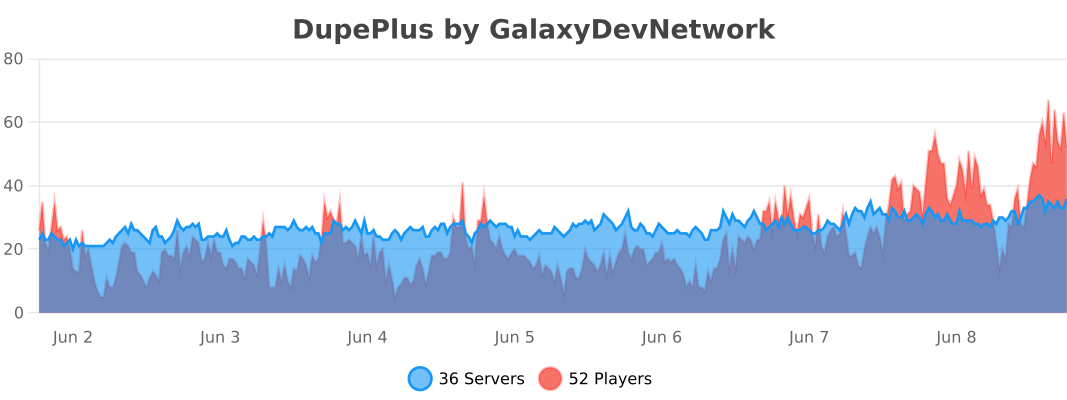
Statistics