

Dream Displays
Create in-game screens to stream your favorite videos in Minecraft.
📖About Dream Displays
If you enjoy Dream Displays, consider buying me a coffee. Every contribution helps keep the project alive!





Available for Fabric, NeoForge, Quilt, and popular server forks
Dream Displays also supports Fabric servers! No Paper or hybrid server software required.
Create interactive in-game displays that stream YouTube videos in real time, with smooth playback, configurable
resolution, and even with synchronization mode for all players on the server.
For this mod to work, players install the client mod, while server admins can install either:
- Server plugin on Paper / Folia / Purpur or other fork
- Fabric server mod on Fabric servers

Features
Client
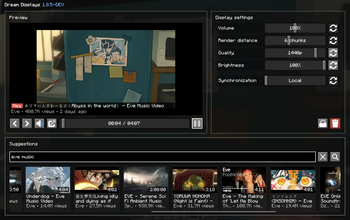
- Ad-free YouTube video playback, so you can enjoy uninterrupted viewing
- Seamless multiplayer synchronization: local, synced, and broadcast
- Livestreams and premières support
- Direct YouTube search and suggestions
- Vertical display orientation support
- Picture-in-Picture mode
- Adjustable resolutions from 144p up to 4K
- Volume control from 0% to 200%
- Brightness control from 0% to 100%
- Multiple video languages support
- Customizable display sizes in blocks
- Integrated controls for play, pause, and seek
- Hardware accelerations
- And much more!
Server
- Screens and settings remain after the server restarts or when unloaded
- Simple and precise server-side configuration
- Ultra-low network impact and zero lags
- Fabric server support (1:1 as Paper)
- Display commands — manage your in-game screens: create, delete, etc.
- Fine-grained permissions for admin-only control
How to use this mod?
Set up a display using black concrete, select it with a diamond axe, and type /display create. After the display is
created, type /display video <link to YouTube video> [language]
Done! To customize the display, look at it and press Shift + RMB
