
MINECRAFTBIBLE
Loading...
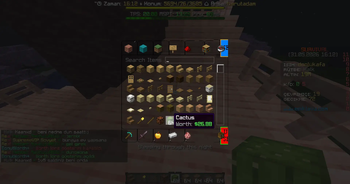

It automatically reads sell prices from ShopGUI+ and displays item values directly on item lore.
DonutWorth+ Wiki
Overview
DonutWorth+ is a lightweight item worth display plugin designed for Minecraft servers using ShopGUI+.
It automatically reads sell prices from ShopGUI+ and displays item values directly on item lore.
The plugin does not include a separate sell system. It only focuses on showing item worth in a clean and optimized way.
Main Features
Automatic item worth lore
ShopGUI+ sell price support
Shulker Box content worth calculation
Toggle command for players
Reload command for administrators
Lightweight and optimized event handling
No custom price list required
No unnecessary inventory scanning
No sell commands included
Requirements
Paper / Purpur / Spigot compatible server
ShopGUI+
Java 17 or newer
Commands
/worth toggle
Toggles worth lore visibility for the player.
When enabled, supported items will display their worth in the item lore.
Permission:
donutworth.use
/worth reload
Reloads the plugin configuration.
Permission:
donutworth.admin
Permissions
donutworth.use
Allows the player to use /worth toggle.
donutworth.admin
Allows the player to use /worth reload.
Configuration
Default configuration:
settings:
prefix: '&bDonutWorth+ &8» '
hooks:
shopgui: true
lore:
line: '&7Worth: &a$%worth%'
shulker-line: '&7Shulker Worth: &a$%worth%'
How Pricing Works
DonutWorth+ does not use a manual prices section.
All item prices are taken directly from ShopGUI+ sell prices.
If an item cannot be sold through ShopGUI+, DonutWorth+ will not add a worth line to that item.
This keeps the plugin simple and prevents price conflicts between multiple systems.
Shulker Box Worth
DonutWorth+ can calculate the total value of items inside a Shulker Box.
Example lore:
Shulker Worth: $3.02K
Only items with valid ShopGUI+ sell prices are included in the total value.
Lore System
The plugin adds its own worth line without removing existing item lore.
Example:
Worth: $256
If the item already has a worth line from DonutWorth+, it will be updated instead of duplicated.
Performance Notes
DonutWorth+ is designed to avoid heavy inventory scans.
Worth lore updates are handled through optimized events such as:
Player join
Held item change
Item pickup
Inventory click scanning is not used by default to prevent unnecessary server load.
The plugin also uses internal caching to reduce repeated ShopGUI+ price lookups.
Installation
Install ShopGUI+ on your server.
Place DonutWorth+ in the plugins folder.
Restart the server.
Configure the lore format if needed.
Use /worth reload after configuration changes.
Important Notes
DonutWorth+ does not sell items.
DonutWorth+ does not create custom item prices.
Item worth is based only on ShopGUI+ sell prices.
Items without a ShopGUI+ sell price will not show worth lore.
Shulker values are calculated from sellable items inside the Shulker Box.
Support
Before reporting an issue, please check:
ShopGUI+ is installed and working.
The item has a valid sell price in ShopGUI+.
The player has the required permission.
The plugin configuration is valid YAML.