

PluginMIT
DonutScoreboard
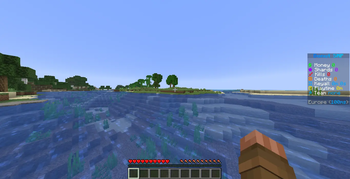
This plugin creates a scoreboard easy adjustment and configuration exactly like the famous server "DonutSMP" that owned but "DrDonutt"
14.9K
Downloads
14
Followers
1 months ago
Updated
📦
7
Versions
📖About DonutScoreboard


Please contact me on Discord if you have any suggestions or edits.

- DonutScoreboard makes a Scoreboard exactly like the famous Server "DonutSMP"

- Pixel-Perfect Design: The scoreboard matches the original DonutSMP layout exactly — same icons, same colors, same gradient title.
- Full Customization: Every single line is editable in config.yml. Change text, colors, hex codes, or swap any value with a placeholder.
- Zero Flicker: Lines only update when the content actually changes. Players never see a flash or refresh stutter.
- Built-in Tokens: Kill count, death count, ping, playtime, and keyall countdown all work out of the box with no extra plugins required.
- Keyall Countdown: A server-wide 60 minute countdown that resets automatically. Operators can set it to any time live with a command.
- Player Toggle: Players can show or hide their own scoreboard at any time with
/sb enableor/sb disable. The preference saves across restarts. - World Control: Disable the scoreboard in specific worlds from config or with a command. Players moving between worlds have it handled automatically.
- In-Game GUI: Operators can configure keyall time and manage disabled worlds directly from a chest GUI without touching config files.
- Red Numbers Hidden: The vanilla red score numbers on the sidebar are completely removed on Paper, Purpur, and Spigot 1.21+.
- Hex Color Support: Full
&#RRGGBBhex color support on every line and the title. Gradients, custom colors, anything works. - PlaceholderAPI Support: Any
%placeholder%from PlaceholderAPI works inside scoreboard lines when PAPI is installed. - Config Auto-Recovery: If config.yml gets corrupted or broken the plugin automatically regenerates a clean copy on the next startup.

| Command | Permission | Description |
|---|---|---|
/donutscoreboard |
Everyone | Shows plugin info and available commands |
/donutscoreboard reload |
donutscoreboard.admin |
Reloads the configuration file |
/donutscoreboard reset |
donutscoreboard.admin |
Resets config to defaults and rebuilds all scoreboards |
/donutscoreboard gui |
donutscoreboard.admin |
Opens the in-game configuration GUI |
/donutscoreboard interval <seconds> |
donutscoreboard.admin |
Sets the scoreboard refresh rate (1-60 seconds) |
/donutscoreboard title edit [text] |
donutscoreboard.admin |
Changes the scoreboard title |
/donutscoreboard title reset |
donutscoreboard.admin |
Resets the title to default |
/donutscoreboard line add [text] |
donutscoreboard.admin |
Adds a new line to the scoreboard |
/donutscoreboard line edit <number> [text] |
donutscoreboard.admin |
Edits a specific line |
/donutscoreboard line delete <number> |
donutscoreboard.admin |
Removes a line from the scoreboard |
/donutscoreboard line empty <number> |
donutscoreboard.admin |
Clears a line (makes it blank) |
/donutscoreboard line reset |
donutscoreboard.admin |
Resets all lines to default |
/donutscoreboard line swap <n> with <n> |
donutscoreboard.admin |
Swaps two lines |
/donutscoreboard keyall time set <time> |
donutscoreboard.admin |
Sets the keyall countdown (example: 30m, 1h, 2d) |
/donutscoreboard keyall time reset |
donutscoreboard.admin |
Resets keyall countdown to max duration |
/donutscoreboard keyall duration <time> |
donutscoreboard.admin |
Sets the max keyall duration (example: 2h, 3d) |
/donutscoreboard world list |
donutscoreboard.admin |
Lists all worlds and their status |
/donutscoreboard world disable <world> |
donutscoreboard.admin |
Disables the scoreboard in a world |
/donutscoreboard world enable <world> |
donutscoreboard.admin |
Enables the scoreboard in a world |
/sb |
donutscoreboard.toggle |
Toggles your scoreboard on or off |
/sb enable |
donutscoreboard.toggle |
Shows your scoreboard |
/sb disable |
donutscoreboard.toggle |
Hides your scoreboard |
| Permission | Default | Description |
|---|---|---|
donutscoreboard.admin |
OP | Access to all admin commands |
donutscoreboard.toggle |
Everyone | Access to /sb toggle command |

- A folder named
DonutScoreboardis created in yourpluginsfolder automatically. Inside you will find a cleanconfig.ymlfile.
# ==========================================================
#
# DonutScoreboard — config.yml
# by SirSnaryo
#
# Works on: Paper · Spigot · Bukkit · Purpur
# Version: 1.21.x
#
# ==========================================================
#
#
# ┌─────────────────────────────────────────────────────────┐
# │ COLOR CODES │
# ├─────────────────────────────────────────────────────────┤
# │ &f = white &7 = gray &0 = black │
# │ &a = green &c = red &e = yellow │
# │ &b = aqua &9 = blue &d = purple │
# │ &l = bold &o = italic &r = reset all │
# │ &#RRGGBB = any hex color (e.g. &#FF5500 = orange) │
# └─────────────────────────────────────────────────────────┘
#
#
# ┌─────────────────────────────────────────────────────────┐
# │ BUILT-IN TOKENS │
# │ These work with no extra plugins installed │
# ├─────────────────────────────────────────────────────────┤
# │ %kills% → total player kills │
# │ %deaths% → total player deaths │
# │ %ping% → player ping in ms │
# │ %playtime% → time played (e.g. 2d 4h / 3h 20m)│
# │ %keyall% → keyall countdown (e.g. 47m 13s) │
# │ │
# │ %keyall% also works anywhere via PlaceholderAPI: │
# │ %donut_keyall_countdown% │
# └─────────────────────────────────────────────────────────┘
#
#
# ┌─────────────────────────────────────────────────────────┐
# │ HOW LINES WORK │
# ├─────────────────────────────────────────────────────────┤
# │ Every line is a plain string. What you type is │
# │ exactly what appears on the sidebar. │
# │ │
# │ A line with just a space ( " " ) is a blank gap. │
# │ │
# │ You can swap any token for hardcoded text. │
# │ For example: &#FF0000%kills% → &#FF00005 │
# └─────────────────────────────────────────────────────────┘
#
#
# ┌─────────────────────────────────────────────────────────┐
# │ CONDITIONAL LINES │
# ├─────────────────────────────────────────────────────────┤
# │ You can make any line appear only when a condition │
# │ is true by adding a condition key with the same name │
# │ plus "-condition" at the end. │
# │ │
# │ Syntax: │
# │ line-name: "&fKills %kills%" │
# │ line-name-condition: "%kills% > 0" │
# │ │
# │ Supported operators: > < >= <= == != │
# │ │
# │ Both sides can be numbers or placeholder values. │
# │ If the condition is false, the line is completely │
# │ hidden — other lines shift up to fill the gap. │
# │ │
# │ Examples: │
# │ kills-condition: "%kills% > 0" │
# │ vip-condition: "%vault_eco_balance% >= 1000" │
# │ ping-condition: "%ping% < 200" │
# └─────────────────────────────────────────────────────────┘
#
#
# ┌─────────────────────────────────────────────────────────┐
# │ COMMANDS │
# ├─────────────────────────────────────────────────────────┤
# │ /sb enable → show scoreboard │
# │ /sb disable → hide scoreboard │
# │ │
# │ /donutscoreboard → plugin info │
# │ /donutscoreboard reload → reload config │
# │ /donutscoreboard reset → reset config │
# │ /donutscoreboard gui → open GUI │
# │ /donutscoreboard interval <secs> → set refresh rate │
# │ /donutscoreboard title edit "txt" → change title │
# │ /donutscoreboard title reset → reset title │
# │ /donutscoreboard line add "text" → add a new line │
# │ /donutscoreboard line edit <n> → edit a line │
# │ /donutscoreboard line delete <n> → remove a line │
# │ /donutscoreboard line empty <n> → blank a line │
# │ /donutscoreboard line reset → reset all lines │
# │ /donutscoreboard line swap <n> with <n> → swap lines │
# │ /donutscoreboard keyall time set <time> │
# │ /donutscoreboard keyall time reset │
# │ /donutscoreboard keyall duration <time> │
# │ /donutscoreboard world enable <world> │
# │ /donutscoreboard world disable <world> │
# └─────────────────────────────────────────────────────────┘
#
#
# ┌─────────────────────────────────────────────────────────┐
# │ BROKEN CONFIG │
# ├─────────────────────────────────────────────────────────┤
# │ If you break this file the plugin automatically │
# │ deletes it and regenerates a clean copy on startup. │
# └─────────────────────────────────────────────────────────┘
#
# ==========================================================
# ----------------------------------------------------------
# PLUGIN TOGGLE
# Set to false to completely disable DonutScoreboard.
# No scoreboards will be shown to anyone on the server.
# ----------------------------------------------------------
enabled: true
# ----------------------------------------------------------
# UPDATE INTERVAL
# How often the scoreboard refreshes, measured in seconds.
# Lower = smoother but more CPU usage.
# Recommended: 1
# ----------------------------------------------------------
update-interval: 1
# ----------------------------------------------------------
# KEYALL DURATION
# The total countdown time for keyall in seconds.
# Default: 3600 (60 minutes)
# You can set this higher for longer countdowns.
# Examples:
# 3600 = 1 hour
# 7200 = 2 hours
# 86400 = 1 day
# 259200 = 3 days
# ----------------------------------------------------------
keyall-duration: 3600
# ----------------------------------------------------------
# DISABLED WORLDS
# Worlds listed here will never show the scoreboard.
# Players moving into a disabled world lose their board,
# and get it back automatically when they leave.
# Example:
# disabled-worlds:
# - world_nether
# - minigames
# ----------------------------------------------------------
disabled-worlds: []
# ----------------------------------------------------------
# TOGGLE MESSAGES
# The message and sound played when a player runs
# /sb enable or /sb disable.
#
# command → the alias players type (letters only, 1-10 chars)
# Default: sb → /sb enable / /sb disable
# Requires a server restart to take effect after changing.
# sound → any Bukkit Sound enum name
# full list: hub.spigotmc.org/javadocs/spigot/org/bukkit/Sound.html
#
# For each message type you can independently enable or disable:
# chat-enabled → true/false — show/hide the chat message
# actionbar-enabled → true/false — show/hide the actionbar message
# title-enabled → true/false — show/hide the title message
# sound-enabled → true/false — play/mute the sound
# ----------------------------------------------------------
toggle:
# The command players type to show or hide their scoreboard.
# Letters only, 1-10 characters. Requires a server restart after changing.
command: "sb"
# Set to false to disable the /sb command entirely.
# Players will not be able to show or hide their scoreboard.
# Default: false (disabled — enable it if you want players to use it)
command-enabled: false
# Permission required to use the /sb command.
# Default: donutscoreboard.toggle (given to all players by default in plugin.yml)
# You can restrict it via LuckPerms by setting default: false in plugin.yml
# and granting it only to specific groups.
permission: "donutscoreboard.toggle"
# Whether new players see the scoreboard the first time they join.
default-on: true
# The argument names players type after /sb.
# Example with defaults: /sb enable /sb disable
# Change these to anything you want.
args:
enable: "enable"
disable: "disable"
# ==========================================================
# ENABLE — shown when a player enables their scoreboard
# ==========================================================
enable:
chat-enabled: true
chat-message: "&aYou have enabled scoreboard."
actionbar-enabled: true
actionbar-message: "&aYou have enabled scoreboard."
title-enabled: false
title-message: "&aScoreboard"
subtitle-message: "&7has been enabled"
title-fade-in: 10
title-stay: 40
title-fade-out: 10
sound-enabled: true
sound: "ENTITY_EXPERIENCE_ORB_PICKUP"
# ==========================================================
# DISABLE — shown when a player disables their scoreboard
# ==========================================================
disable:
chat-enabled: true
chat-message: "&cYou have disabled scoreboard."
actionbar-enabled: true
actionbar-message: "&cYou have disabled scoreboard."
title-enabled: false
title-message: "&cScoreboard"
subtitle-message: "&7has been disabled"
title-fade-in: 10
title-stay: 40
title-fade-out: 10
sound-enabled: true
sound: "ENTITY_EXPERIENCE_ORB_PICKUP"
scoreboard:
# ----------------------------------------------------------
# TITLE
# ----------------------------------------------------------
title: "DFC&lDXFC&lo\FC&ln	DFC&lu�A8FC<�B3FC&l S�BDFC&lM�C8FC&lP"
lines:
spacer-top: " "
money: "&f�FF00&l$ &fMoney �FF000"
shards: "&f&#A503FC★ &fShards &#A503FC0"
kills: "&f&#FF0000\uD83D\uDDE1 &fKills &#FF0000%kills%"
deaths: "&f&#FC7703\u2620 &fDeaths &#FC7703%deaths%"
keyall: "&f�A6FF\u231B &fKeyall �A6FF%keyall%"
playtime: "&f&#FFE600\u231A &fPlaytime &#FFE600%playtime%"
team: "�A6FF\uD83E\uDE93 &#FFFFFFTeam �A6FFnone"
spacer-mid: " "
footer: "&f&7NA East &7(�A6FF%ping%ms&7)"
# ----------------------------------------------------------
# KEYALL AUTO-EXECUTE
# When the keyall countdown reaches zero, the plugin can
# automatically run a list of commands as the console and
# optionally notify all online players.
#
# enabled → set to true to activate this feature
# commands → list of console commands to run
# Do NOT include the leading slash.
# Example: crates key give @a example
#
# notify settings → independently toggle actionbar, title,
# and sound sent to every online player
# at the moment the commands fire.
# ----------------------------------------------------------
keyall-execute:
# Master switch — false by default.
enabled: false
# Commands executed as the console the instant the timer hits zero.
# Do NOT include a leading slash.
commands:
- "crates key give @a example"
- "broadcast &6&lKeyall keys have been distributed!"
notify:
# ------ Actionbar ----------------------------------------
# Shown above the hotbar of every online player.
actionbar-enabled: false
actionbar-message: "�A6FF&lKeyall &7keys have been given to everyone!"
# ------ Title --------------------------------------------
# Big text displayed in the center of the screen.
title-enabled: false
title-message: "�A6FF&lKEYALL"
subtitle-message: "&7Keys have been distributed!"
title-fade-in: 10
title-stay: 60
title-fade-out: 10
# ------ Sound --------------------------------------------
# Played for every online player when commands execute.
# Full list: hub.spigotmc.org/javadocs/spigot/org/bukkit/Sound.html
sound-enabled: false
sound: "ENTITY_PLAYER_LEVELUP"

- Download the latest version of DonutScoreboard.
- Drop the
.jarfile into your server'spluginsfolder. - Restart your server.
- Done! No additional setup required.


© 2026 DonutScoreboard. All rights reserved to MIT.
