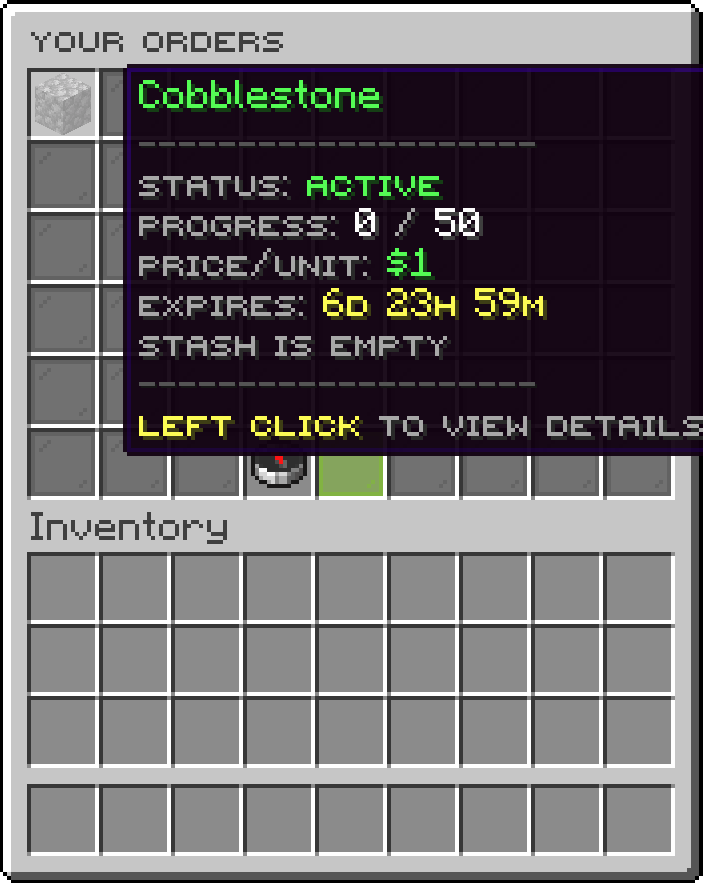
Players post buy orders for items, other players fulfill them for instant payment. No chest shops. No admin setup. Just a clean GUI and automatic economy.
How It Works
- Buyer opens
/orders, clicks New Order, picks an item, types the quantity and price-per-unit in chat.
- Funds are escrowed immediately — the buyer can't spend money they don't have.
- Sellers browse the public marketplace, pick an order, drop their items into the delivery GUI, and get paid on the spot.
- If an order only partially fills, the buyer's purchased items wait in a personal stash until they collect them.
- Orders expire automatically after a configurable number of days — any unspent funds are refunded and any collected items stay in the stash ready to pick up.
Features
Buyer Side
- Post buy orders for any material on the server's allowed-materials list
- Escrow system — funds withdrawn on order creation, never double-spent
- Order status tracking — Active, Completed, Expired, or Cancelled
- Virtual stash — delivered items are stored safely server-side until you collect them, even if your inventory is full
- Overflow protection — stash items that don't fit on collection are dropped at your feet
- Cancel & refund — cancel an active order at any time and receive the unspent balance back
- Order detail view — see progress, price, expiry, and stash status from a single GUI
Seller Side
- Browse all active orders in a paginated marketplace GUI
- Delivery GUI — dedicated 45-slot input grid; only the correct material is accepted
- Wrong-item rejection — the GUI refuses incompatible items immediately with a clear message
- Partial fills — deliver as many or as few items as you want; payment is per-item
- Anti-duplication lock — concurrent delivery attempts on the same order are serialized server-side
- Excess item return — any items beyond what the order needs are automatically returned to your inventory
Economy
- Powered by Vault — works with any Vault-compatible economy plugin (EssentialsX, CMI, etc.)
- Optional configurable tax applied to seller payouts as an economy sink (disabled by default)
- Refunds are always exact — no rounding errors
Admin & Configuration
/orders admin reload — hot-reload config.yml and messages.yml without a server restart- Fully configurable max orders per player
- Configurable order expiry duration (days)
- Configurable allowed materials list — control exactly which items can be traded
- All player-facing strings in
messages.yml — fully translatable, supports & color codes and #RRGGBB hex colors
Technical
- Full Folia support — all scheduling uses regionised entity/global schedulers; also works on standard Paper/Spigot
- SQLite + HikariCP — orders are persisted to a local database with WAL mode; no external database required
- Async database I/O — DB reads and writes never block the main thread or region threads
- Shaded & relocated dependencies — no classpath conflicts with other plugins
Commands
| Command |
Description |
Permission |
/orders |
Open your orders (aliases: /order, /market) |
donutorders.use |
/orders admin reload |
Reload config and messages |
donutorders.admin |
Permissions
| Permission |
Default |
Description |
donutorders.use |
Everyone |
Use /orders and all GUI features |
donutorders.admin |
OP |
Access admin sub-commands |
GUI Overview
| Screen |
Purpose |
| Your Orders |
View your own buy orders, check status and stash, cancel orders |
| New Order |
Pick an item, set amount and price via chat prompts |
| Browse Market |
Paginated list of all active orders posted by any player |
| Deliver Items |
45-slot grid to drop items into for a chosen order |
| Confirm Delivery |
Review the delivery before it is processed |
| Order Detail |
Full info on one of your own orders with cancel and collect options |
| Collect Stash |
Take all delivered items out of your virtual stash |
Configuration
orders:
  max-per-player: 10        # Max simultaneous active orders per player
  default-expiry-days: 7    # Days before an unfilled order expires
  tax-percent: 0.0          # % of seller payout taken as economy sink (0 = off)

database:
  filename: donutorders.db  # SQLite file in the plugin's data folder

allowed-materials:
  - DIAMOND
  - EMERALD
  - GOLD_INGOT
  - IRON_INGOT
  - NETHERITE_INGOT
  - COAL
  - LAPIS_LAZULI
  - REDSTONE
  - QUARTZ
  - AMETHYST_SHARD
  - GLOWSTONE_DUST
  - BLAZE_ROD
  - ENDER_PEARL
  - GHAST_TEAR
  - NETHER_STAR
  - ELYTRA
  - TOTEM_OF_UNDYING
  - SHULKER_SHELL
  - HEART_OF_THE_SEA
  - TRIDENT
  - OAK_LOG
  # ... and any other Bukkit Material name
Requirements
| Requirement |
Version |
| Paper / Folia |
1.20+ |
| Java |
17+ |
| Vault |
Any compatible release |
| Economy plugin |
EssentialsX, CMI, or any Vault economy |
Installation
- Drop
DonutOrders-1.0.0.jar into your plugins/ folder.
- Make sure Vault and an economy plugin are installed.
- Start the server —
config.yml and messages.yml are generated automatically.
- Edit
allowed-materials and other options, then run /orders admin reload.
Support & Source
Open an issue or pull request on the project repository.