Logo
MINECRAFTBIBLE
Items
Items

All game items

Blocks
Blocks

Building blocks

Mobs
Mobs

Creatures & monsters

Biomes
Biomes

World biomes

Structures
Structures

Generated structures

Recipes
Recipes

Crafting guides

Advancements
Advancements

Achievements

Loot Tables
Loot Tables

Drop rates

Tags
Tags

Item groupings

All Versions
View all data →
Capes
Cape ArchiveNEW

Browse rare Minecon capes, OptiFine capes, and custom capes from players worldwide

Browse

Player Database
Player DatabasePopular

Search any player

Skin Browser
Skin Browser

Browse & download skins

Cape Gallery
Cape GalleryNEW

Minecon & OptiFine capes

Seed Vault
Seed Vault

Curated seeds

Learn

Guides
GuidesNew

Tutorials & tips

Blog
Blog

News & updates

Community

Community Hub
Community HubHub

Posts, discussions & more

All Versions
View community →
Seed Analyzer
Seed Analyzer

World seed analysis

Loot Explorer
Loot Explorer

Drop rates

Crafting Calculator
Crafting Calculator

Material planning

Enchant Calculator
Enchant Calculator

Probability math

Redstone Lab
Redstone Lab

Signal timing

Trading Profit
Trading Profit

Villager ROI

All Versions
View all tools →
Mods
Mods

Browse all mods

Plugins
Plugins

Server plugins

Resource Packs
Resource Packs

Textures & sounds

Shaders
Shaders

Visual enhancements

Datapacks
Datapacks

World logic

Scanner
Mod Intelligence

Scan & analyze any mod

All Versions
View all mods →
Loading...
IntroductionIntroductionVersion HistoryVersion HistoryGuidesGuidesBlog & NewsBlog & News
ItemsItemsBlocksBlocksMobsMobsRecipesRecipesBiomesBiomesStructuresStructuresAdvancementsAdvancementsLoot TablesLoot TablesTagsTags
ModsModsPluginsPluginsResource PacksResource PacksShadersShadersDatapacksDatapacks

MinecraftBible

The Ultimate Wiki

Logo
MINECRAFTBIBLE

The ultimate Minecraft reference. Every item, block, mob, and recipe documented with precision.

Community

  • Skin Browser
  • Cape Gallery
  • Seed Vault
  • Blog
  • Guides

Database

  • Items
  • Blocks
  • Mobs
  • Recipes
  • Biomes
  • Structures

Tools

  • Seed Analyzer
  • Mod Intelligence
  • Crafting Calculator
  • Enchant Calculator

Mods & Packs

  • Mods
  • Plugins
  • Resource Packs
  • Shaders
  • Datapacks

Site & Legal

  • About
  • Authors
  • Editorial Policy
  • Corrections
  • Contact
  • Privacy Policy
  • Terms of Service
  • DMCA
  • Sitemap

© 2026 MinecraftBible. Not affiliated with Mojang or Microsoft.

PrivacyTermsContact
Dis2FA
PluginMIT

Dis2FA

Discord-based 2FA for offline-mode Minecraft servers. Link accounts, prevent unauthorized logins, and manage access through approvals.

53
Downloads
0
Followers
3 months ago
Updated
📦
3
Versions
managementsocialutilitybukkitfoliapaperpurpurspigot
Download Latestv1.5.2View on Modrinth

📖About Dis2FA

Dis2FA

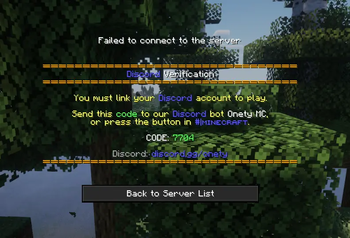
Secure your offline-mode Minecraft server with Discord-based two-factor authentication. Players link their Discord account to their Minecraft account — and any device change requires Discord approval before they can join again.

How it works

  1. A player joins for the first time and gets kicked with a one-time code
  2. They send the code to the bot (DM or configured channel)
  3. Their Discord account is linked to their Minecraft UUID
  4. On future joins they're let straight in — unless their device changes
  5. If a new device is detected, an approval request is posted to Discord before they can join

Features

  • Discord-based verification — uses a bot your players already have
  • Device approval — IP-based fingerprinting flags logins from new devices
  • Discord role gating — restrict access to players with a specific role
  • Ban sync — Discord bans can carry over to Minecraft and vice versa
  • Chat bridge — two-way chat between Discord and Minecraft
  • Web config editor — edit your config from a browser via /da web with magic link login
  • Standalone — built-in JDA, no DiscordSRV or other plugins required
  • SQLite storage — all links and device requests persist automatically

Compatibility

Platform Version Jar
Bukkit / Spigot / Purpur 1.18.2+ Dis2FA-bukkit-<version>.jar
Paper 1.20.2+ Dis2FA-paper-<version>.jar
Folia 1.20.2+ Dis2FA-folia-<version>.jar

Requirements

  • Java 17+
  • A Discord bot token

Setup

  1. Pick the correct jar for your server type
  2. Drop it into plugins/ and start the server once to generate config.yml
  3. Add your bot token and channel IDs to config.yml
  4. Restart the server
  5. Verify everything is working with /da status

Links

  • Source code on GitHub
  • Report an issue

👥 Team & Contributors

Majoramari
MajoramariOwner

⚙️ Compatibility

Environment
🖥️ Server-side
Loaders
bukkitfoliapaperpurpurspigot
Minecraft Versions
1.181.18.11.18.2

🔗 Links

Modrinth Page