Logo
MINECRAFTBIBLE
Items
Items

All game items

Blocks
Blocks

Building blocks

Mobs
Mobs

Creatures & monsters

Biomes
Biomes

World biomes

Structures
Structures

Generated structures

Recipes
Recipes

Crafting guides

Advancements
Advancements

Achievements

Loot Tables
Loot Tables

Drop rates

Tags
Tags

Item groupings

All Versions
View all data →
Capes
Cape ArchiveNEW

Browse rare Minecon capes, OptiFine capes, and custom capes from players worldwide

Browse

Player Database
Player DatabasePopular

Search any player

Skin Browser
Skin Browser

Browse & download skins

Cape Gallery
Cape GalleryNEW

Minecon & OptiFine capes

Seed Vault
Seed Vault

Curated seeds

Learn

Guides
GuidesNew

Tutorials & tips

Blog
Blog

News & updates

Community

Community Hub
Community HubHub

Posts, discussions & more

All Versions
View community →
Seed Analyzer
Seed Analyzer

World seed analysis

Loot Explorer
Loot Explorer

Drop rates

Crafting Calculator
Crafting Calculator

Material planning

Enchant Calculator
Enchant Calculator

Probability math

Redstone Lab
Redstone Lab

Signal timing

Trading Profit
Trading Profit

Villager ROI

All Versions
View all tools →
Mods
Mods

Browse all mods

Plugins
Plugins

Server plugins

Resource Packs
Resource Packs

Textures & sounds

Shaders
Shaders

Visual enhancements

Datapacks
Datapacks

World logic

Scanner
Mod Intelligence

Scan & analyze any mod

All Versions
View all mods →
Loading...
IntroductionIntroductionVersion HistoryVersion HistoryGuidesGuidesBlog & NewsBlog & News
ItemsItemsBlocksBlocksMobsMobsRecipesRecipesBiomesBiomesStructuresStructuresAdvancementsAdvancementsLoot TablesLoot TablesTagsTags
ModsModsPluginsPluginsResource PacksResource PacksShadersShadersDatapacksDatapacks

MinecraftBible

The Ultimate Wiki

Logo
MINECRAFTBIBLE

The ultimate Minecraft reference. Every item, block, mob, and recipe documented with precision.

Community

  • Skin Browser
  • Cape Gallery
  • Seed Vault
  • Blog
  • Guides

Database

  • Items
  • Blocks
  • Mobs
  • Recipes
  • Biomes
  • Structures

Tools

  • Seed Analyzer
  • Mod Intelligence
  • Crafting Calculator
  • Enchant Calculator

Mods & Packs

  • Mods
  • Plugins
  • Resource Packs
  • Shaders
  • Datapacks

Site & Legal

  • About
  • Authors
  • Editorial Policy
  • Corrections
  • Contact
  • Privacy Policy
  • Terms of Service
  • DMCA
  • Sitemap

© 2026 MinecraftBible. Not affiliated with Mojang or Microsoft.

PrivacyTermsContact
Dirt Drops OP Items
PluginLicenseRef-All-Rights-Reserved

Dirt Drops OP Items

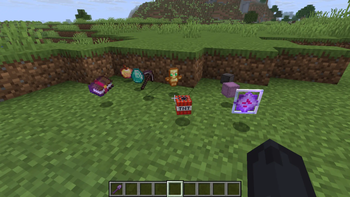
Upgrade your shovels through custom tiers to unlock OP loot from dirt, but beware of escalating lethal traps!

50
Downloads
1
Followers
3 months ago
Updated
📦
1
Versions
equipmentgame-mechanicsmobspaperpurpurspigot
Download Latestv1.0.0View on Modrinth

📖About Dirt Drops OP Items

The Concept

This plugin changes how you interact with the most common block in the game. Every time you mine a block of dirt, you have a chance to get high value loot or trigger a dangerous trap. It is designed to be a survival challenge where the rewards get better as you progress.

How it Works

The system is based on four tiers of custom shovels. You start with a basic wooden shovel and work your way up to netherite. Each tier increases your chances of finding rare items and decreases the likelihood of common junk. However, as the loot gets better, the traps become more frequent and more lethal.

Key Features

Feature Description
Custom Shovels Four distinct levels of shovels to craft and use.
Tiered Loot From basic survival supplies to rare end game materials.
Dangerous Traps Explosions, hostile mobs, or heavy falling objects.
Progression Better tools provide better loot but carry higher risk.

Crafting Recipes

Use a standard crafting table to create your tools. The recipes follow the standard shovel pattern but apply custom logic to the finished item.

Shovel Tier Ingredients
Iron OP Shovel 1 Iron Ingot + 2 Sticks
Gold OP Shovel 1 Gold Ingot + 2 Sticks
Diamond OP Shovel 1 Diamond + 2 Sticks
Netherite OP Shovel 1 Netherite Ingot + 2 Sticks

Installation Guide

Follow these steps to add the plugin to your server:

  1. Download: Get the .jar file from the Versions tab.
  2. Locate: Open your Minecraft server directory.
  3. Upload: Place the file into the plugins folder.
  4. Launch: Start or restart your server to enable the plugin.

Technical Details

This plugin is compatible with Paper, Spigot, and Purpur server software. It is recommended for use in new survival worlds to experience the full progression system.

Support & Community

Found a bug? Want to suggest a new trap? Just want to hang out?

  • 💬 Join the Discord Server
  • ▶️ YouTube Channel

👥 Team & Contributors

Hyperreal
HyperrealOwner

⚙️ Compatibility

Environment
🖥️ Server-side
Loaders
paperpurpurspigot
Minecraft Versions
1.21.11

🔗 Links

Modrinth Page