
DialogWindow
A powerful, fully configurable dialog UI system for version 1.21.6+. Create dynamic, interactive GUI dialogs entirely from YAML files
📖About DialogWindow
DialogWindow
Turn any command into a clean in-game GUI — no code required.
DialogWindow lets server admins build fully custom dialog menus for Minecraft using simple YAML files. Built on top of Minecraft's native Dialog API (1.21.6+), it gives commands that normally just print text in chat a proper graphical interface instead: buttons, checkboxes, dropdowns, sliders, text fields, and custom item displays.
Perfect for warp menus, rule acceptance screens, shop confirmations, settings panels, rank pickers, PvP toggles, or any admin tool that deserves more than a wall of chat text.
What it does
- Define entire GUIs in YAML — no plugin development needed
- Add labels, buttons, checkboxes, select menus, sliders, and text inputs
- Show custom items with names, lore, skull textures, glow effects, and more
- Trigger console and player commands based on what the user picks
- Plug in PlaceholderAPI placeholders anywhere — titles, labels, item lore, commands
- Organize dozens of menus in subfolders without losing track of anything
- Works on both Paper and Spigot
Requirements
- Minecraft 1.21.6 or newer
- Java 17+
- PlaceholderAPI (optional, but recommended)
Older versions aren't supported since the plugin relies on Minecraft's built-in Dialog API.
Getting started
- Drop the jar into your
pluginsfolder - Restart the server
- DialogWindow generates
config.yml,messages.yml, and aninterfaces/folder with working examples - Edit or add your own interface files
- Run
/dwreload— done, no restart needed
Commands
| Command | What it does | Permission |
|---|---|---|
/dwreload |
Reloads config, messages, and all interfaces on the fly | dialogwindow.reload |
/dwreport |
Generates a diagnostic report for support requests | dialogwindow.report |
How an interface looks
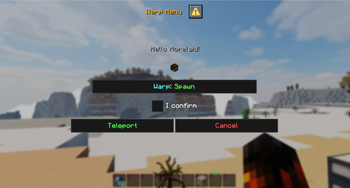
Each YAML file in interfaces/ defines one command and its dialog. A minimal warp menu:
command:
  name: "warpui"
  description: "Warp selection menu"
  permission: "dialogwindow.warpui"

dialog:
  title: "<gold>Warp Menu</gold>"
  can-close-with-escape: false

ui:
  - label: "<yellow>Select your destination:</yellow>"

  - item:
      type: item
      material: PLAYER_HEAD
      name: "<gold>%playername%</gold>"
      skull-owner: "%playername%"
      glow: true

  - input:
      type: checkbox
      key: confirm
      label: "<green>Confirm teleport</green>"

  - buttons:
      - label: "<green>Teleport</green>"
        console-commands:
          - "warp ${destination}"
Elements render top to bottom, exactly as listed: labels, items, inputs, buttons — mix and match freely.
Inputs you can use
- text – free text field
- checkbox – on/off toggle with custom return values
- single_option – select menu / dropdown
- number_range – slider with min/max/step
Item display (Paper only)
Material, amount, name, lore, skull owner, glow, custom model data, enchantments, item flags, unbreakable — all configurable, all support placeholders.
Placeholders
Built-in: %playername%, %uuid%, %world%
Plus full PlaceholderAPI support in titles, labels, item names/lore, input defaults, button commands, and hover text — if PAPI is installed, it just works.
Use cases
Warp menus · shop confirmations · rule acceptance dialogs · PvP toggles · rank selection · settings panels · command configuration UIs · admin tools
Web Editor
Build your YAML visually instead of by hand: morelaid.com/dwe
Support
Discord: https://discord.gg/5zuC36R
Before reaching out, please run /dwreport and bring the result with you — it speeds up troubleshooting a lot. Questions are welcome in German or English.