
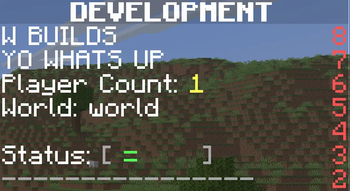

Development Plugin
This plugin that lets you develop stuff. This plugin uses paperMC software to run. It has many features such as: Custom GUI maker, Dynamic CMD maker, and more.
📖About Development Plugin
An all-in-one Paper/Spigot 1.21.1+ utility plugin. Create custom GUIs, dynamic commands, holograms, boss bars, scoreboards, and clickable NPCs in-game—no code or restarts needed.
Development Plugin
A powerful, all-in-one utility plugin for Paper/Spigot 1.21.1+ servers. This plugin allows server owners to create custom GUIs, dynamic commands, interactive items with map art, holograms, and boss bars—all without touching a single line of code or restarting the server.
🚀 Features
1. Custom GUI System
Create interactive menus with buttons that execute commands.
- Visual Editor:
/develop gui interface <name>- Left Click (with item): Set an item in a slot.
- Shift + Left Click: Set/Update an item and prompt for a chat command.
- Right Click: Remove a button from a slot.
- Create a GUI:
/develop gui create <name> - Set a Button (Command): Hold an item and run
/develop gui setbutton <name> <slot> <command> - View a GUI:
/develop gui view <name> - Delete a GUI:
/develop gui delete <name>(Requires 15s confirmation)
2. Dynamic Commands
Create your own server commands on the fly.
- Create Command:
/develop cmd <name> <execution_command> <level>- Levels:
4for OP only,1for all players. - Placeholders: Use
{player}for the runner's name, or{0},{1}for arguments. - Example:
/develop cmd day "time set day" 4
- Levels:
- List Commands:
/develop cmd list - Delete Command:
/develop cmd delete <name>
3. Custom Items & Map Art
Craft unique items with custom NBT data or render images onto Minecraft maps.
- Give Item:
/develop item <material> <name> <lore> <nbt_key:val> [image.png]- Lore: Use
|for line breaks. - Map Art: Drop a
.pnginto/plugins/Development/images/and specify the filename as the last argument to render it onto a map! - Example:
/develop item DIAMOND_SWORD "&bExcalibur" "&7A legendary sword|&ePower: 9000" "custom:sword"
- Lore: Use
4. Dynamic Holograms
Floating text displays that update in real-time.
- Create:
/develop hologram create <name> <text>- Placeholders:
{online}(online count),{time}(server time). - Example:
/develop hologram spawn &bWelcome!|&ePlayers: {online}
- Placeholders:
- Move:
/develop hologram movehere <name> - Delete:
/develop hologram delete <name>
5. Boss Bar Announcements
Server-wide announcements with customizable styles.
- Create:
/develop bossbar create <name> <color> <style> <title>- Colors: PINK, BLUE, RED, GREEN, YELLOW, PURPLE, WHITE.
- Styles: SOLID, SEGMENTED_6, 10, 12, 20.
- Show:
/develop bossbar show <name>(Shows to all online players) - Progress:
/develop bossbar setprogress <name> <0.0 - 1.0> - Delete:
/develop bossbar delete <name>
6. Custom Scoreboard System
Dynamic scoreboards with animation support.
- Visual Editor:
/develop scoreboard interface <id>- Gives you a book editor. Each page in the book represents one line on the scoreboard.
- Signing or saving the book updates the scoreboard immediately.
- Create:
/develop scoreboard create <id> <world> <title> - Set Line:
/develop scoreboard setline <id> <index> <text> - Delete:
/develop scoreboard delete <id> - Reload:
/develop scoreboard reload
7. Custom NPC System
Spawn stationary entities that execute commands when right-clicked.
- Create NPC:
/develop npc create <id> <type> <display_name>- Example:
/develop npc create guard VILLAGER &b&lCastle Guard
- Example:
- Set Command:
/develop npc setcommand <id> <command> - List NPCs:
/develop npc list - Delete NPC:
/develop npc delete <id>
🛠️ Installation
- Download the latest
Development.jar. - Place it in your server's
pluginsfolder. - Restart the server.
- Ensure you have the permission
development.adminor are an OP to use/develop.
📂 File Structure
guis.yml: Stores all custom menu configurations.commands.yml: Stores dynamically registered commands.holograms.yml: Stores persistent hologram data.npcs.yml: Stores persistent NPC data.images/: Put your PNG files here for the Map Art feature.
💻 Technical Requirements
- Server: Paper or Spigot 1.21.1+
- Java: Java 21+
- Developer: everett2323