Logo
MINECRAFTBIBLE
Items
Items

All game items

Blocks
Blocks

Building blocks

Mobs
Mobs

Creatures & monsters

Biomes
Biomes

World biomes

Structures
Structures

Generated structures

Recipes
Recipes

Crafting guides

Advancements
Advancements

Achievements

Loot Tables
Loot Tables

Drop rates

Tags
Tags

Item groupings

All Versions
View all data →
Capes
Cape ArchiveNEW

Browse rare Minecon capes, OptiFine capes, and custom capes from players worldwide

Browse

Player Database
Player DatabasePopular

Search any player

Skin Browser
Skin Browser

Browse & download skins

Cape Gallery
Cape GalleryNEW

Minecon & OptiFine capes

Seed Vault
Seed Vault

Curated seeds

Learn

Guides
GuidesNew

Tutorials & tips

Blog
Blog

News & updates

Community

Community Hub
Community HubHub

Posts, discussions & more

All Versions
View community →
Seed Analyzer
Seed Analyzer

World seed analysis

Loot Explorer
Loot Explorer

Drop rates

Crafting Calculator
Crafting Calculator

Material planning

Enchant Calculator
Enchant Calculator

Probability math

Redstone Lab
Redstone Lab

Signal timing

Trading Profit
Trading Profit

Villager ROI

All Versions
View all tools →
Mods
Mods

Browse all mods

Plugins
Plugins

Server plugins

Resource Packs
Resource Packs

Textures & sounds

Shaders
Shaders

Visual enhancements

Datapacks
Datapacks

World logic

Scanner
Mod Intelligence

Scan & analyze any mod

All Versions
View all mods →
Loading...
IntroductionIntroductionVersion HistoryVersion HistoryGuidesGuidesBlog & NewsBlog & News
ItemsItemsBlocksBlocksMobsMobsRecipesRecipesBiomesBiomesStructuresStructuresAdvancementsAdvancementsLoot TablesLoot TablesTagsTags
ModsModsPluginsPluginsResource PacksResource PacksShadersShadersDatapacksDatapacks

MinecraftBible

The Ultimate Wiki

Logo
MINECRAFTBIBLE

The ultimate Minecraft reference. Every item, block, mob, and recipe documented with precision.

Community

  • Skin Browser
  • Cape Gallery
  • Seed Vault
  • Blog
  • Guides

Database

  • Items
  • Blocks
  • Mobs
  • Recipes
  • Biomes
  • Structures

Tools

  • Seed Analyzer
  • Mod Intelligence
  • Crafting Calculator
  • Enchant Calculator

Mods & Packs

  • Mods
  • Plugins
  • Resource Packs
  • Shaders
  • Datapacks

Site & Legal

  • About
  • Authors
  • Editorial Policy
  • Corrections
  • Contact
  • Privacy Policy
  • Terms of Service
  • DMCA
  • Sitemap

© 2026 MinecraftBible. Not affiliated with Mojang or Microsoft.

PrivacyTermsContact
DeluxeEggs
PluginLicenseRef-All-Rights-Reserved

DeluxeEggs

Best Free EGG Cosmetic Solution for your Server !

52
Downloads
1
Followers
3 months ago
Updated
📦
1
Versions
economymanagementutilitybukkitpaperpurpurspigot
Download Latestv1.0.0View on Modrinth

📖About DeluxeEggs

🥚 DeluxeEggs

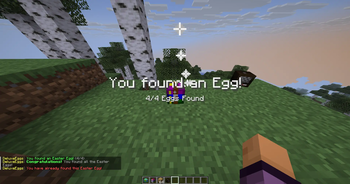
Hide custom Easter Eggs around your server for players to discover! DeluxeEggs is a fun and lightweight way to create seasonal events, hub activities, or spawn-area scavenger hunts that encourage exploration and reward your community. Everything can be managed directly in-game, making setup quick, simple, and easy to maintain.

✨ In-Game GUI Editor

Create and manage hidden eggs, edit rewards, change messages, and teleport to egg locations without touching a config file. Just use /ee menu.

🎨 Flexible Egg Customization

Make every hidden egg fit your server’s style. DeluxeEggs supports HeadDatabase (hdb:<id>), Base64 textures, and player heads (zhead:<name>), so you can create unique collectibles for seasonal events, quests, or custom adventures.


Customization & Settings

DeluxeEggs is designed to be plug-and-play. Nearly everything can be managed without touching a configuration file. Egg locations, rewards, and custom discovery messages can all be edited live in-game through the built-in GUI editor.

For advanced users, the config.yml provides additional options such as:

  • toggling fireworks and specific particles on discovery
  • adjusting the claim method (Click, Walk Over, or Both)
  • changing the plugin prefix and default egg skins
  • enabling Hex colors for 1.16+ versions

Commands

Command Permission Description
/ee menu deluxeeggs.admin Open the full GUI editor to manage eggs
/ee create deluxeeggs.admin Turn your held item into a placeable Easter Egg
/ee set deluxeeggs.admin Set the block you are currently looking at as an egg
/ee give deluxeeggs.admin Give an egg item (supports HeadDatabase, ZHead, and Base64)
/ee edit <id> deluxeeggs.admin Open the GUI editor for a specific egg
/ee tp <id> deluxeeggs.admin Teleport instantly to an egg's location
/ee list deluxeeggs.admin List all hidden eggs and their coordinates
/ee reload deluxeeggs.admin Reload the plugin configuration and messages
/ee found None Let players check their personal discovery progress

OP players will have all permissions. To manually grant permissions, use LuckPerms.


General Features

  • Custom Rewards: Run any console commands when a player finds an egg, such as giving money, items, ranks, tags, or other rewards.
  • Rich Feedback: Celebrate discoveries with Titles/Subtitles, customizable particles, level-up sounds, and fireworks.
  • PlaceholderAPI Support: Show player progress on scoreboards, tab lists, or in chat.
  • Claim Methods: Choose how players interact with eggs in the config — Click, Walk Over, or Both.

Some Advice

  • To use the hdb:<id> shortcut in the /ee give command, you must have the HeadDatabase plugin installed on your server.
  • For placeholders, make sure PlaceholderAPI is installed and working properly.
  • All player-facing messages, prefixes, particles, and sounds are fully translatable and customizable in the config.yml and messages.yml files.

👥 Team & Contributors

Critic
CriticOwner

⚙️ Compatibility

Environment
🖥️ Server-side
Loaders
bukkitpaperpurpurspigot
Minecraft Versions
1.81.8.11.8.21.8.31.8.41.8.51.8.61.8.7+64 more

🔗 Links

Modrinth Page