

DeathLog_By_FeDen
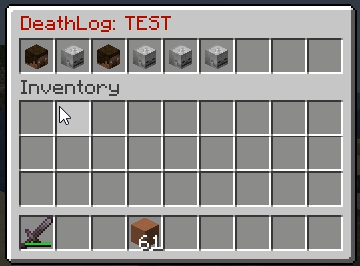
This project adds a complete death tracking system for Minecraft servers. It records player deaths, including lost items, coordinates, cause of death, and killer, and provides an intuitive GUI for administrators to review and manage death history.
📖About DeathLog_By_FeDen
DeathLog - Death History & Item Recovery
Lightweight death history and item recovery plugin for Paper/Spigot servers.
DeathLog is a lightweight admin plugin for Paper/Spigot that stores player death history,
displays lost items through a convenient GUI, and allows staff to safely restore lost items.
---
✨ Features
- Logs player deaths using
PlayerDeathEvent - Death history GUI
- View lost items for each death
- Full
ItemStacksaving:- meta
- NBT
- enchantments
- lore
- custom item data
- Saves:
- world
- coordinates
- death time
- Detects:
- death cause
- killer
- player / mob / projectile
- Teleport staff to death locations
- Restore items directly through GUI
- Inventory free-space check before restore
- One-time restore protection
- Logs the administrator who restored items
- Removes tracked world drops after restore
- Removes items from players who picked up someone else's death loot
- Removes equipped stolen items from:
- armor slots
- offhand
- Removes placed blocks created from death loot
- Attempts block rollback at death location
- Configurable death limit per player with FIFO cleanup
- Player opt-out system for death saving
- EN/RU language support
- Configurable prefix and core settings
📜 Commands
/deathlog
Open your death history.
/deathlog <player>
Open another player's death history.
/deathlog clear
Clear your death history.
/deathlog clear <player>
Clear another player's death history.
/deathlog nosave <deathId>
Used by the opt-out button to remove a saved death.
🔑 Permissions
By default, only OP has access.
deathlog.view
Access your own history.
deathlog.others
View and manage other players' histories.
deathlog.restore
Restore items.
♻️ Restore
Before Restore
- Player must be online
- Free inventory space is checked
- Death must not already be restored
After Restore
- Items are returned to the dead player
- Armor is restored to armor slots if available
- Offhand items are restored to the offhand slot if free
- Inventory items return to original slots if available
- Occupied slots fallback to free inventory space
- Tracked drops are removed from the world
- Picked-up items are removed from other players
- Equipped stolen items are removed from:
- inventory
- armor
- offhand
- Blocks placed from death loot are removed
- Restore administrator is logged
💀 Death Saving
After death, the player receives a chat message:
Death info saved for staff. [Do not save]
Behavior
- If the player does nothing:
- the death remains saved for staff
- If the player clicks:
[Do not save]
the death record is deleted and hidden from staff.
⚙️ Config
File:
plugins/DeathLog/config.yml
language: "en"
prefix: "&8[&cDeathLog&8] &7"

storage:
  max_deaths_per_player: 10
  date_format: "dd.MM.yyyy HH:mm:ss"
  auto_save_on_death: true
  allow_player_opt_out: true

restore:
  require_player_online: true
  check_inventory_space: true
  one_time_restore: true
  remove_world_drops: true
  remove_picked_items: true
  remove_picked_items_on_join: true
  remove_placed_blocks: true
  block_rollback: true
  notify_target: true

tracking:
  dropped_item_search_radius: 4.0
  track_picked_items: true
  track_placed_blocks: true

gui:
  history_size: 54
  details_size: 54
  teleport_slot: 45
  restore_slot: 49
  back_slot: 53
🌍 Languages
Default language:
English
Available Languages
en — English
ru — Русский
Language Files
plugins/DeathLog/lang/en.yml
plugins/DeathLog/lang/ru.yml
Russian Language
language: "ru"
After changing the language, restart the server.
💾 Storage
All deaths are stored in:
plugins/DeathLog/deaths.yml
Saved Data
- Player UUID and nickname
- Death time
- World and coordinates
- Yaw/Pitch
- Death cause
- Killer
- Lost items
- Original item slots
- Tracked drop UUIDs
- Players who picked up items
- Blocks placed using death loot
- Restore status
- Restore administrator and timestamp
📦 Installation
1. Download
DeathLog.jar
2. Move
Place the jar into:
plugins/
3. Restart
Start or restart your server.
4. Configure
Edit:
plugins/DeathLog/config.yml
5. Language
language: "ru"
🧩 Compatibility
Minecraft: 1.20+ / 1.21+
Platform: Paper / Spigot
Java: 17+
🎯 Use Cases
DeathLog is useful for:
- Survival servers
- Grief-control systems
- Staff utility servers
- Hardcore gameplay
- Administrative moderation
- Any server where staff need fast and safe item recovery tools
❤️ DeathLog
Simple. Safe. Staff-friendly death recovery.