

DataLens
Real-time data inspector for Minecraft
📖About DataLens
🔍 DataLens
Real-time data inspector for Minecraft — inspect, edit, compare and export any block, entity or item.

Overview
DataLens is a Paper plugin that gives server operators and developers a powerful lens into the internal data structures of Minecraft objects. Point at any block, entity or player, and instantly explore its full data tree — PDC tags, attributes, potion effects, enchantments, block states and more — through both a paginated chest GUI and chat commands.
Unlike simple NBT viewers, DataLens provides a complete inspect → edit → validate → diff → export pipeline with automatic rollback on failure, a built-in changelog, and a public API for third-party schema registration.
Supported platforms: Bukkit / Spigot / Paper 1.20.x – 1.21.x · Java 21+
Features
🔎 Deep Inspection
- Blocks, Entities, Items & Players — inspect any object via raytrace targeting or by player name.
- Full data tree extraction — PDC keys, block states, entity attributes, potion effects, equipment, enchantments, lore, and more are captured into a hierarchical
DataNodetree. - Version-adaptive — pluggable adapter layer auto-detects the server version and loads the appropriate reader/writer.
✏️ Safe In-Place Editing
- Set / Remove any primitive value by dot-notation path (e.g.
pdc.myplugin:level). - Type validation & coercion — raw string inputs are validated against the target node's
DataTypebefore committing. - Atomic rollback — a deep-copy snapshot is taken before every write; if persistence fails the tree is restored automatically.
📊 Diff Engine
- Compare the live data tree against your working copy to see exactly what changed — additions, removals and modifications are displayed with color-coded chat output.
📤 Export
- Dump the complete data tree as JSON or YAML directly to chat.
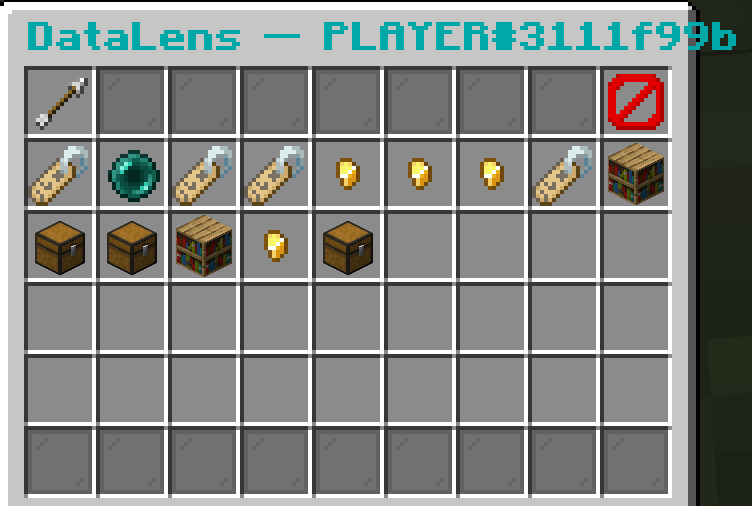
🖥️ Inspector GUI
- 54-slot paginated inventory with navigation breadcrumbs.
- Click into compound/list nodes to drill down; use Back to navigate up.
- Color-coded type indicators, pagination controls, and one-click export.
📝 Changelog
- Every
SETandREMOVEoperation is logged toplugins/DataLens/changelog.logwith timestamps, actor, path, and old/new values. - Configurable — can be disabled entirely.
🔐 Permission System
- Granular permission nodes (
datalens.inspect,datalens.edit,datalens.admin).
🧩 Public API
- Third-party plugins can register schemas for their PDC namespaces to improve labelling and validation.
- Programmatic access to
InspectorServiceandSessionServiceviaDataLensPlugin.getAPI().
⚡ Performance
- Per-player sessions backed by a Caffeine LRU cache with configurable TTL and capacity.
- Read operations are thread-safe; writes enforce main-thread execution.
Commands
| Command | Description | Permission |
|---|---|---|
/inspect |
Inspect the block/entity you are looking at (raytrace) | datalens.inspect |
/inspect <player> |
Inspect a named online player directly | datalens.inspect |
/data set <path> <value> |
Edit a primitive value at the given path | datalens.edit |
/data remove <path> |
Delete the node at the given path | datalens.edit |
/data export [json|yaml] |
Export the inspected data tree to chat | datalens.inspect |
/data diff |
Show differences between live data and working copy | datalens.inspect |
Both commands include context-aware tab completion — paths are autocompleted from the live data tree, and values suggest type-appropriate options.
Permissions
| Node | Description | Default |
|---|---|---|
datalens.inspect |
Inspect blocks, entities and items | op |
datalens.edit |
Edit inspected data values | op |
datalens.admin |
Full administrative access (inherits inspect + edit) | op |
Configuration
Configuration is stored in plugins/DataLens/config.yml:
debug: false

cache:
  session-ttl-seconds: 60     # Idle timeout for player sessions
  max-sessions: 100            # Maximum concurrent inspection sessions

inspect:
  max-ray-distance: 5.0        # Raytrace distance in blocks for /inspect

changelog:
  enabled: true                # Enable/disable edit logging
  max-entries: 10000           # Maximum changelog entries
📚 Documentation and support
All documentation, source code, and examples are available in the official repository:
👉 https://github.com/Parallax-Development/DataLens