

CyberWorldReset
Easily reset a world with a scheduler or a specific time/date and more!
📖About CyberWorldReset




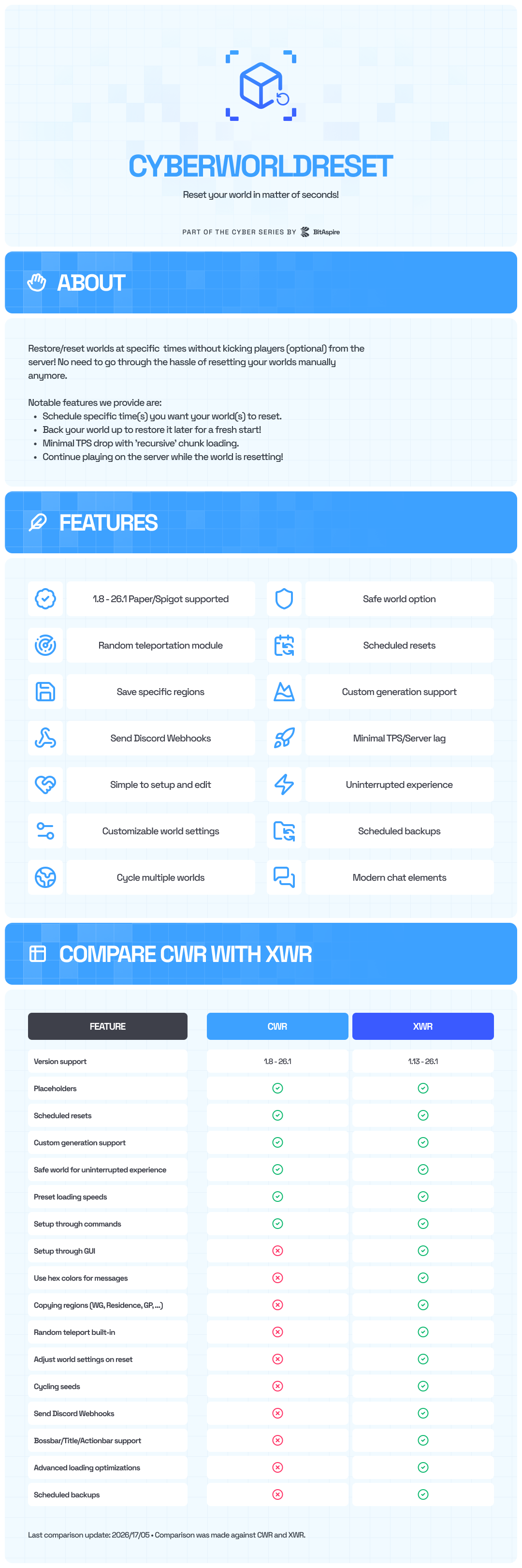


XenoWorldReset now has much different internals when compared to its standard counterpart (~12k different lines) and contains almost triple the code count.
CyberWorldReset has now been made open source for the community to contribute. Be sure to check it out using the link above if you are interested!
Info: CyberWorldReset changed its Spigot author account, but it is still maintained by the same team. No changes were made to the product. Thank you!
XenoWorldReset [More Features]
Information on upgrading (RECOMMENDED) from CyberWorldReset to XenoWorldReset can be found here.
Restore/reset worlds at specific times without kicking players (optional) from the server. No need to go through the hassle of resetting your worlds manually anymore.
Please stay up to date! Older plugin versions are unsupported and can be inefficient.
This plugin does not depend on any other plugin. PlaceholderAPI and Multiverse are soft dependencies, meaning they are not required. However, we highly suggest using at least Multiverse. For available placeholders, check out the PlaceholderAPI spoiler below.
Based on all the testing we've done, the plugin shows to be stable. However, it is still recommended to use it in a testing environment.
We try our best to fix bugs as soon as they become apparent. We ask that you report any bug(s) you encounter in our Discord server.
WIKI - All your questions answeredYou can find the completed WIKI here.
Plugin reviewsVersion 0.5.5 - ServerMiner
https://www.youtube.com/watch?v=kizXdDZ_7Fs
Version 0.2.4 - BlackNovember
https://www.youtube.com/watch?v=hXV-i0vdc-k
TranslationsYou can download translations from here.
If you want to translate, please reach out to me on Discord or Spigot.
The WIKI can be found here.
This link is currently broken, please use the information on this page. We are working on an updated wiki!
Features
- 1.8.8 - 1.21.x Spigot/Paper Supported
- Simple to Use/Setup - Quickly set up and edit world configurations with commands or in the
worlds.ymlfile. Tab complete will help you quickly set up/edit a world configuration. - Backups - Back your world up to restore it later for a fresh start.
- Scheduled Resets - Schedule specific time(s) you want your world(s) to reset. No need to manually do so. Intervals are supported too.
- Custom Generation - Supports custom generation such as Terra, Iris, etc. as of
0.5.0. Please review the guide below. - Fast - Plugin attempts to use minimal RAM/memory. Data is saved to cache and quickly accessed when needed.
- Optimizable - Tailor how chunks are loaded to your CPU power or player amount. Minimal TPS drop with
recursivechunk loading. - Uninterrupted Experience - Continue playing on the server while the world is resetting with little to no TPS drop/lag. Just send all your players to a safe world while the world resets.
- Configurable - Add warning messages, world-specific commands, specific/random/default seed, schedulers, restore saved worlds, and much more to come soon.
- Confirmation - Prevent accidental world resets by confirming your command.
- Fully Custom
lang.yml- Customize all messages to any language. - Auto-Update Configs - Configurations automatically adjust themselves with each update. No need to redo your configuration files for every update.
- Java 8+ Support - Supports Java 8 and newer versions, including Java 11 and 17.
- Support - Quick to fix any issues present or help with your query. Join our Discord server and get support ASAP.
Get XenoWorldReset here.
Custom GeneratorsCWR supports custom generation as of 0.5.0. This should work with most generators, tested on Terra and Iris.
WARNING: Make sure to add the generator under the world in bukkit.yml or weird chunk glitches can occur. Be sure to restart afterward.
Example using Terra in bukkit.yml:
worlds:
  world:
    generator: Terra:DEFAULT
Once it has been added, you can now add it in CWR using:
/cwr edit <world> setGenerator Terra:DEFAULT
During the next reset, it will use this generator.
NOTE: If the generator is already under the world in bukkit.yml and the world is already loaded using that generator, you can leave the generator as DEFAULT in CWR. It will continue using this generator.
This is still technically an experimental feature, so please let me know if you run into any issues.
PlaceholderAPIAvailable placeholders
%cwr_reset_status_<world>%- Specific world reset status.%cwr_reset_status%- Next world reset status.%cwr_chunk_radius%- Radius of chunk loading as set in config.%cwr_chunk_diameter%- Diameter of chunk loading as set in config.%cwr_chunk_area%- Area of chunk loading as set in config.%cwr_tps%- Instantaneous TPS of the server.%cwr_remaining_time_<world>%- Remaining time until next reset.%cwr_remaining_seconds_<world>%- Remaining seconds until next reset.%cwr_remaining_chunks_<world>%- Remaining chunks to load.%cwr_loaded_chunks_<world>%- Amount of chunks already loaded.%cwr_reset_percent_<world>%- Percent of loading completed.
You can use the placeholder %cwr_reset_status_<world>% to display the status of a specific world reset.
Live demonstration:
https://www.youtube.com/watch?v=ao1S1-bryR4
You can edit the placeholder to display whatever you want in lang.yml.
More placeholders coming soon.
How to set up a scheduler?Please note timers can be tricky to set up and may not work the way you think. Try to avoid using ** as much as possible, as they will set to the current date or time. Every time you edit the region, the timer may re-initialize and totally shift your regeneration date when using **.
The plugin will initialize timers that repeat and that are from a past date. Use this to your advantage.
If you need help setting one up, I can help you on Discord.
What are loading types?When creating this plugin, I found the standard world loading mechanism to cause major TPS drops and instantaneous stress on the CPU. Because of this, I created my own loading mechanism that this plugin utilizes with the ULTRA-SAFE, SAFE, NORMAL, and FAST options. These modes also recognize when the server TPS drops below 20 and will slow down the chunk loading time based on the current TPS.
Essentially, the plugin stretches out the loading time to cause minimal stress/TPS drop. Each server can select its desired loading speed/type and radius.
Loading Types
- STANDARD uses Minecraft's chunk loading mechanism, which can cause major lag.
- ULTRA-SAFE loads a chunk every 2.5 seconds. Loads 4 chunks per second as of
v0.3.2. - SAFE loads a chunk every 1.5 seconds. Loads 7 chunks per second as of
v0.3.2. - NORMAL loads a chunk every 0.6 seconds. Loads 12 chunks per second as of
v0.3.2. - FAST loads a chunk every 0.25 seconds. Loads 20 chunks per second as of
v0.3.0. - ULTRA-FAST will not load any chunks. The chunks will be force loaded when the players are sent back.
Chunks are loaded starting from the spawn chunk and spiraling out until the final chunk is loaded. Here is a visual representation of what order the plugin will load chunks for a 3 radius setup:
Commands
/cwr about- About the plugin./cwr help- See the help menu./cwr reload- Reload the plugin./cwr confirm- Confirm an action./cwr list- See a list of existing world setups./cwr create [<world>]- Create a world setup./cwr save [<world>]- Backup a world./cwr reset [<world>]- Regenerate a world./cwr info [<world>]- Info about a world setup./cwr edit <world> <setting> <value>- Adjust a setting.
setEnabled <true|false>- Enable/disable a world config.enabledLastSaved <true|false>- Enable/disable restoring of last saved world.addTimer <timer|<yyyy-MM-dd HH:mm>>- Add a scheduler.delTimer <index>- Delete a set scheduler.setSeed <<seed>|random|default>- Set a seed to reset to.setGenerator <<generator>|default>- Set a generator to use.setEnvironment <default|normal|nether|the_end>- Set an environment to use.addMessage <message>- Add a reset message.delMessage <index>- Delete a reset message.enableWarning <true|false>- Enable/disable warnings.addWarningMSG <message>- Add a warning message.delWarningMSG <index>- Delete a warning message.addWarningTime <seconds>- Add a time for when to send warning message.delWarningTime <index>- Delete a warning time.enableSafeWorld <true|false>- Enable/disable safe world.setSafeWorld <world>- Set a world to teleport players to.setSafeWorldDelay <seconds>- Set a delay before teleporting players back.setSafeWorldSpawn <default|<x>, <y>, <z>>>- Set a safeworld teleport location. NEW
NOTE: You can also use /worldregen, /worldreset, or /cyberworldreset.
CyberWorldReset.player.*- All player permissions.CyberWorldReset.player.about- About command.
CyberWorldReset.admin.*- All admin permissions.CyberWorldReset.admin.reload- Reload the plugin.CyberWorldReset.admin.list- List of world setups.CyberWorldReset.admin.create- Create a world setup.CyberWorldReset.admin.reset- Force reset a world.CyberWorldReset.admin.save- Save the current world.CyberWorldReset.admin.info- Get info about world setup.CyberWorldReset.admin.edit.*- All editing permissions.CyberWorldReset.admin.edit.enable- Enable a world setup.CyberWorldReset.admin.edit.lastsaved- Enable to restore last saved.CyberWorldReset.admin.edit.timer- Add and delete timers.CyberWorldReset.admin.edit.seed- Set the reset world seed.CyberWorldReset.admin.edit.generator- Set the reset world generator.CyberWorldReset.admin.edit.environment- Set the reset world environment.CyberWorldReset.admin.edit.message- Add and delete reset messages.CyberWorldReset.admin.edit.commands- Add and delete reset commands.CyberWorldReset.admin.edit.warnings- Adjust warning times/messages.CyberWorldReset.admin.edit.safeworld- Adjust safe world settings.
Support
Found a bug or have a question? Open a ticket on our Discord server or contact Kihsomray#0001.
Please do not use the review section for support. Thanks =D
TOS- This resource may not be redistributed or sold.
- You cannot claim this resource as your own.
- These terms can be updated at any given time.
Failure to comply with these terms may result in consequences.