

CraftGuard
A lightweight, highly configurable Minecraft plugin for managing restrictions for workstations on a per-world basis.
📖About CraftGuard

CraftGuard





History
CraftGuard is the official evolution of FlameAntiCraft. All development and new features now focus on CraftGuard.Information
CraftGuard will be rebranded to ServerGuard. The updated version will be found under the VOMLabs Organization
I am really sorry for moving the plugins so many times 🙏🙏🙏
CraftGuard gives you powerful, per-world control over crafting, workstations, containers, and portals! Precise management for any server type.
What is CraftGuard?
CraftGuard is a Minecraft server plugin that provides granular control over what players can interact with! Crafting Tables, Furnaces, Portals, Containers, and more, down to the individual world level.
Perfect for server networks with creative worlds, adventure maps, minigames, or survival hubs that need different rules.
Why CraftGuard?
- Per-World Control — Different rules for every world, not just global toggles
- Workstation Protection — Control 15+ workstation types individually (anvil, furnace, blast furnace, smoker, enchantment table, brewing stand, smithing table, etc.)
- Container Security — Lock down chests, ender chests, shulker boxes, and more
- Portal Management — Restrict nether/end portals per world
- Flexible Storage — Use YAML, H2, MySQL, MariaDB, PostgreSQL, MongoDB, or Redis
- Export & Import — Migrate settings between servers or backup with a single command
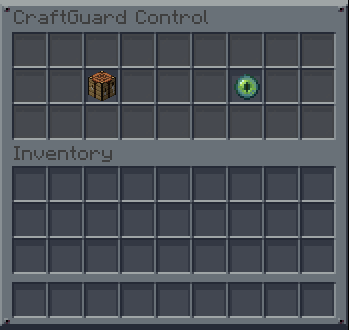
- Interactive GUI — Full in-game management interface with real-time status indicators
- Multi-Language — Available in 13 languages out of the box
- Auto-Migration — Configs upgrade automatically between versions
- PlaceholderAPI — Dynamic placeholders for scoreboards, holograms, and messages
Modern & Fresh UI
CraftGuard now features a sleek, modern design with a professional color palette:
- Primary Color:
#478fc6(Prefix & Accents) - Neutral:
#C2C7D3(Standard Text) - Warning/Error:
#D1968C&#CE5F4E

Features
Core Functionality
- Per-World Management — Control crafting, workstations, containers, and portals individually per world
- Granular Toggles — Enable or disable specific workstations, containers, or portal types
- Item Blockability — Block specific items from being crafted (e.g., diamond tools) while keeping the workstation functional
- Emergency Lockdown — Instantly disable all interactions in a world for maintenance or events
- Bypass Permissions — Allow specific players or groups to bypass restrictions
User Experience
- Interactive GUI — In-game chest menu for visual feature management
- Smart Commands — Simple syntax:
/cg <world> <feature> <on|off|toggle> - Tab Completion — Full command and world name autocomplete
- Real-Time Feedback — Status indicators and player notifications
Technical
- Multiple Databases — YAML, H2, MySQL, MariaDB, PostgreSQL, MongoDB, Redis support
- Export/Import — Move settings between storage backends or servers
- World Migration — Copy or move settings between worlds with
/cg migrate <source> <target> [copy] - Auto-Update — Built-in Modrinth update checker with optional auto-download
- Audit Logging — Track blocked interactions for monitoring
- WorldGuard Integration — Region-based bypass support
Supported Languages
English (US), English (UK), German, Custom
Supported Features
| Category | Features |
|---|---|
| Core | crafting, nether-portal, end-portal, lockdown |
| Workstations | anvil, furnace, blast-furnace, smoker, enchanting, brewing, smithing, loom, cartography, grindstone, stonecutter |
| Containers | chest, trapped-chest, ender-chest, copper-chest, shulker-box |
How to Install
Requirements
- Paper 1.21.11+ or compatible server (Purpur, Folia)
- Java 21+
- (Optional) PlaceholderAPI for extended placeholders
- (Optional) WorldGuard for region-based bypass
Installation
- Download
craftguard-2.2.0.jarfrom Modrinth - Place the JAR in your server's
plugins/folder - Start/restart the server
- Edit
plugins/CraftGuard/config.ymlto customize - Use
/cg helpor/cgto get started
Quick Setup
# Block crafting in lobby world
/cg lobby crafting off
# » Crafting disabled in lobby.

# Allow nether portals in survival
/cg survival nether-portal on
# » Nether Portal enabled in survival.

# Open management GUI
/cg
# » Opened Management-GUI!
Commands
| Command | Description | Permission |
|---|---|---|
/cg |
Open management GUI | admin |
/cg help |
Show help menu | admin |
/cg <world> <feature> on |
Enable feature in world | admin |
/cg <world> <feature> off |
Disable feature in world | admin |
/cg <world> <feature> toggle |
Toggle feature state | admin |
/cg reload |
Reload configuration | admin |
/cg export |
Export settings to file | admin |
/cg import <file> |
Import settings from file | admin |
/cg migrate <from> <to> [copy] |
Copy/move settings between worlds | admin |
Permissions
| Permission | Description | Default |
|---|---|---|
craftguard.admin |
Full access to all commands | OP |
craftguard.bypass.* |
Bypass all restrictions | false |
craftguard.bypass.<type> |
Bypass specific restriction | false |
Configuration
Configuration files are located in plugins/CraftGuard/:
config.yml— Main settings (features, messages, effects)locales/— Language files for translationsworlds.yml— World-specific state storage
Key Config Options
settings:
  enabled: true          # Master toggle
  language: en-us        # Locale
  default-state: true   # Default for new worlds

item-blockability:
  enabled: true
  blocked-items:
    CRAFTING:
      - DIAMOND_SWORD
      - NETHERITE_*
PlaceholderAPI
CraftGuard provides dynamic placeholders:
World State
%craftguard_world_state%— Current world state (enabled/disabled)%craftguard_world_state_<type>%— Specific feature state%craftguard_world_<world>_<type>%— Any world's state
Stats
%craftguard_stats_global_total%— Total blocks%craftguard_stats_type_<type>_total%— Blocks by type%craftguard_stats_world_<world>_total%— Blocks by world
Developers
- Paper 1.21.11 Platform — Built for the latest 1.21 builds using modern Paper standards.
- Java 21 — Leveraging LTS Java features for stable server-side execution.
Building
git clone https://github.com/itzzjustmateo/CraftGuard.git
cd CraftGuard
mvn clean package
API Usage
CraftGuard plugin = CraftGuard.getInstance();
ConfigManager cm = plugin.getConfigManager();

// Check if feature is enabled
boolean craftingEnabled = cm.isFeatureEnabled("survival", "crafting");

// Set feature state
cm.setFeatureEnabled("survival", "furnace", false);
License
See LICENSE.md. Attribution required for derivative works.
Support
- Bugs: GitHub Issues
- Features: Discussions
- Chat: Discord