

CPVPSingleBiome
CPVPSingleBiome is a Paper plugin that creates PvP-friendly single-biome worlds with configurable terrain generation, world reset support, and Chunky integration. Designed for Crystal PvP and practice servers.
📖About CPVPSingleBiome
CPVPSingleBiome
🎥 Showcase Video: https://youtu.be/viWAo7wzos8
CPVPSingleBiome is a highly configurable single-biome world generator for Paper and Purpur servers, designed for Crystal PvP, practice servers, events and competitive gameplay.
Originally developed for the Crystal PvP practice server cpvpprac.eu, CPVPSingleBiome focuses on one goal:
Creating visually distinct worlds that remain fair, readable and enjoyable for PvP combat.
Unlike survival-focused world generators, CPVPSingleBiome is optimized for:
- Open sightlines
- Gentle elevation changes
- Reduced terrain clutter
- Predictable combat space
- Fast arena deployment
- Easy long-term world maintenance
It is suitable for Crystal PvP, FFA worlds, practice arenas, events, duels and training servers.
Available Biomes
CPVPSingleBiome currently supports the following biome types:
plains
desert
badlands
snow
mushroom
end
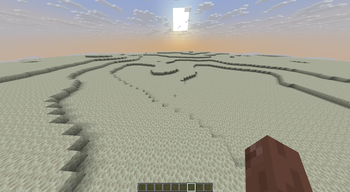
Each biome is designed around PvP readability while still keeping its own atmosphere and visual identity.
Features
PvP-Focused Terrain
CPVPSingleBiome prioritizes competitive gameplay instead of survival exploration.
The terrain is designed for:
- Open combat areas
- Smooth movement
- Clear visibility
- Reduced clutter
- Controlled elevation changes
- Sparse PvP-friendly decoration
The result is terrain that looks natural while still being practical for Crystal PvP and competitive gameplay.
Highly Configurable
Most important generation settings can be adjusted in the configuration file.
You can configure:
- Terrain height
- Height variation
- Noise scale
- Flatness
- Decoration density
- Tree density
- World border size
- Reset behavior
- Chunky pregeneration settings
This allows you to create anything from nearly flat PvP arenas to more natural-looking practice worlds.
Safe Default Configuration
Fresh installations are safe by default.
Automatic scheduled resets are disabled by default and must be enabled manually after you have configured your worlds.
This prevents accidental world resets on first server start.
Default behavior on fresh installation:
- Automatic scheduled resets: disabled
- Automatic Chunky pregeneration: disabled
- Manual world creation: available
- Manual reset commands: available for admins
last-reset-date: initialized safely when scheduled resets are enabled for the first time
To enable scheduled resets, edit config.yml, set reset scheduling to enabled, and reload the plugin or restart the server.
Automated World Resets
CPVPSingleBiome includes built-in reset functionality for long-running PvP servers.
Reset features include:
- Scheduled full resets
- Manual full resets
- Manual single-world resets
- Automatic world recreation
- Automatic biome recreation
- WorldBorder restoration
- Difficulty restoration
- GameMode restoration
- PvP setting restoration
- Join protection during reset phases
- Optional Chunky pregeneration after resets
Example restored world settings:
world-border-size: 10000
difficulty: HARD
gamemode: SURVIVAL
pvp: true
This makes CPVPSingleBiome useful for practice networks and PvP servers where worlds need to stay clean, predictable and easy to maintain.
Chunky Integration
CPVPSingleBiome can integrate with Chunky for pregeneration after world creation or resets.
Chunky support allows:
- Automatic pregeneration after resets
- Manual pregeneration commands
- Multi-world pregeneration
- Reduced lag after world creation
- Cleaner production workflows for larger arena worlds
Chunky is optional, but recommended for production servers with larger world borders.
Commands
General Commands
/cpvpsb help
/cpvpsb version
/cpvpsb about
/cpvpsb status
/cpvpsb export
/cpvpsb reload
/cpvpsb biomes
/cpvpsb info
World Management
/cpvpsb create <world> [biome]
/cpvpsb tp <world>
Reset Commands
/cpvpsb reset now
/cpvpsb reset <world>
/cpvpsb reset status
/cpvpsb reset reload
Chunky Commands
/cpvpsb chunky start <world>
/cpvpsb chunky start-all
Diagnostic Export
CPVPSingleBiome includes a diagnostic export command:
/cpvpsb export
It creates a text report under:
plugins/CPVPSingleBiome/exports/
The export includes:
- Plugin version
- Server version
- Java version
- Available biomes
- Generator configuration
- World border configuration
- Reset configuration
- Chunky configuration
- Configured reset worlds
- Loaded worlds
- Raw
config.yml
This is useful for debugging, support and server documentation.
Always review exported files before sharing them publicly.
Installation
- Download the latest CPVPSingleBiome
.jarfile. - Place it into your server's
pluginsfolder. - Restart the server.
- Configure
plugins/CPVPSingleBiome/config.yml.
The default config contains example reset-world entries.
These entries tell CPVPSingleBiome which worlds should be managed and recreated during resets. They do not replace the initial world setup.
To create a world manually, use:
/cpvpsb create <world-name> [biome]
Examples:
/cpvpsb create arena_plains plains
/cpvpsb create arena_snow snow
/cpvpsb create arena_desert desert
/cpvpsb create arena_badlands badlands
/cpvpsb create arena_mushroom mushroom
/cpvpsb create arena_end end
The first value is the world name.
The second value is the CPVPSingleBiome biome type.
For example:
/cpvpsb create arena_snow snow
creates a world named arena_snow using the snow biome generator.
If no biome is specified, the configured default biome from config.yml will be used.
World Name Recommendation
The first value in /cpvpsb create <world-name> [biome] is only the world name.
For most biomes, simple names such as plains, desert, snow or mushroom are fine.
For the End-style biome generator, you can use:
/cpvpsb create end end
However, if your server already uses custom End worlds, Multiverse End worlds or if you want to avoid confusion with vanilla-style End dimensions, use a clearer custom name instead:
/cpvpsb create arena_end end
Here, arena_end is the world name and end is the CPVPSingleBiome biome type.
Optional Multiverse Usage
CPVPSingleBiome can create and manage worlds without Multiverse-Core, but Multiverse-Core is recommended for convenient multi-world management.
Example Multiverse command:
/mv create arena_plains normal -g CPVPSingleBiome:plains
If you use custom world names, make sure the reset-world list in config.yml matches those names.
Requirements
Required
- Java 21+
- Paper or Purpur server
Optional but Recommended
Multiverse-Core
Recommended for convenient multi-world management.Chunky
Recommended for pregenerating worlds and reducing lag after creation or resets.
CPVPSingleBiome can generate and manage single-biome worlds without Multiverse-Core or Chunky.
If Multiverse-Core is not installed, Multiverse commands such as /mv create, /mv tp and /mv modify are not available.
If Chunky is not installed, Chunky pregeneration features are not available.
Compatibility
Tested server versions:
| Minecraft Version | Platform | Status |
|---|---|---|
| 1.21.11 | Paper | Tested ✅ |
| 26.1.2 | Paper | Tested ✅ |
| 1.21.11 | Purpur | Tested ✅ |
| 26.1.2 | Purpur | Tested ✅ |
The plugin includes compatibility handling for both traditional world storage and newer Paper dimension world storage formats.
Other Paper or Purpur versions may work, but are not officially guaranteed unless tested.
For exact changes between releases, please check the version changelog.
Real Server Usage
CPVPSingleBiome is actively used in production on:
cpvpprac.eu
A Crystal PvP practice server focused on competitive gameplay, open arena worlds and fair PvP terrain.
Open Source
CPVPSingleBiome is licensed under the GNU General Public License v3.0 only.
Source code is available on GitHub.
Disclaimer
This project is not affiliated with Mojang, Microsoft, Minecraft or PaperMC.
Minecraft is a trademark of Microsoft.