

CozyDisplays
Lightweight PaperMC plugin for easily creating, editing, and moving text display entities on servers.
📖About CozyDisplays
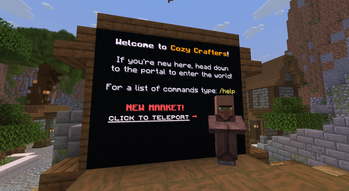
CozyDisplays is a lightweight Paper plugin for creating and managing vanilla TextDisplay-based server displays. It is built for practical server signage: floating text, wall-snapped displays, spawn notes, rules boards, and simple hologram-style text without adopting a large hologram suite.
Displays are created and edited in-game with admin commands, saved to plugins/CozyDisplays/displays.yml, and respawned after restart or reload. CozyDisplays supports legacy & color codes, per-display scale and render range, easy wall snapping, small positioning nudges, and optional PlaceholderAPI text refreshes.
CozyDisplays is intentionally simple and admin-friendly. It focuses on vanilla text display entities and does not aim to replace full hologram platforms with per-player holograms, animations, or complex scripting.
Features
- Vanilla
TextDisplayentities for lightweight signage. - Floating text and simple hologram-style displays.
- Wall-snapped signage with
/display snapwall. - Multi-line display creation and editing.
- Scale, view range, hide/show, move, nudge, list, info, stats, and reload commands.
- Optional PlaceholderAPI support.
- Configurable placeholder refresh interval.
- Safe defaults and validation for common numeric settings.
Installation
- Download the CozyDisplays jar from Modrinth.
- Stop your Paper server.
- Put the jar in
plugins/. - Optionally install PlaceholderAPI.
- Start the server.
- Use
/display create <id> <text...>to create your first display.
Commands
| Command | Description |
|---|---|
/display create <id> <text...> |
Create a display at your location. |
/display addline <id> <text...> |
Add a line. |
/display setline <id> <lineNumber> <text...> |
Replace one line. |
/display removeline <id> <lineNumber> |
Remove one line. |
/display movehere <id> |
Move a display to your location. |
/display snapwall <id> |
Place a display on the wall you are looking at. |
/display nudge <id> <direction> [amount] |
Fine tune position. |
/display up/down/left/right/forward/back <id> [amount] |
Shortcut movement commands. |
/display scale <id> <scale> |
Set text scale. |
/display viewrange <id> <range> |
Set render range in blocks. |
/display viewrangeall <range> |
Set render range for all displays. |
/display hide <id> |
Hide a display. |
/display show <id> |
Show a display. |
/display enabled <id> <true|false> |
Set visibility. |
/display info <id> |
Show display details. |
/display stats |
Show saved/spawned display counts. |
/display list |
List displays. |
/display delete <id> |
Delete a display. |
/display reload |
Reload config and displays. |
Permissions
| Permission | Default | Description |
|---|---|---|
cozydisplays.admin |
op |
Allows all CozyDisplays commands. |
Dependencies
- Required: Paper 1.21.11, Java 21
- Optional: PlaceholderAPI
PlaceholderAPI is only needed for placeholders such as %server_online%. If PlaceholderAPI is not installed, CozyDisplays starts normally and leaves placeholder text unchanged.
Compatibility
- Minecraft/Paper: 1.21.11
- Java: 21
- Platforms: Paper-compatible servers using the Paper API