Logo
MINECRAFTBIBLE
Items
Items

All game items

Blocks
Blocks

Building blocks

Mobs
Mobs

Creatures & monsters

Biomes
Biomes

World biomes

Structures
Structures

Generated structures

Recipes
Recipes

Crafting guides

Advancements
Advancements

Achievements

Loot Tables
Loot Tables

Drop rates

Tags
Tags

Item groupings

All Versions
View all data →
Capes
Cape ArchiveNEW

Browse rare Minecon capes, OptiFine capes, and custom capes from players worldwide

Browse

Player Database
Player DatabasePopular

Search any player

Skin Browser
Skin Browser

Browse & download skins

Cape Gallery
Cape GalleryNEW

Minecon & OptiFine capes

Seed Vault
Seed Vault

Curated seeds

Learn

Guides
GuidesNew

Tutorials & tips

Blog
Blog

News & updates

Community

Community Hub
Community HubHub

Posts, discussions & more

All Versions
View community →
Seed Analyzer
Seed Analyzer

World seed analysis

Loot Explorer
Loot Explorer

Drop rates

Crafting Calculator
Crafting Calculator

Material planning

Enchant Calculator
Enchant Calculator

Probability math

Redstone Lab
Redstone Lab

Signal timing

Trading Profit
Trading Profit

Villager ROI

All Versions
View all tools →
Mods
Mods

Browse all mods

Plugins
Plugins

Server plugins

Resource Packs
Resource Packs

Textures & sounds

Shaders
Shaders

Visual enhancements

Datapacks
Datapacks

World logic

Scanner
Mod Intelligence

Scan & analyze any mod

All Versions
View all mods →
Loading...
IntroductionIntroductionVersion HistoryVersion HistoryGuidesGuidesBlog & NewsBlog & News
ItemsItemsBlocksBlocksMobsMobsRecipesRecipesBiomesBiomesStructuresStructuresAdvancementsAdvancementsLoot TablesLoot TablesTagsTags
ModsModsPluginsPluginsResource PacksResource PacksShadersShadersDatapacksDatapacks

MinecraftBible

The Ultimate Wiki

Logo
MINECRAFTBIBLE

The ultimate Minecraft reference. Every item, block, mob, and recipe documented with precision.

Community

  • Skin Browser
  • Cape Gallery
  • Seed Vault
  • Blog
  • Guides

Database

  • Items
  • Blocks
  • Mobs
  • Recipes
  • Biomes
  • Structures

Tools

  • Seed Analyzer
  • Mod Intelligence
  • Crafting Calculator
  • Enchant Calculator

Mods & Packs

  • Mods
  • Plugins
  • Resource Packs
  • Shaders
  • Datapacks

Site & Legal

  • About
  • Authors
  • Editorial Policy
  • Corrections
  • Contact
  • Privacy Policy
  • Terms of Service
  • DMCA
  • Sitemap

© 2026 MinecraftBible. Not affiliated with Mojang or Microsoft.

PrivacyTermsContact
Compact Diamonds
PluginLicenseRef-All-Rights-Reserved

Compact Diamonds

No need to carry too many shulkers because you happen to be too rich. Just pack them together into a Compact Block of Diamond.

2.0K
Downloads
3
Followers
2 months ago
Updated
📦
11
Versions
economystoragetransportationdatapackfabricforgeneoforgepaperpurpurquilt
Download Latestv1.0.0+plugin-21View on Modrinth

📖About Compact Diamonds

Does your server have a diamond-based economy?
Is your server dealing with large transactions?
Are you tired of carrying so many diamonds?

Well you're in luck!

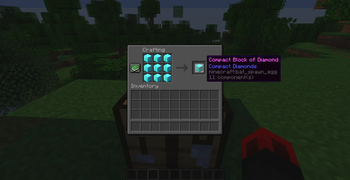
Crafting a Compact Block of Diamond

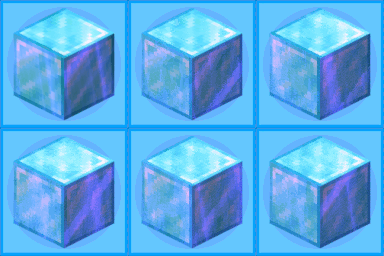
Compact Diamonds is a simple yet very useful Data Pack that adds a new item called "Compact Block of Diamond", crafted with 9 Blocks of Diamond and easily uncrafted in the inventory crafting menu.

The Compact Block of Diamond can be carried in stacks of 64 or placed on the ground

One Compact Block of Diamond is the equivalent to 81 diamonds.

How to install?

Vanilla [Datapack]:

  1. Download the latest release for vanilla.
  2. Open Minecraft.
  3. Select the world you want to install the data pack for, click on "Edit", then "Open world folder".

    ⚠ Server note:

    For a server, simply find the folder in the server called "world".

  4. Open the folder named datapacks, and put the datapack into it. The datapack should be a .zip file.
  5. If you are in the world during the installation, type /reload (if you have enabled cheats) or press F3+T.
  6. If the datapack was installed correctly, it should be enabled in the world. If you have enabled cheats, you can verify by typing /datapack list enabled and find an entry named [file/Compact-Diamonds.zip].
  7. If it doesn't work then reload Minecraft.
  8. If it still doesn't work then just search on the internet.

Modded [Fabric / Quilt / Forge / NeoForge]

  1. Download the latest release for modded.
  2. Locate your mods folder. Often located in %appdata%\.minecraft\mods or ~/Library/Application Support/minecraft/mods.
  3. Put the Compact Diamonds .jar in the mods folder.
  4. If Minecraft is open, please restart it for Compact Diamonds to load.

    ⚠ Fabric / Quilt note:

    Fabric iconFabricAPI (or specifically fabric-resource-loader-v0) is required for the .jar to load.

Plugin [Paper / Purpur]

⚠ Plugin support is very experimental

  1. Download the latest release for plugin.
  2. Locate your plugins folder.
  3. Put the Compact Diamonds .jar in the plugins folder.
  4. If Minecraft is open, please restart it for Compact Diamonds to load.
Dev Info: Compact Block of Diamond can be translated using the key block.compact_diamonds.compact_diamond_block, fallback is "Compact Block of Diamond".
If you want to change the texture of the Compact Block of Diamond without also changing the normal Diamond Block, you can use Compact-Diamonds-Custom-Model-Template Compact Diamonds Custom Model Template.

All repositories related to Compact Diamonds:
Compact Diamonds Compact Diamonds Custom Model Template Compact Diamonds Translations Compact Diamonds Paper

I'm currently working on on making translations for this datapack, I'd love some help.

👥 Team & Contributors

nobodyasidentity
nobodyasidentityOwner

⚙️ Compatibility

Environment
🖥️ Server-side
Loaders
datapackfabricforgeneoforgepaperpurpurquilt
Minecraft Versions
25w02a25w03a25w04a25w05a25w06a25w07a25w08a25w09a+100 more

🔗 Links

Modrinth Page