Logo
MINECRAFTBIBLE
Items
Items

All game items

Blocks
Blocks

Building blocks

Mobs
Mobs

Creatures & monsters

Biomes
Biomes

World biomes

Structures
Structures

Generated structures

Recipes
Recipes

Crafting guides

Advancements
Advancements

Achievements

Loot Tables
Loot Tables

Drop rates

Tags
Tags

Item groupings

All Versions
View all data →
Capes
Cape ArchiveNEW

Browse rare Minecon capes, OptiFine capes, and custom capes from players worldwide

Browse

Player Database
Player DatabasePopular

Search any player

Skin Browser
Skin Browser

Browse & download skins

Cape Gallery
Cape GalleryNEW

Minecon & OptiFine capes

Seed Vault
Seed Vault

Curated seeds

Learn

Guides
GuidesNew

Tutorials & tips

Blog
Blog

News & updates

Community

Community Hub
Community HubHub

Posts, discussions & more

All Versions
View community →
Seed Analyzer
Seed Analyzer

World seed analysis

Loot Explorer
Loot Explorer

Drop rates

Crafting Calculator
Crafting Calculator

Material planning

Enchant Calculator
Enchant Calculator

Probability math

Redstone Lab
Redstone Lab

Signal timing

Trading Profit
Trading Profit

Villager ROI

All Versions
View all tools →
Mods
Mods

Browse all mods

Plugins
Plugins

Server plugins

Resource Packs
Resource Packs

Textures & sounds

Shaders
Shaders

Visual enhancements

Datapacks
Datapacks

World logic

Scanner
Mod Intelligence

Scan & analyze any mod

All Versions
View all mods →
Loading...
IntroductionIntroductionVersion HistoryVersion HistoryGuidesGuidesBlog & NewsBlog & News
ItemsItemsBlocksBlocksMobsMobsRecipesRecipesBiomesBiomesStructuresStructuresAdvancementsAdvancementsLoot TablesLoot TablesTagsTags
ModsModsPluginsPluginsResource PacksResource PacksShadersShadersDatapacksDatapacks

MinecraftBible

The Ultimate Wiki

Logo
MINECRAFTBIBLE

The ultimate Minecraft reference. Every item, block, mob, and recipe documented with precision.

Community

  • Skin Browser
  • Cape Gallery
  • Seed Vault
  • Blog
  • Guides

Database

  • Items
  • Blocks
  • Mobs
  • Recipes
  • Biomes
  • Structures

Tools

  • Seed Analyzer
  • Mod Intelligence
  • Crafting Calculator
  • Enchant Calculator

Mods & Packs

  • Mods
  • Plugins
  • Resource Packs
  • Shaders
  • Datapacks

Site & Legal

  • About
  • Authors
  • Editorial Policy
  • Corrections
  • Contact
  • Privacy Policy
  • Terms of Service
  • DMCA
  • Sitemap

© 2026 MinecraftBible. Not affiliated with Mojang or Microsoft.

PrivacyTermsContact
CombatTimer
PluginLicenseRef-All-Rights-Reserved

CombatTimer

A simple and lightweight CombatTimer plugin!

180
Downloads
1
Followers
4 weeks ago
Updated
📦
2
Versions
equipmentgame-mechanicsutilitybukkitpaperpurpurspigot
Download Latestv1.1View on Modrinth

📖About CombatTimer

CombatTimer

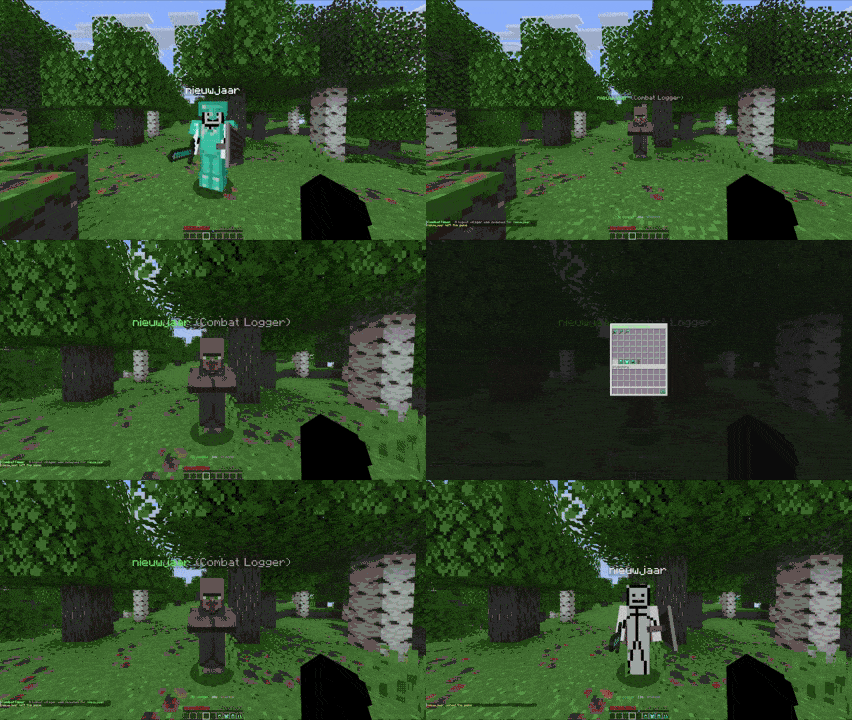
CombatTimer is a lightweight and configurable Minecraft plugin that stops players from escaping combat by logging out.

It is built for survival, SMP, factions, and PvP servers that want fair fights without constantly needing staff to punish combat loggers manually.

CombatTimer can simply kill or ban combat loggers, or it can replace them with a lootable logout villager so the fight continues even after they disconnect.


Key Features

Combat Timer

CombatTimer tags players when they enter combat.

You decide what should trigger combat:

MOB
PLAYER
BOTH

This allows you to use CombatTimer for:

  • PvP-only combat tagging
  • mob combat tagging
  • full survival combat tagging
  • faction or SMP combat protection

The combat duration is fully configurable.


On-Screen Combat Timer

Players can clearly see when they are still in combat.

Available display modes:

Mode Description
ACTIONBAR Shows the timer above the hotbar
BOSSBAR Shows the timer as a bossbar
BOTH Shows both actionbar and bossbar
NONE Hides the timer display

Bossbar color is configurable.


Logout Villagers

One of CombatTimer’s main features is the optional logout villager system.

When a player logs out during combat, they can be replaced by a villager at their logout location.

That villager represents the logged-out player.

Other players can:

  • find the logout villager
  • click it
  • open the combat logger’s stored inventory
  • loot items directly from the GUI
  • kill the villager to treat the combat logger as killed

If the combat logger rejoins while their villager still exists:

  • the villager is removed
  • the remaining inventory is restored
  • armor is restored
  • offhand item is restored
  • the player returns at the villager location

Logout villagers are saved in the database and restored after server restarts, so combat loggers cannot escape by waiting for a reboot.


Combat Logout Punishments

If logout villagers are disabled, CombatTimer can still punish combat loggers directly.

Supported punishment options:

  • kill on logout
  • permanent combat-log ban
  • temporary combat-log ban

Temporary bans support flexible durations:

30m
1h
1h 30m
2d
1w

If logout villagers are enabled, the configured punishment can still be applied when the villager is killed.


Custom Ban System

CombatTimer uses its own SQLite-backed ban system instead of relying on Minecraft’s default ban list.

This allows cleaner ban screens and better control over combat-log punishments.

Bans are stored locally in:

plugins/CombatTimer/combattimer.db

Staff can view and remove CombatTimer bans with plugin commands.


Fully Configurable

CombatTimer uses simple JSON configuration.

Example config:

{
  "trigger_when": "BOTH",
  "timer_seconds": 30,
  "timer_display": "ACTIONBAR",
  "bossbar_color": "GREEN",

  "kill_on_logout": true,
  "ban_on_logout": false,
  "ban_type": "PERMANENT",
  "tempban_duration": "1d",

  "logout_villagers_enabled": true
}

Customizable Messages

All plugin messages can be edited.

You can customize:

  • combat timer text
  • actionbar text
  • bossbar text
  • logout broadcasts
  • logout villager names
  • villager inventory title
  • ban screen message
  • command messages
  • update notifications

File structure:

plugins/CombatTimer/

config.json
combattimer.db

translations/
  messages.json

Bypass Permission

Trusted players or staff groups can bypass combat tagging.

combattimer.bypass

Hot Reload Support

Reload config and translation files without restarting the server.

/combattimer reload

Missing files are recreated automatically.


Commands

Command Description
/combattimer help Displays plugin commands
/combattimer reload Reloads config and messages
/combattimer unban <player> Removes a CombatTimer ban
/combattimer banlist [page] Lists active CombatTimer bans

Alias:

/ctimer

Permissions

Permission Description Default
combattimer.help Allows /combattimer help true
combattimer.reload Allows /combattimer reload op
combattimer.unban Allows unbanning players op
combattimer.banlist Allows viewing CombatTimer bans op
combattimer.bypass Bypasses combat timer tagging false
combattimer.update.notify Allows receiving update notifications op

Why Use CombatTimer?

Combat logging can ruin fights.

Common problems include:

  • players disconnecting before dying
  • players saving loot by logging out
  • PvP fights ending unfairly
  • combat loggers avoiding consequences
  • staff needing to handle reports manually
  • players abusing restarts to escape combat

CombatTimer solves this by keeping combat fair, visible, and configurable.

Use a simple timer, punish combat loggers directly, or enable logout villagers for a more interactive and loot-friendly system.


Best For

PvP servers
SMP servers
Survival servers
Faction servers
Hardcore servers
Event servers
Lifesteal-style servers

Compatibility

  • Minecraft 1.21+
  • Spigot / Paper
  • Lightweight with minimal performance impact

Configuration Philosophy

CombatTimer is designed to be:

  • simple to configure
  • fair for players
  • useful for staff
  • strong against combat logging

You decide when combat starts, how long it lasts, and what happens when someone logs out.


Support

If you encounter issues or have feature requests, feel free to open a ticket in the Discord server.

Keep combat fair, stop logout abuse, and make every fight count.

👥 Team & Contributors

nieuwjaar
nieuwjaarOwner

⚙️ Compatibility

Environment
🖥️ Server-side
Loaders
bukkitpaperpurpurspigot
Minecraft Versions
1.20.11.20.21.20.31.20.41.20.51.20.61.211.21.1+13 more

🔗 Links

Modrinth Page