

PluginMIT
Colored
Color your chat with legacy codes!
46
Downloads
1
Followers
2 months ago
Updated
📦
3
Versions
📖About Colored
Colored
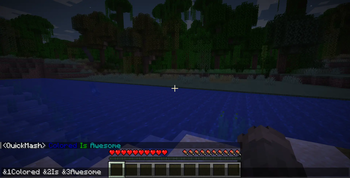
Colored is a simple plugin that allows your players to format their chat using classic color codes.


💡 What is Colored?
Colored is a simple plugin that allows your players to format their chat, the same way as you would format your server's MOTD. Simply type color codes into the chat, and your message will be automatically formatted.
🎨 Color Chart
| Code | Color | Code | Color | Code | Color | Code | Color |
|---|---|---|---|---|---|---|---|
| &0 | Black | &5 | Dark Purple | &a | Green | &f | White |
| &1 | Dark Blue | &6 | Gold | &b | Aqua | &r | Reset |
| &2 | Dark Green | &7 | Light Gray | &c | Red | ||
| &3 | Dark Aqua | &8 | Gray | &d | Purple | ||
| &4 | Dark Red | &9 | Blue | &e | Yellow |
✨ Format Codes
| Code | Formatting |
|---|---|
| &l | Bold |
| &m | Strikethrough |
| &n | Underline |
| &o | Italic |
| &k | Obfuscated |
🤝 Contributing
Don't be afraid to contribute! This is how the plugin gets better.
- Fixes: Submit a PR for any bugs you find.
- Features: Create an issue and label it as an
enhancement.
🚀 Release Publishing (GitHub Releases)
The release workflow is in .github/workflows/build-and-publish.yml and runs on published releases.
- The plugin version is set from
github.ref_name(-PreleaseVersion=...) so plugin metadata and published versions match the Git tag.- Local/CI precedence is
-PreleaseVersionfirst, thenGITHUB_REF_NAMEas a fallback.
- Local/CI precedence is
- Release publishing runs
clean test verifySingleReleaseJarbefore upload. - Build artifact validation uses
verifySingleReleaseJarand publishing fails unless exactly one release JAR exists inbuild/libs(excluding-sources,-javadoc,-dev,-plainjars). - Required repository secrets:
MODRINTH_TOKENHANGAR_TOKEN
- Current project identifiers used by the workflow:
- Modrinth
project_id:colored - Hangar
project_id:QuickMash/Colored
- Modrinth
Recommended local release check:
./gradlew clean verifySingleReleaseJar -PreleaseVersion=v1.0.0