
PluginApache-2.0
ChestShops
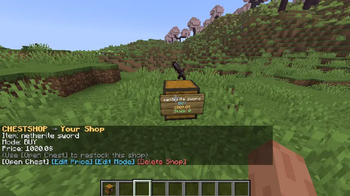
ChestShop is a lightweight Minecraft plugin that lets players create chest shops to buy and sell items. This is great for player based economies. It supports simple setup, permissions, and fully configurable messages.
391
Downloads
3
Followers
1 months ago
Updated
📦
2
Versions
📖About ChestShops
ChestShop
A simple, modern, and lightweight chest shop plugin for Minecraft servers.
Features
- Create player chest shops with ease
- Buy and Sell shop modes
- Vault economy support
- Optional WorldGuard support
- Floating item displays
- Editable prices and modes
- Action bar transaction messages
- Shop stock tracking
- Clean configurable messages
- Simple admin management commands
Requirements
- Minecraft 1.19+
- Java 17+
- Vault
- Economy plugin (EssentialsX Economy, CMI, etc.)
Optional
- WorldGuard
Installation
- Download the plugin
- Place the jar inside your
/pluginsfolder - Install Vault and an economy plugin
- Restart your server
- Configure the plugin files if needed
Creating a Shop
To create a shop:
- Hold the item you want to sell
- Look at a chest
- SHIFT + LEFT CLICK the chest
You will then be prompted in chat to:
- Select the shop mode (
BUYorSELL) - Enter the item price
Commands
| Command | Description |
|---|---|
/chestshop help |
Show help menu |
/chestshop list |
List your shops |
/chestshop reload |
Reload plugin configs |
/chestshop remove <x> <y> <z> <world> |
Force remove a shop |
Permissions
| Permission | Description | Default |
|---|---|---|
chestshop.create |
Allows creating shops | true |
chestshop.admin |
Access to admin commands | op |
chestshop.limit.* |
Shop limit permission | false |
Example:
chestshop.limit.20
Allows a player to create up to 20 shops.
Authors
- Tommy_202020
Sponsored By
- AsteroidMC
License
MIT License