Logo
MINECRAFTBIBLE
Items
Items

All game items

Blocks
Blocks

Building blocks

Mobs
Mobs

Creatures & monsters

Biomes
Biomes

World biomes

Structures
Structures

Generated structures

Recipes
Recipes

Crafting guides

Advancements
Advancements

Achievements

Loot Tables
Loot Tables

Drop rates

Tags
Tags

Item groupings

All Versions
View all data →
Capes
Cape ArchiveNEW

Browse rare Minecon capes, OptiFine capes, and custom capes from players worldwide

Browse

Player Database
Player DatabasePopular

Search any player

Skin Browser
Skin Browser

Browse & download skins

Cape Gallery
Cape GalleryNEW

Minecon & OptiFine capes

Seed Vault
Seed Vault

Curated seeds

Learn

Guides
GuidesNew

Tutorials & tips

Blog
Blog

News & updates

Community

Community Hub
Community HubHub

Posts, discussions & more

All Versions
View community →
Seed Analyzer
Seed Analyzer

World seed analysis

Loot Explorer
Loot Explorer

Drop rates

Crafting Calculator
Crafting Calculator

Material planning

Enchant Calculator
Enchant Calculator

Probability math

Redstone Lab
Redstone Lab

Signal timing

Trading Profit
Trading Profit

Villager ROI

All Versions
View all tools →
Mods
Mods

Browse all mods

Plugins
Plugins

Server plugins

Resource Packs
Resource Packs

Textures & sounds

Shaders
Shaders

Visual enhancements

Datapacks
Datapacks

World logic

Scanner
Mod Intelligence

Scan & analyze any mod

All Versions
View all mods →
Loading...
IntroductionIntroductionVersion HistoryVersion HistoryGuidesGuidesBlog & NewsBlog & News
ItemsItemsBlocksBlocksMobsMobsRecipesRecipesBiomesBiomesStructuresStructuresAdvancementsAdvancementsLoot TablesLoot TablesTagsTags
ModsModsPluginsPluginsResource PacksResource PacksShadersShadersDatapacksDatapacks

MinecraftBible

The Ultimate Wiki

Logo
MINECRAFTBIBLE

The ultimate Minecraft reference. Every item, block, mob, and recipe documented with precision.

Community

  • Skin Browser
  • Cape Gallery
  • Seed Vault
  • Blog
  • Guides

Database

  • Items
  • Blocks
  • Mobs
  • Recipes
  • Biomes
  • Structures

Tools

  • Seed Analyzer
  • Mod Intelligence
  • Crafting Calculator
  • Enchant Calculator

Mods & Packs

  • Mods
  • Plugins
  • Resource Packs
  • Shaders
  • Datapacks

Site & Legal

  • About
  • Authors
  • Editorial Policy
  • Corrections
  • Contact
  • Privacy Policy
  • Terms of Service
  • DMCA
  • Sitemap

© 2026 MinecraftBible. Not affiliated with Mojang or Microsoft.

PrivacyTermsContact
ChestFinder
PluginLicenseRef-All-Rights-Reserved

ChestFinder

ChestFinder is a plugin for Minecraft (Spigot/Paper) that helps players find chests within a 10-block radius.

87
Downloads
0
Followers
1 years ago
Updated
📦
1
Versions
adventurepaperspigot
Download Latestv1.0View on Modrinth

📖About ChestFinder

1

ChestFinder - Chest Finding Plugin for Minecraft

ChestFinder is a plugin for Minecraft (Spigot/Paper) that helps players find chests within a 10-block radius. The plugin triggers sound and visual effects when approaching a chest and allows administrators to grant or revoke access to the chest search feature.

📜 Features

🔍 Chest Search: Players can activate chest search for 5 minutes.

🎁 Special Chest Search Only: The plugin only considers chests found in temples, abandoned mines, dungeons, fortresses, and sunken ships.

⏳ Limited Usage Time: Access is valid for 3 days, but players can use the search only once.

⏳ Disabling Auto-Grant: You can disable auto-grant when joining the server and assign permissions manually.

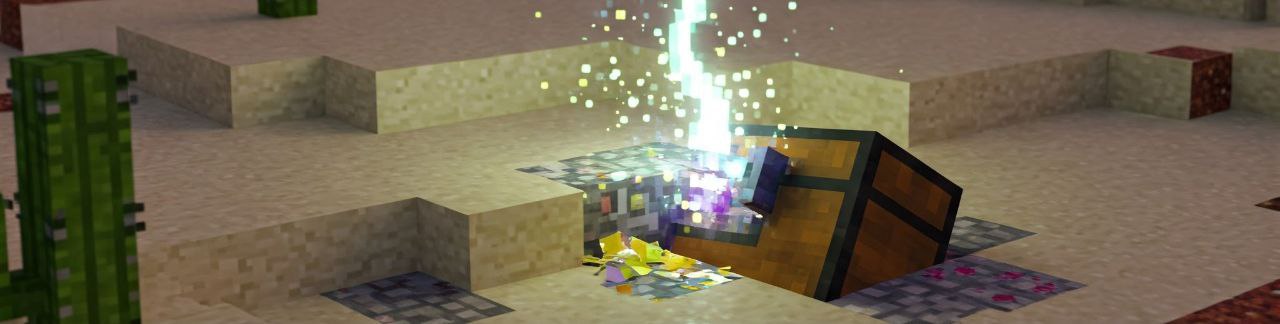
🎇 Sound and Visual Effects: Upon detecting a chest, players hear the chest-opening sound and see a lightning particle.

⚙ Admin Commands: Flexible permission management through commands.

2
✨✨✨✨✨✨✨✨✨✨✨✨✨✨✨✨✨✨✨✨✨✨✨✨
✨✨✨✨✨✨✨✨✨✨✨✨✨✨✨✨✨✨✨✨✨✨✨✨

TEST ALL OUR PLUGINS HERE
🔥 SERVER: javarangers.falixsrv.me:22707
🔥

(PLEASE NOTE, server version 1.21.4)

✨✨✨✨✨✨✨✨✨✨✨✨✨✨✨✨✨✨✨✨✨✨✨✨
✨✨✨✨✨✨✨✨✨✨✨✨✨✨✨✨✨✨✨✨✨✨✨✨

📦 Installation

  1. Download ChestFinder.jar.
  2. Place it in your server's plugins folder.
  3. Restart the server.

3

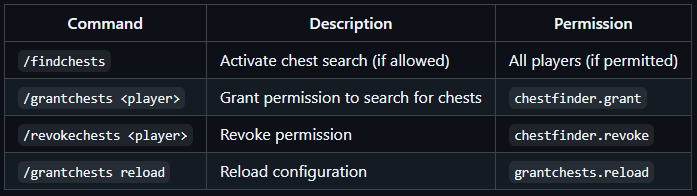
⌨ Commands

4

🔔 Access Reminder

When a player enters the game, if they have active access but haven’t used it, they will receive a message with the remaining time.

📌 Example of Operation

  1. A player logs in and receives permission to search for chests for 3 days.
  2. They activate /findchests and have 5 minutes to search.
  3. When approaching a chest, they hear the chest-opening sound and see lightning.
  4. If the player hasn’t used /findchests, they will receive a reminder about their access on their next login.

⚠ Important

  • Players can use /findchests only once during the permission period.
  • Only chests in specified structures are considered (not regular chests).
    Enjoy the game! 🎮

Let me know if you need any adjustments!

Disclaimer: These images are illustrative and do not represent actual in-game graphics. The final appearance may vary based on Minecraft's visual style and server settings.

👥 Team & Contributors

JavaRangers
JavaRangersOwner

⚙️ Compatibility

Environment
🖥️ Server-side
Loaders
paperspigot
Minecraft Versions
1.211.21.11.21.21.21.31.21.4

🔗 Links

Modrinth Page