Logo
MINECRAFTBIBLE
Items
Items

All game items

Blocks
Blocks

Building blocks

Mobs
Mobs

Creatures & monsters

Biomes
Biomes

World biomes

Structures
Structures

Generated structures

Recipes
Recipes

Crafting guides

Advancements
Advancements

Achievements

Loot Tables
Loot Tables

Drop rates

Tags
Tags

Item groupings

All Versions
View all data →
Capes
Cape ArchiveNEW

Browse rare Minecon capes, OptiFine capes, and custom capes from players worldwide

Browse

Player Database
Player DatabasePopular

Search any player

Skin Browser
Skin Browser

Browse & download skins

Cape Gallery
Cape GalleryNEW

Minecon & OptiFine capes

Seed Vault
Seed Vault

Curated seeds

Learn

Guides
GuidesNew

Tutorials & tips

Blog
Blog

News & updates

Community

Community Hub
Community HubHub

Posts, discussions & more

All Versions
View community →
Seed Analyzer
Seed Analyzer

World seed analysis

Loot Explorer
Loot Explorer

Drop rates

Crafting Calculator
Crafting Calculator

Material planning

Enchant Calculator
Enchant Calculator

Probability math

Redstone Lab
Redstone Lab

Signal timing

Trading Profit
Trading Profit

Villager ROI

All Versions
View all tools →
Mods
Mods

Browse all mods

Plugins
Plugins

Server plugins

Resource Packs
Resource Packs

Textures & sounds

Shaders
Shaders

Visual enhancements

Datapacks
Datapacks

World logic

Scanner
Mod Intelligence

Scan & analyze any mod

All Versions
View all mods →
Loading...
IntroductionIntroductionVersion HistoryVersion HistoryGuidesGuidesBlog & NewsBlog & News
ItemsItemsBlocksBlocksMobsMobsRecipesRecipesBiomesBiomesStructuresStructuresAdvancementsAdvancementsLoot TablesLoot TablesTagsTags
ModsModsPluginsPluginsResource PacksResource PacksShadersShadersDatapacksDatapacks

MinecraftBible

The Ultimate Wiki

Logo
MINECRAFTBIBLE

The ultimate Minecraft reference. Every item, block, mob, and recipe documented with precision.

Community

  • Skin Browser
  • Cape Gallery
  • Seed Vault
  • Blog
  • Guides

Database

  • Items
  • Blocks
  • Mobs
  • Recipes
  • Biomes
  • Structures

Tools

  • Seed Analyzer
  • Mod Intelligence
  • Crafting Calculator
  • Enchant Calculator

Mods & Packs

  • Mods
  • Plugins
  • Resource Packs
  • Shaders
  • Datapacks

Site & Legal

  • About
  • Authors
  • Editorial Policy
  • Corrections
  • Contact
  • Privacy Policy
  • Terms of Service
  • DMCA
  • Sitemap

© 2026 MinecraftBible. Not affiliated with Mojang or Microsoft.

PrivacyTermsContact
ChatNext
PluginMIT

ChatNext

The next generation of Minecraft chat management. Multilingual, private, and highly customizable. Build the chat your community deserves with ChatNext.

73
Downloads
1
Followers
2 months ago
Updated
📦
5
Versions
managementsocialutilitybukkitfoliapaperpurpurspigot
Download Latestv1.4.0View on Modrinth

📖About ChatNext

ChatNext

The definitive chat management solution for modern Minecraft servers. ChatNext is a lightweight, efficient, and highly customizable chat plugin designed to replace cumbersome, outdated chat managers. Built from the ground up for compatibility with Spigot 1.20+, it offers the perfect balance between professional features and simplicity.

Features

ChatNext launches with a robust core set of features designed to improve communication.

Languages

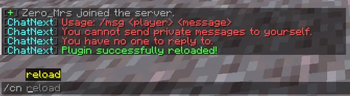
ChatNext is multilingual. Out of the box, we support English (en), Spanish (es), and Portuguese (pt). All messages are separated into language files in the /idiomas/ folder. This allows administrators to easily change the server language in the config.yml or create translations.

Format

  • Placeholders: Define your chat structure using {prefix}, {player}, and {message}.
  • Configurable: Control exactly how the chat looks via the config.yml. Example: &8[&bPrefix&8] {player} &8» &f{message}.

Private

  • System: Includes native /msg (aliases: tell, w, m) and /reply (r) commands.
  • Tracking: Conversations use player UUIDs, preventing memory leaks.
  • Toggleable: Messaging can be disabled entirely via the config.
  • Block: A clean prevention system stops players from messaging themselves.

Alerts

  • Silent: Completely disable Minecraft's default yellow join/quit messages.
  • Custom: Define unique, colorful, and localized messages in the config.yml that appear when a player enters or leaves.

Commands

Core

  • /chatnext (Alias: /cn): Base command.
  • /chatnext reload: Reloads config.yml and language files instantly. Permission: chatnext.admin

Messages

  • /msg <player> <message>: Send a PM. Permission: chatnext.msg
  • /reply <message>: Reply to the last conversation. Permission: chatnext.msg

Installation

  1. Download the ChatNext-1.0.0.jar.
  2. Place it in your server's plugins folder.
  3. Restart your server.
  4. Edit the generated config.yml to set your desired language.
# Available languages in the 'idiomas' folder: en, es, pt
language: "en"

# Default Chat Format
chat-format: "{prefix} {player} &8» &f{message}"

private-messages:
  enabled: true
  format-send: "&8[&dMe &5-> &d{receiver}&8] &f{message}"
  format-receive: "&8[&d{sender} &5-> &dMe&8] &f{message}"

join-quit-messages:
  enabled: true
  join: "&8[&a+&8] &7{player} joined the server."
  quit: "&8[&c-&8] &7{player} left the server."

👥 Team & Contributors

No authors recorded.

⚙️ Compatibility

Environment
🖥️ Server-side
Loaders
bukkitfoliapaperpurpurspigot
Minecraft Versions
1.201.20.11.20.21.20.31.20.41.20.51.20.61.21+11 more

🔗 Links

Modrinth Page