

PluginMIT
Chat Bubble
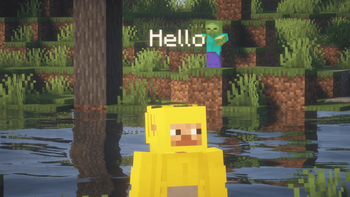
Shows chat messages as floating bubbles above player heads. Smooth movement and auto disappear. Everything can be configured and Background color and Text Color
770
Downloads
11
Followers
2 months ago
Updated
📦
7
Versions
📖About Chat Bubble


Please contact me on Discord if you have any suggestions or edits.

- ChatBubble makes a bubble above you or your friend that contains text only appears when you or your friend send message at chat

- Text Entities: Better than armor stand that causes lag.
- Message Stacking: Multiple messages stack neatly on top of each other.
- Text Color: You can choose any color for the Bubbles
- Background Color: You can choose any color for the Bubbles
- Optimization: Culling features to save performance on big servers.
- Animation: You can enable or disabled and adjust animation when appearing
- Fading: Customize fading in and out enabled or disabled
- Size: Size the bubble with any numbers you can.
- Movement: The Bubble is anchored with your head for better reading.

| Command | Access | Description |
|---|---|---|
/chatbubble:use |
Everyone | Shows credits for the creator |
/chatbubble:reload |
Operator | Reloads the configuration |

- A folder named
ChatBubbleis created in yourpluginsfolder automatically. Inside you will find a cleanconfig.ymlfile.
# =============================================================
#                 CHAT BUBBLE CONFIGURATION
# =============================================================

# -------------------------------------------------------------
# [General Settings]
# -------------------------------------------------------------

# Enable the plugin?
plugin-enabled: true

# Height above player's head.
base-height: 0.75

# Max characters per line.
line-length: 30

# -------------------------------------------------------------
# [Visual & Color]
# -------------------------------------------------------------

# The color of the text message.
text-color: "#FFFFFF"

# The background color of the bubble.
# Format: #AARRGGBB (Alpha, Red, Green, Blue)
# Default: #80000000 (Transparent Black)
# Transparent #00000000 (Invisible)
background-color: "#80000000"

# Should the text have a shadow?
text-shadow: true

# Can the bubble be seen through walls?
see-through-blocks: false

# -------------------------------------------------------------
# [Duration]
# -------------------------------------------------------------

# Minimum time (in ticks) a bubble stays. 100 ticks = 5 seconds.
base-duration-ticks: 100
# Time added per letter. Higher = slower disappear.
ticks-per-character: 5

# -------------------------------------------------------------
# [Stacking System]
# -------------------------------------------------------------

stacking-enabled: true
max-active-bubbles: 3
stack-height-offset: 0.35

# -------------------------------------------------------------
# [Optimization]
# -------------------------------------------------------------

culling-enabled: false
culling-range: 50

# -------------------------------------------------------------
# [Sound]
# -------------------------------------------------------------

sound-enabled: false
sound-name: "UI_TOAST_IN"
sound-volume: 0.5
sound-pitch: 1.5

# -------------------------------------------------------------
# [Animations]
# -------------------------------------------------------------

fade-in-enabled: false
fade-in-ticks: 5
fade-out-enabled: true
fade-out-ticks: 20

# -------------------------------------------------------------
# [Filtering]
# -------------------------------------------------------------

hide-while-sneaking: false
hide-if-invisible: true

world-filter:
  enabled: false
  disabled-worlds:
    - "spawn_hub"
    - "pvp_arena"

word-filter:
  enabled: false
  replacement-char: "*"
  blocked-words:
    - "badword"
    - "slur"

- Download the latest version of BubbleChat.
- Drop the
.jarfile into your server'spluginsfolder. - Restart your server.
- Done! No additional setup required.


© 2026 Chat Bubble. All rights reserved to MIT.
