

ChainmailSieve
ChainmailSieve is a lightweight Paper plugin that gives chainmail helmets a special survival mechanic.
📖About ChainmailSieve
ChainmailSieve
ChainmailSieve is a lightweight Paper plugin that gives chainmail helmets a special survival mechanic.
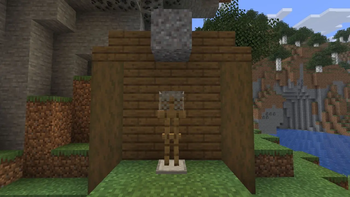
When a player wearing a chainmail helmet is hit on the head by a falling block of sand, red sand, or gravel, the block breaks instantly instead of placing normally. The block drops as an item, the helmet loses durability, and a small impact effect is played using in-game particles and block break sounds.
No client-side mod is required.
Features
- Breaks falling
SAND,RED_SAND, andGRAVELon contact with a chainmail helmet - Drops the broken block as an item instead of placing it in the world
- Damages the helmet using normal Minecraft durability behavior
- Plays
falling_dustparticles and the matching block break sound - Supports permission-based control through standard Bukkit permission nodes
- Works with permission managers such as LuckPerms without requiring a direct dependency
How It Works
If a falling supported block collides with the helmet area of a player wearing a chainmail helmet:
- The falling block is removed before it can place normally
- The corresponding block item is dropped
- The helmet loses durability
- Visual and sound effects are played at the impact point
Configuration
The plugin creates a config.yml file automatically on first startup.
Default config:
enabled: true

debug:
  enabled: false

durability-cost: 1

supported-materials:
  - SAND
  - RED_SAND
  - GRAVEL

permissions:
  use: chainmailsieve.use
  bypass: chainmailsieve.bypass
  admin: chainmailsieve.admin

effects:
  particles:
    enabled: true
    count: 18
    offset: 0.18
    extra: 0.0
  sound:
    enabled: true
    volume: 1.0
    pitch: 1.0

messages:
  reloaded: "&aChainmailSieve config reloaded."
  no-permission: "&cYou do not have permission to use this command."
  usage: "&eUsage: /chainmailsieve reload"
Config Options
enabled: Enables or disables the entire mechanicdebug.enabled: Enables debug logging for troubleshootingdurability-cost: How much durability is consumed per impactsupported-materials: List of falling block types that can be broken by the helmetpermissions.*: Permission nodes used by the plugineffects.particles.*: Controls thefalling_dustimpact effecteffects.sound.*: Controls the block break sound effectmessages.*: Messages used by the reload command
Commands
/chainmailsieve reload- Alias:
/cms reload
Reloads the plugin configuration without restarting the server.
Permissions
chainmailsieve.use
Allows the mechanic for a player. Default:truechainmailsieve.bypass
Prevents the mechanic from affecting a player. Default:falsechainmailsieve.admin
Allows use of the reload command. Default:op
LuckPerms
ChainmailSieve uses normal Bukkit permission nodes, so it works with LuckPerms out of the box.
Example:
/lp user Steve permission set chainmailsieve.use true
/lp user Steve permission set chainmailsieve.bypass false
Compatibility
- Minecraft:
1.21.11 - Server software:
Paper - Likely compatible with modern Paper forks such as
PurpurandPufferfish, but officially developed and tested for Paper - Not designed for
Spigot,CraftBukkit, orFolia - Java:
21+
Installation
- Download the plugin jar
- Put it into your server's
pluginsfolder - Start or restart the server
- Edit
plugins/ChainmailSieve/config.ymlif needed - Use
/chainmailsieve reloadafter changing the config
Notes
- The mechanic only works when the player is actually wearing a chainmail helmet
- Players with the bypass permission are ignored by the mechanic
- If you are using a permission plugin, make sure
chainmailsieve.bypassis not granted by mistake