

CelestCombat Pro
A simple plugin that tags players in PvP and kills those who disconnect to prevent combat logging. but a better version
📖About CelestCombat Pro
CelestCombat Pro



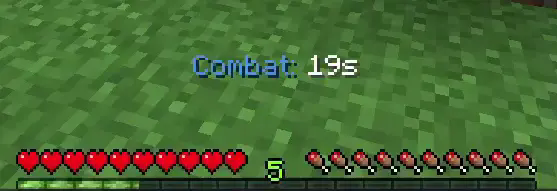
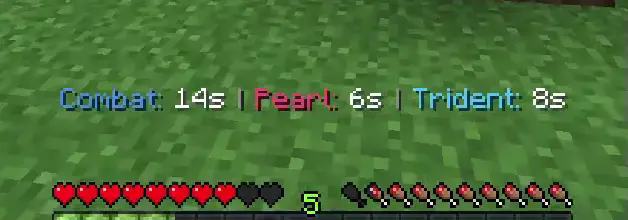
CelestCombat Pro is a highly optimized, feature-rich, and enterprise-grade combat management plugin for Minecraft servers specializing in PvP environments. Fully compatible with Paper, Purpur, and Folia, it provides comprehensive combat logging prevention, forcefields, anti-glitch systems, newbie protections, and kill rewards without sacrificing server performance.
Crediting original: https://github.com/NighterDevelopment/CelestCombat

📖 Table of Contents
- 🚀 Core Features
- 📋 Requirements & Installation
- 💻 Commands & Permissions
- ⚙️ Quick-Start Configuration Guide
- 🛠️ Developer API
- 🤝 Contributing & Support
- 📄 License
🚀 Core Features
⚔️ Combat Tagging & Anti-Log System
- Auto-Tagging: Automatically tags players in combat when they deal or receive damage.
- Combat Flight Control: Disables flight and Elytra usage immediately upon entering combat to prevent players from fleeing.
- Command Blocking: Prevent players from escaping PvP using teleportation or utility commands. Supports both blacklist and whitelist command modes.
- Combat Logout Punishment: Kills players who log out during combat, drops their items, executes custom server commands (like global chat announcements), and awards attacker rewards.
- Exempt Admin Actions: Optionally bypasses combat tagging during administrative kicks to prevent false logging punishments.
🛡️ Forcefield Border & Area Protection
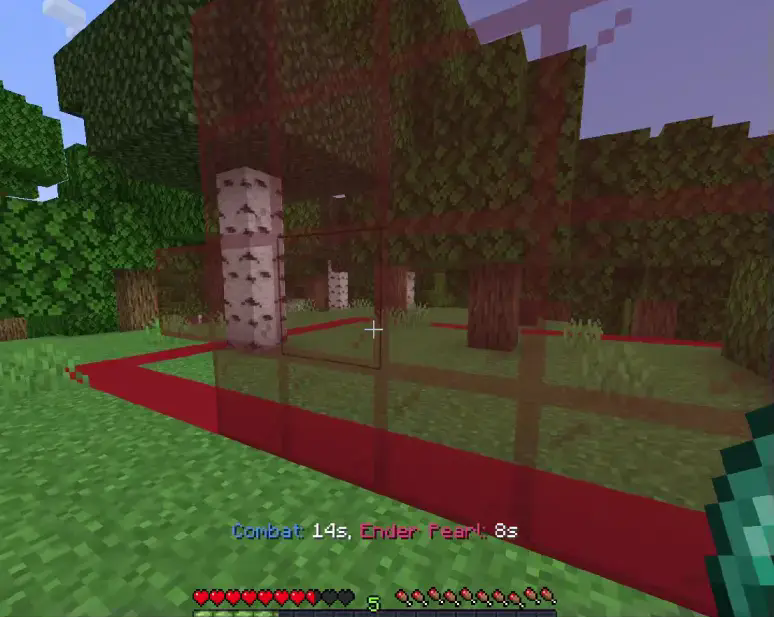
- WorldGuard Safezones: Tagged players are pushed back with customizable force when they attempt to enter WorldGuard safe zones. Features a beautiful stained-glass forcefield visualizer (default:
RED_STAINED_GLASS). - GriefPrevention Claims: Pushes combatants out of active GriefPrevention claims to prevent "claim-hopping" during fights. Renders a distinct visual boundary (default:
BLUE_STAINED_GLASS). - UXM Claims: Comprehensive control over player entry, combat, item restrictions (Chorus Fruit, Pearls, Totems), and command blocking inside UXM claims. Supports separate rule profiles for Admin, Player, and Public claims.
🧬 Ender Pearl & Trident Mechanics
- Ender Pearl Glitch Prevention: Employs advanced physics checks to prevent players from getting stuck in blocks, doing micro-teleports, passing through doors/gates, and glitching through walls or tight spaces.
- Pearl & Trident Cooldowns: Enforces custom cooldown timers (global or combat-only) with world-specific toggles.
- Combat Refresh: Option to refresh/renew the combat timer when an Ender Pearl or Trident lands.
- Trident Restrictions: Option to ban trident usage entirely in configured worlds (e.g., Nether).
🎁 Player Progression & Rewards
- Newbie Protection: Grants temporary PvP and mob damage protection to new players. Features customizable bossbar/actionbar countdown displays and removes protection early if they deal damage to others.
- Kill Rewards: Triggers custom commands (e.g., giving keys/currencies) upon player kills with global and same-player farming cooldowns to prevent exploitation.
- Death Animations: Plays stunning visual effects (lightning strikes and fire particles) when players die.
📋 Requirements & Installation
Requirements
- Minecraft Version: 1.21 - 26.X
- Server Software: Paper, Purpur, Folia
- Java Version: Java 21+
Installation
- Download the latest release from Modrinth.
- Place the
.jarfile in your server'spluginsfolder. - Restart your server.
- Configure the settings in
plugins/CelestCombat/config.ymland language files inplugins/CelestCombat/language/. - Reload the configuration with
/cc reload.
💻 Commands & Permissions
Commands
| Command | Aliases | Permission | Description |
|---|---|---|---|
/cc help |
/combat, /celestcombat |
celestcombat.command.use |
Displays command help menu |
/cc reload |
/combat, /celestcombat |
celestcombat.command.use |
Reloads configs, messages, and dynamic event priorities |
/cc tag <player1> [player2] |
/combat, /celestcombat |
celestcombat.command.use |
Manually tags player(s) in combat |
/cc removetag <player/world/all> |
/combat, /celestcombat |
celestcombat.command.use |
Instantly removes combat tag(s) |
Permissions
| Permission | Default | Description |
|---|---|---|
celestcombat.command.use |
OP | Access to all plugin commands |
celestcombat.update.notify |
OP | Receive update notifications on login |
celestcombat.bypass.tag |
false | Completely bypasses combat tagging |
⚙️ Quick-Start Configuration Guide
Below is a breakdown of key sections in the config.yml to help you customize the plugin.
Adjusting Event Priorities
If another plugin overrides command blocking or damage handling, adjust the listener priority:
event_priorities:
  command_blocking: "LOW"   # Options: LOWEST, LOW, NORMAL, HIGH, HIGHEST, MONITOR
  combat_damage: "HIGH"
  teleportation: "HIGH"
Configuring Combat Punishment
Set up what happens when a player logs out during a PvP engagement:
combat:
  duration: 20s
  combat_logout:
    enabled: true
    kill_player: true
    reward_attacker: true
    punishment_commands:
      - "broadcast &c%player% &7logged out during combat!"
    attacker_reward_commands:
      - "broadcast &a%player% &7killed &c%victim% &7(Combat Logout)"
Forcefields & safe zones
Adjust the forcefield visual and push back power:
safezone_protection:
  enabled: true
  barrier_material: "RED_STAINED_GLASS"
  barrier_detection_radius: 5
  push_back_force: 0.6
🛠️ Developer API
CelestCombat Pro provides a robust API for external plugins to integrate with its combat systems.
Accessing the API
Ensure you import com.shyamstudio.celestCombatPro.api.CelestCombatAPI and hook into it:
import com.shyamstudio.celestCombatPro.api.CelestCombatAPI;
import com.shyamstudio.celestCombatPro.api.CombatAPI;
import org.bukkit.entity.Player;

public class MyPluginIntegration {

    public void checkPlayerCombat(Player player) {
        CombatAPI api = CelestCombatAPI.getCombatAPI();
        if (api != null && api.isInCombat(player)) {
            player.sendMessage("You are currently in combat!");

            // Get the remaining combat time
            int secondsLeft = api.getRemainingCombatTime(player);

            // Get their current opponent
            Player opponent = api.getCombatOpponent(player);
        }
    }
}
📦 Building
To build CelestCombat Pro locally:
git clone https://github.com/ShyamStudios/CelestCombat-Pro.git
cd CelestCombat-Pro
./gradlew build
The compiled JAR will be saved in build/libs/.
🤝 Contributing & Support
- Issues & Bug Reports: GitHub Issues
- Discord Community: Join our Discord
📊 Statistics

📄 License
This project is licensed under the CC BY-NC-SA 4.0 License - see the https://github.com/ShyamStudios/CelestCombat-Pro/blob/main/LICENSE file for details.