
MINECRAFTBIBLE
Loading...
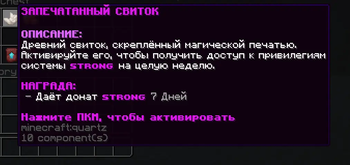

CatItems is a plugin for creating custom items right in the game. With it, you can add attributes, enchantments, hide prompts, give permanent effects, create abilities on Shift, and build .schem schematics on right-click...
CatItems is a plugin for creating custom items directly in the game. With it, you can add attributes and enchantments to items, hide tooltips, grant permanent effects, create abilities on Shift, build .schem schematics on right-click, execute commands from an item, play sounds, set cooldowns and usage limits, and parse items into parse.yml for use in DeluxeMenus and other menu plugins.
Commands
/catitems give (id) — Gives a ready-made item from the plugin.
/catitems reload — Reloads the config and working data of the plugin.
/item add attribute (slot) (attribute) (value) — Adds an attribute to an item. Great for creating RPG weapons, armor, amulets, and special items.
/item add enchant (enchantment) (level) — Adds an enchantment to an item.
/item add flag (flag) (true/false) — Shows or hides specific item properties, such as enchantments, attributes, and other tooltips.
/item add effect (effect) (level) (seconds) — Adds an effect to a potion.
/item add itemeffect (slot) (effect) (level) — Gives the player a permanent effect while the item is in the specified slot.
/item add save (true/false) — Marks the item as saved.
/item add block (true/false) — Prevents or allows the item to be used as a block.
/item add action create (name) command (command) (limit) — Activates a command when right-clicking the item. Great for unique items like lucky bags, sealed gold, coupons, keys, case rewards, and single-use artifacts.
/item add action create (name) sound (sound name) (limit) — Plays a sound for the player who right-clicked the item. Useful for visual/audio effects when used.
/item add action create (name) shift effect (effect) (level) (duration) (radius) (limit) — Creates a Shift action that applies an effect to players within a radius.
/item add action create (name) shift attribute (attribute) (value) (duration) (radius) (limit) — Creates a Shift action that temporarily changes attributes of players within a radius.
/item add action create (name) schem (schematic name) (limit) — Builds a .schem schematic at the player's location when right-clicking. Great for single-use bases, altars, arenas, and special structures.
/item add action create (name) cooldown (milliseconds) — Sets a cooldown for using the item.
/item add action create (name) queue (false/all) — Configures the queue mode for command actions. false = all commands at once, all = one per use.
/item add action edit (name) command (command) (limit) — Edits a command action.
/item add action edit (name) sound (sound) (limit) — Edits a sound action.
/item add action edit (name) shift effect (effect) (level) (seconds) (radius) (limit) — Edits a Shift effect action.
/item add action edit (name) shift attribute (attribute) (value) (seconds) (radius) (limit) — Edits a Shift attribute action.
/item add action edit (name) schem (schematic name) (limit) — Edits a schematic action.
/item add action edit (name) cooldown (milliseconds) — Changes the item's cooldown.
/item add action edit (name) queue (false/all) — Changes the command queue mode.
/item add action remove (name) — Removes an action from the item.
/item parse — Reads the item in hand and saves it to parse.yml. Useful for transferring items to DeluxeMenus and other menu plugins.
/item schem save (name) — Saves a region selected with WorldEdit or FastAsyncWorldEdit as a schematic.
/item schem list — Shows a list of available schematics.
What actions can do
command — Executes a command from the console after right-clicking the item.
sound — Plays a sound for the player after using the item.
shift — Activates when pressing Shift and affects players within a specified radius.
schem — Places a .schem schematic at the player's location.
cooldown — Limits how often the item can be used.
queue — Manages the order of command actions.
Additional Features
Shift abilities — Apply effects and attributes to players within a radius. Affected players see a message in their action bar.
Schematics — Supports .schem files. Requires WorldEdit or FastAsyncWorldEdit.
Usage limits — Allows creating single-use and limited-use items.
Item parser — Saves an item to parse.yml in a convenient config format for easy transfer to DeluxeMenus.
Permissions
catitems.give — Grants access to the item giving command.
catitems.edit — Grants access to all editor commands, including /item add, /item parse, and /item schem.
Installation Monitoring
The plugin sends technical statistics to the CatDev website. This includes the server name, IP:PORT, and current online player count. This is used by the product owner to monitor installations, total number of servers, and overall online player count.
The server name is taken from TAB if available, otherwise from the server MOTD.
Dependencies
Schematics require WorldEdit or FastAsyncWorldEdit.