Logo
MINECRAFTBIBLE
Items
Items

All game items

Blocks
Blocks

Building blocks

Mobs
Mobs

Creatures & monsters

Biomes
Biomes

World biomes

Structures
Structures

Generated structures

Recipes
Recipes

Crafting guides

Advancements
Advancements

Achievements

Loot Tables
Loot Tables

Drop rates

Tags
Tags

Item groupings

All Versions
View all data →
Capes
Cape ArchiveNEW

Browse rare Minecon capes, OptiFine capes, and custom capes from players worldwide

Browse

Player Database
Player DatabasePopular

Search any player

Skin Browser
Skin Browser

Browse & download skins

Cape Gallery
Cape GalleryNEW

Minecon & OptiFine capes

Seed Vault
Seed Vault

Curated seeds

Learn

Guides
GuidesNew

Tutorials & tips

Blog
Blog

News & updates

Community

Community Hub
Community HubHub

Posts, discussions & more

All Versions
View community →
Seed Analyzer
Seed Analyzer

World seed analysis

Loot Explorer
Loot Explorer

Drop rates

Crafting Calculator
Crafting Calculator

Material planning

Enchant Calculator
Enchant Calculator

Probability math

Redstone Lab
Redstone Lab

Signal timing

Trading Profit
Trading Profit

Villager ROI

All Versions
View all tools →
Mods
Mods

Browse all mods

Plugins
Plugins

Server plugins

Resource Packs
Resource Packs

Textures & sounds

Shaders
Shaders

Visual enhancements

Datapacks
Datapacks

World logic

Scanner
Mod Intelligence

Scan & analyze any mod

All Versions
View all mods →
Loading...
IntroductionIntroductionVersion HistoryVersion HistoryGuidesGuidesBlog & NewsBlog & News
ItemsItemsBlocksBlocksMobsMobsRecipesRecipesBiomesBiomesStructuresStructuresAdvancementsAdvancementsLoot TablesLoot TablesTagsTags
ModsModsPluginsPluginsResource PacksResource PacksShadersShadersDatapacksDatapacks

MinecraftBible

The Ultimate Wiki

Logo
MINECRAFTBIBLE

The ultimate Minecraft reference. Every item, block, mob, and recipe documented with precision.

Community

  • Skin Browser
  • Cape Gallery
  • Seed Vault
  • Blog
  • Guides

Database

  • Items
  • Blocks
  • Mobs
  • Recipes
  • Biomes
  • Structures

Tools

  • Seed Analyzer
  • Mod Intelligence
  • Crafting Calculator
  • Enchant Calculator

Mods & Packs

  • Mods
  • Plugins
  • Resource Packs
  • Shaders
  • Datapacks

Site & Legal

  • About
  • Authors
  • Editorial Policy
  • Corrections
  • Contact
  • Privacy Policy
  • Terms of Service
  • DMCA
  • Sitemap

© 2026 MinecraftBible. Not affiliated with Mojang or Microsoft.

PrivacyTermsContact
CarryMe
PluginMIT

CarryMe

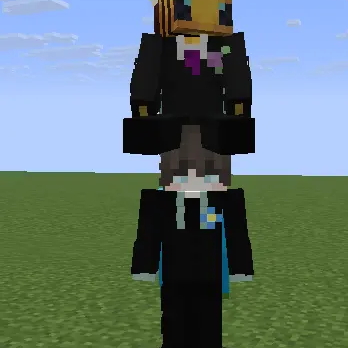
Put your friends on your shoulders!

632
Downloads
3
Followers
2 months ago
Updated
📦
4
Versions
minigamesocialutilitybukkitfoliapaperpurpurspigot
Download Latestv1.0.3View on Modrinth

📖About CarryMe

🤝 CarryMe

Modern, lightweight and fun player carrying system

Version: 1.0.2 | Compatibility: 1.19 up to 26.1+ (and forks)

🎮 Support Discord


Looking for a simple and fun way for players to interact beyond the usual gameplay? CarryMe adds a lightweight carrying system that lets players pick up other players and travel together in a more immersive way.

It is perfect for roleplay, survival, social servers, and hubs. Carry your AFK friend, create funny moments with other players, and enjoy a clean request-based system that feels intuitive and easy to use.


✨ Main Features

🤝 Interactive Request System

Send a carry request to another player with a simple command:

  • The target receives a clickable chat message.
  • Includes [Accept] and [Deny] buttons for a fast response.
  • Keeps interactions clean, simple, and user-friendly.

💻 Commands and Permissions

Main Command:

  • /carryme

Commands:

  • /carry <player> - Sends a carry request to another player (carryme.cargar)
  • /drop - Drops the player you are currently carrying (carryme.soltar)
  • /accept - Accepts a pending carry request (carryme.accept)
  • /reject - Denies a pending carry request (carryme.rechazar)
  • /carryme reload - Reloads the plugin configuration (carryme.reload)

🛠️ Example Usage Flow

Using CarryMe is quick and simple:

  1. Run /carry <player>
  2. Wait for the target player to accept
  3. Carry the player on your shoulders
  4. Use /drop to release them when needed
  5. The carried player can also dismount by pressing Shift

🖼️ Preview

Carry player


⚙️ Installation

  1. Download the CarryMe.jar file
  2. Place it inside your server's plugins folder
  3. Start or restart the server
  4. Use /carry <player> to get started

⚙️ Configuration

The config.yml file allows you to adjust plugin behavior and translate every message into your own language.


✅ Compatibility

  • Minecraft 1.19 up to 26.1.2
  • Paper
  • Folia
  • Modern forks

💬 Support

To report bugs, suggest improvements, or get help with the plugin, use the discussion page or join the Discord server.

👥 Team & Contributors

AquilesLuxo
AquilesLuxoOwner

⚙️ Compatibility

Environment
🖥️ Server-side
Loaders
bukkitfoliapaperpurpurspigot
Minecraft Versions
1.131.13.11.13.21.141.14.11.14.21.14.31.14.4+41 more

🔗 Links

Modrinth Page