Logo
MINECRAFTBIBLE
Items
Items

All game items

Blocks
Blocks

Building blocks

Mobs
Mobs

Creatures & monsters

Biomes
Biomes

World biomes

Structures
Structures

Generated structures

Recipes
Recipes

Crafting guides

Advancements
Advancements

Achievements

Loot Tables
Loot Tables

Drop rates

Tags
Tags

Item groupings

All Versions
View all data →
Capes
Cape ArchiveNEW

Browse rare Minecon capes, OptiFine capes, and custom capes from players worldwide

Browse

Player Database
Player DatabasePopular

Search any player

Skin Browser
Skin Browser

Browse & download skins

Cape Gallery
Cape GalleryNEW

Minecon & OptiFine capes

Seed Vault
Seed Vault

Curated seeds

Learn

Guides
GuidesNew

Tutorials & tips

Blog
Blog

News & updates

Community

Community Hub
Community HubHub

Posts, discussions & more

All Versions
View community →
Seed Analyzer
Seed Analyzer

World seed analysis

Loot Explorer
Loot Explorer

Drop rates

Crafting Calculator
Crafting Calculator

Material planning

Enchant Calculator
Enchant Calculator

Probability math

Redstone Lab
Redstone Lab

Signal timing

Trading Profit
Trading Profit

Villager ROI

All Versions
View all tools →
Mods
Mods

Browse all mods

Plugins
Plugins

Server plugins

Resource Packs
Resource Packs

Textures & sounds

Shaders
Shaders

Visual enhancements

Datapacks
Datapacks

World logic

Scanner
Mod Intelligence

Scan & analyze any mod

All Versions
View all mods →
Loading...
IntroductionIntroductionVersion HistoryVersion HistoryGuidesGuidesBlog & NewsBlog & News
ItemsItemsBlocksBlocksMobsMobsRecipesRecipesBiomesBiomesStructuresStructuresAdvancementsAdvancementsLoot TablesLoot TablesTagsTags
ModsModsPluginsPluginsResource PacksResource PacksShadersShadersDatapacksDatapacks

MinecraftBible

The Ultimate Wiki

Logo
MINECRAFTBIBLE

The ultimate Minecraft reference. Every item, block, mob, and recipe documented with precision.

Community

  • Skin Browser
  • Cape Gallery
  • Seed Vault
  • Blog
  • Guides

Database

  • Items
  • Blocks
  • Mobs
  • Recipes
  • Biomes
  • Structures

Tools

  • Seed Analyzer
  • Mod Intelligence
  • Crafting Calculator
  • Enchant Calculator

Mods & Packs

  • Mods
  • Plugins
  • Resource Packs
  • Shaders
  • Datapacks

Site & Legal

  • About
  • Authors
  • Editorial Policy
  • Corrections
  • Contact
  • Privacy Policy
  • Terms of Service
  • DMCA
  • Sitemap

© 2026 MinecraftBible. Not affiliated with Mojang or Microsoft.

PrivacyTermsContact
CactusFFA
PluginMIT

CactusFFA

CactusFFA is a configurable Paper free-for-all plugin built for production Minecraft servers.

103
Downloads
0
Followers
2 months ago
Updated
📦
3
Versions
adventuregame-mechanicsminigamebukkitpaperpurpurspigot
Download Latestv1.0.2View on Modrinth

📖About CactusFFA

CactusFFA

CactusFFA is a configurable Paper free-for-all plugin built for production Minecraft servers.

This plugin was used on play.cactusmc.xyz.

It includes:

  • kit categories and direct kit joining
  • per-kit arenas
  • arena creation in any world
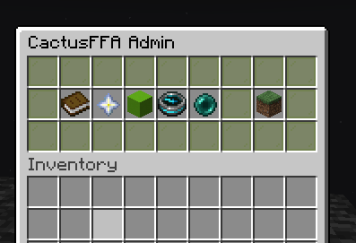
  • GUI-based kit selection
  • combat-lock duels
  • per-kit combat options
  • kill rewards and configurable drops
  • scoreboard override while players are in FFA
  • admin commands for arenas, kits, categories, and lobby setup

Requirements

  • Paper 1.21.11+
  • Java 21

Build

mvn clean package

Output jar:

  • target/CactusFFA-*.jar

Installation

  1. Download the release jar.
  2. Put CactusFFA-*.jar into your server plugins folder.
  3. Start the server once.
  4. Stop the server and review the generated config files in plugins/CactusFFA/.
  5. Start the server again and begin setup.

First Setup

  1. Go to the world and location where you want an arena.
  2. Create arenas directly at your current position:
/cacffa arena create nethop
/cacffa arena create sword-beast
/cacffa arena create sword-speed
  1. Set the main server lobby location players should return to when leaving FFA:
/cacffa setlobby
  1. Edit your kits in plugins/CactusFFA/kits.yml.
  2. Reload the plugin:
/cacffa reload

Player Commands

/ffa
/ffa <category>
/ffa <kit>
/ffa <category> <kit>
/leave

Admin Commands

/cacffa
/cacffa reload
/cacffa setlobby
/cacffa arena create <id>
/cacffa arena setspawn <id>
/cacffa arena tp <id>
/cacffa arena delete <id>
/cacffa kitcategory create <id>
/cacffa kitcategory delete <id>
/cacffa kit create <id> <arena> [category|none]
/cacffa kit setinventory <id>
/cacffa kit delete <id>

Config Notes

Important files:

  • plugins/CactusFFA/config.yml
  • plugins/CactusFFA/messages.yml
  • plugins/CactusFFA/menus.yml
  • plugins/CactusFFA/kits.yml
  • plugins/CactusFFA/arenas.yml

Production Notes

  • Review kits.yml carefully before launch.
  • Confirm every kit points to a valid arena.
  • Create arenas in whichever worlds fit your server design. A dedicated FFA world is not required.
  • Test /leave, respawn, kill rewards, combat-locking, and lobby teleporting before public release.

Credits

Developed for the CactusMC network at play.cactusmc.xyz.

👥 Team & Contributors

CuteeCactus
CuteeCactusOwner

⚙️ Compatibility

Environment
🖥️ Server-side
Loaders
bukkitpaperpurpurspigot
Minecraft Versions
1.211.21.11.21.21.21.31.21.41.21.51.21.61.21.7+4 more

🔗 Links

Modrinth Page