Logo
MINECRAFTBIBLE
Items
Items

All game items

Blocks
Blocks

Building blocks

Mobs
Mobs

Creatures & monsters

Biomes
Biomes

World biomes

Structures
Structures

Generated structures

Recipes
Recipes

Crafting guides

Advancements
Advancements

Achievements

Loot Tables
Loot Tables

Drop rates

Tags
Tags

Item groupings

All Versions
View all data →
Capes
Cape ArchiveNEW

Browse rare Minecon capes, OptiFine capes, and custom capes from players worldwide

Browse

Player Database
Player DatabasePopular

Search any player

Skin Browser
Skin Browser

Browse & download skins

Cape Gallery
Cape GalleryNEW

Minecon & OptiFine capes

Seed Vault
Seed Vault

Curated seeds

Learn

Guides
GuidesNew

Tutorials & tips

Blog
Blog

News & updates

Community

Community Hub
Community HubHub

Posts, discussions & more

All Versions
View community →
Seed Analyzer
Seed Analyzer

World seed analysis

Loot Explorer
Loot Explorer

Drop rates

Crafting Calculator
Crafting Calculator

Material planning

Enchant Calculator
Enchant Calculator

Probability math

Redstone Lab
Redstone Lab

Signal timing

Trading Profit
Trading Profit

Villager ROI

All Versions
View all tools →
Mods
Mods

Browse all mods

Plugins
Plugins

Server plugins

Resource Packs
Resource Packs

Textures & sounds

Shaders
Shaders

Visual enhancements

Datapacks
Datapacks

World logic

Scanner
Mod Intelligence

Scan & analyze any mod

All Versions
View all mods →
Loading...
IntroductionIntroductionVersion HistoryVersion HistoryGuidesGuidesBlog & NewsBlog & News
ItemsItemsBlocksBlocksMobsMobsRecipesRecipesBiomesBiomesStructuresStructuresAdvancementsAdvancementsLoot TablesLoot TablesTagsTags
ModsModsPluginsPluginsResource PacksResource PacksShadersShadersDatapacksDatapacks

MinecraftBible

The Ultimate Wiki

Logo
MINECRAFTBIBLE

The ultimate Minecraft reference. Every item, block, mob, and recipe documented with precision.

Community

  • Skin Browser
  • Cape Gallery
  • Seed Vault
  • Blog
  • Guides

Database

  • Items
  • Blocks
  • Mobs
  • Recipes
  • Biomes
  • Structures

Tools

  • Seed Analyzer
  • Mod Intelligence
  • Crafting Calculator
  • Enchant Calculator

Mods & Packs

  • Mods
  • Plugins
  • Resource Packs
  • Shaders
  • Datapacks

Site & Legal

  • About
  • Authors
  • Editorial Policy
  • Corrections
  • Contact
  • Privacy Policy
  • Terms of Service
  • DMCA
  • Sitemap

© 2026 MinecraftBible. Not affiliated with Mojang or Microsoft.

PrivacyTermsContact
BuildMC-Core
PluginApache-2.0

BuildMC-Core

This plugin adds basic functionality for SMPs like claims, statuses, etc. to Minecraft, that can be turned on or off.

213
Downloads
0
Followers
4 months ago
Updated
📦
20
Versions
game-mechanicsmanagementutilitypaperspigot
Download Latestv1.1.0-beta4_Hotfix03-01-2026View on Modrinth

📖About BuildMC-Core

🌍 BuildMC-Core

A powerful and very configurable, core plugin for the BuildMC SMP project. Made for modern Minecraft development, crafted with care for 1.21.*

GitHub

✨ Features

BuildMC-Core provides a solid foundation for any Minecraft project. Designed for the BuildMC SMP, it bundles essential features every project might need:

  • 🧑‍🤝‍🧑 Teams & Player Status
    Create and manage teams and let players set their status.

  • 🪂 Spawn Elytra Boost
    Launch yourself from spawn with a built-in Elytra boost system. Rocket usage is blocked to prevent abuse.

  • Player Head Drops
    Players will drop their head on death. It even shows the players death message when hovering over it.

  • 🌀 Toggle The End
    Enable or disable the End dimension dynamically. No restarts required. Broadcasts the change to all players.

  • 🧱 Survival-Friendly Chunk Claiming
    A secure, intuitive chunk claim system tied into the teams system. Built for balance and survival fairness.

  • ⚙️ Easy Setup
    Configure the plugin using /buildmc or edit the config files directly.


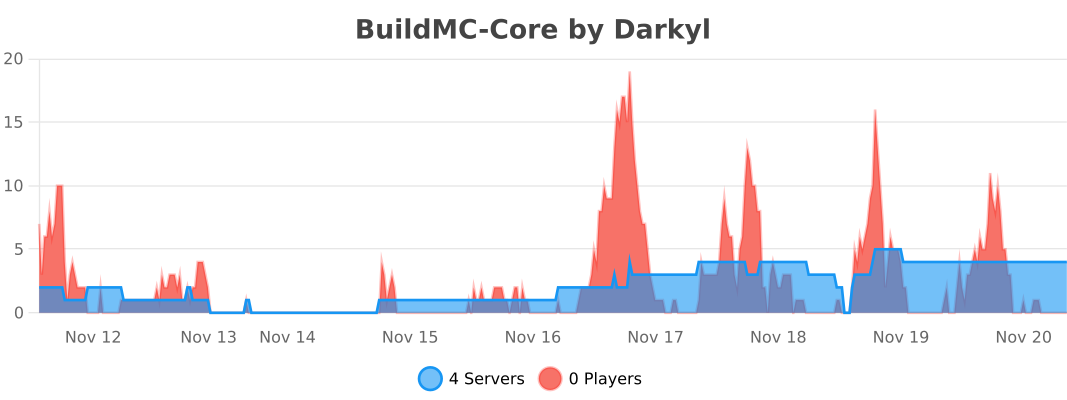
bStats

Here is our bStats page.
Our bStats player & server graph

📥 Installation Steps

  1. Download the Plugin

  2. Install it on Your Server

    • Place the .jar file into your server’s plugins/ directory.
    • Start (or restart) your server.
  3. Configure (Optional)

    • Run /buildmc in-game for setup options.
    • Or modify the BuildMC-Core/config.yml file directly.

👥 Team & Contributors

No authors recorded.

⚙️ Compatibility

Environment
🖥️ Server-side
Loaders
paperspigot
Minecraft Versions
1.211.21.11.21.21.21.31.21.41.21.51.21.61.21.7+3 more

🔗 Links

Modrinth Page