Logo
MINECRAFTBIBLE
Items
Items

All game items

Blocks
Blocks

Building blocks

Mobs
Mobs

Creatures & monsters

Biomes
Biomes

World biomes

Structures
Structures

Generated structures

Recipes
Recipes

Crafting guides

Advancements
Advancements

Achievements

Loot Tables
Loot Tables

Drop rates

Tags
Tags

Item groupings

All Versions
View all data →
Capes
Cape ArchiveNEW

Browse rare Minecon capes, OptiFine capes, and custom capes from players worldwide

Browse

Player Database
Player DatabasePopular

Search any player

Skin Browser
Skin Browser

Browse & download skins

Cape Gallery
Cape GalleryNEW

Minecon & OptiFine capes

Seed Vault
Seed Vault

Curated seeds

Learn

Guides
GuidesNew

Tutorials & tips

Blog
Blog

News & updates

Community

Community Hub
Community HubHub

Posts, discussions & more

All Versions
View community →
Seed Analyzer
Seed Analyzer

World seed analysis

Loot Explorer
Loot Explorer

Drop rates

Crafting Calculator
Crafting Calculator

Material planning

Enchant Calculator
Enchant Calculator

Probability math

Redstone Lab
Redstone Lab

Signal timing

Trading Profit
Trading Profit

Villager ROI

All Versions
View all tools →
Mods
Mods

Browse all mods

Plugins
Plugins

Server plugins

Resource Packs
Resource Packs

Textures & sounds

Shaders
Shaders

Visual enhancements

Datapacks
Datapacks

World logic

Scanner
Mod Intelligence

Scan & analyze any mod

All Versions
View all mods →
Loading...
IntroductionIntroductionVersion HistoryVersion HistoryGuidesGuidesBlog & NewsBlog & News
ItemsItemsBlocksBlocksMobsMobsRecipesRecipesBiomesBiomesStructuresStructuresAdvancementsAdvancementsLoot TablesLoot TablesTagsTags
ModsModsPluginsPluginsResource PacksResource PacksShadersShadersDatapacksDatapacks

MinecraftBible

The Ultimate Wiki

Logo
MINECRAFTBIBLE

The ultimate Minecraft reference. Every item, block, mob, and recipe documented with precision.

Community

  • Skin Browser
  • Cape Gallery
  • Seed Vault
  • Blog
  • Guides

Database

  • Items
  • Blocks
  • Mobs
  • Recipes
  • Biomes
  • Structures

Tools

  • Seed Analyzer
  • Mod Intelligence
  • Crafting Calculator
  • Enchant Calculator

Mods & Packs

  • Mods
  • Plugins
  • Resource Packs
  • Shaders
  • Datapacks

Site & Legal

  • About
  • Authors
  • Editorial Policy
  • Corrections
  • Contact
  • Privacy Policy
  • Terms of Service
  • DMCA
  • Sitemap

© 2026 MinecraftBible. Not affiliated with Mojang or Microsoft.

PrivacyTermsContact
Building Competition
PluginGPL-3.0-or-later

Building Competition

A Paper plugin for creating a long-term building competition server. Provides plot management and protections.

66
Downloads
1
Followers
4 weeks ago
Updated
📦
5
Versions
managementutilitypaperpurpur
Download Latestvv1.0.0View on Modrinth

📖About Building Competition

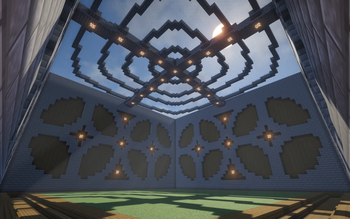
The banner image for the plugin. It's blue text in a modernized minecraft style that says "BC". It's on top of a blurred background which is an image of an example plot design for the plugin.

Source Code | Issues

A paper plugin for a long-term building competition in Minecraft.

Existing solutions for a building competition style server involve short "build battle" games that repeat over and over again. I needed to set up a server where participants have a week or more to log in and make their build before they're later judged. This plugin makes it easier to set up a longer-term building competition server.

Once configured, the plugin allows players to create a plot with /bc buildplot, and later return to it using the same command. WorldGuard regions are automatically created so that players are only able to build in their own plot. When setting up the plugin, the buildable area can be specified, so that players can't damage the walls of their plot.

Requires FastAsyncWorldEdit for pasting plot schematics, and WorldGuard for setting up plot protections. Multiverse is recommended for creating a designated plot world.

Features

  • Create a plot for a player upon running a command, tiled in a plot world next to other plots, and automatically teleport them there
  • Don't let players damage plots outside of their own
  • Define a buildable area, so that players can't damage the walls of their plot
  • Send the player back to their existing plot if it was already created
  • Dev mode for testing

Usage

See the README for detailed set up instructions.

  1. Install this plugin, FastAsyncWorldEdit, and WorldGuard to your server.
  2. Create a plot schematic and save it to disk using FAWE.
  3. Place that .schem file into the plugin's configuration folder, and specify some options in the config.yml file.
  4. Then, players can run /bc buildplot to generate their plots. This command can be run from other places too, like when a user enters a Multiverse portal.

👥 Team & Contributors

nfoert
nfoertOwner

⚙️ Compatibility

Environment
🖥️ Server-side
Loaders
paperpurpur
Minecraft Versions
1.211.21.11.21.21.21.31.21.41.21.51.21.61.21.7+4 more

🔗 Links

Modrinth Page