Logo
MINECRAFTBIBLE
Items
Items

All game items

Blocks
Blocks

Building blocks

Mobs
Mobs

Creatures & monsters

Biomes
Biomes

World biomes

Structures
Structures

Generated structures

Recipes
Recipes

Crafting guides

Advancements
Advancements

Achievements

Loot Tables
Loot Tables

Drop rates

Tags
Tags

Item groupings

All Versions
View all data →
Capes
Cape ArchiveNEW

Browse rare Minecon capes, OptiFine capes, and custom capes from players worldwide

Browse

Player Database
Player DatabasePopular

Search any player

Skin Browser
Skin Browser

Browse & download skins

Cape Gallery
Cape GalleryNEW

Minecon & OptiFine capes

Seed Vault
Seed Vault

Curated seeds

Learn

Guides
GuidesNew

Tutorials & tips

Blog
Blog

News & updates

Community

Community Hub
Community HubHub

Posts, discussions & more

All Versions
View community →
Seed Analyzer
Seed Analyzer

World seed analysis

Loot Explorer
Loot Explorer

Drop rates

Crafting Calculator
Crafting Calculator

Material planning

Enchant Calculator
Enchant Calculator

Probability math

Redstone Lab
Redstone Lab

Signal timing

Trading Profit
Trading Profit

Villager ROI

All Versions
View all tools →
Mods
Mods

Browse all mods

Plugins
Plugins

Server plugins

Resource Packs
Resource Packs

Textures & sounds

Shaders
Shaders

Visual enhancements

Datapacks
Datapacks

World logic

Scanner
Mod Intelligence

Scan & analyze any mod

All Versions
View all mods →
Loading...
IntroductionIntroductionVersion HistoryVersion HistoryGuidesGuidesBlog & NewsBlog & News
ItemsItemsBlocksBlocksMobsMobsRecipesRecipesBiomesBiomesStructuresStructuresAdvancementsAdvancementsLoot TablesLoot TablesTagsTags
ModsModsPluginsPluginsResource PacksResource PacksShadersShadersDatapacksDatapacks

MinecraftBible

The Ultimate Wiki

Logo
MINECRAFTBIBLE

The ultimate Minecraft reference. Every item, block, mob, and recipe documented with precision.

Community

  • Skin Browser
  • Cape Gallery
  • Seed Vault
  • Blog
  • Guides

Database

  • Items
  • Blocks
  • Mobs
  • Recipes
  • Biomes
  • Structures

Tools

  • Seed Analyzer
  • Mod Intelligence
  • Crafting Calculator
  • Enchant Calculator

Mods & Packs

  • Mods
  • Plugins
  • Resource Packs
  • Shaders
  • Datapacks

Site & Legal

  • About
  • Authors
  • Editorial Policy
  • Corrections
  • Contact
  • Privacy Policy
  • Terms of Service
  • DMCA
  • Sitemap

© 2026 MinecraftBible. Not affiliated with Mojang or Microsoft.

PrivacyTermsContact
BreweryXTBP-Bridge
PluginMIT

BreweryXTBP-Bridge

A plugin that adds some of the new features from TBP to BreweryX

76
Downloads
3
Followers
2 months ago
Updated
📦
4
Versions
adventurefoodgame-mechanicsbukkitfoliapaperpurpurspigot
Download Latestv1.1.2View on Modrinth

📖About BreweryXTBP-Bridge

ONLY TESTED ON PAPER TBH


BreweryX TBP Bridge

TBP-inspired multiblock brewing systems built on top of BreweryX.

This addon expands BreweryX with structured distillation, bulk vat brewing, and persistent brew customization without replacing or modifying its core mechanics.


Overview

BreweryX TBP Bridge turns brewing into a physical, interactive system.

Players must construct valid multiblock setups to distill and process brews, manage fuel and timing, and scale production using vats. Everything is configurable and designed to stay fully compatible with BreweryX.


Features

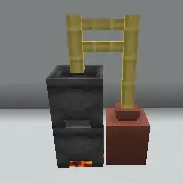
Multiblock Distillery System

  • Distillation is blocked unless a valid still structure is built
  • Supports multiple configurable still layouts
  • Prevents oversized or invalid builds from matching
  • Open a custom distillery GUI by interacting with the structure

Custom Processing Workflow

  • Insert brews and fuel into a dedicated GUI
  • Processing time scales per bottle (not per batch)
  • Batch info includes bottle count, duration, and fuel cost
  • Optional live countdown timer and process step display

Advanced Fuel System

  • Global fuel defaults or per-recipe overrides
  • Recipes can require different fuel types and costs
  • Mixed batches supported when enough fuel slots are available
  • Processing is blocked if fuel requirements aren’t met

Bulk Vat Brewing

  • Optional multiblock vat for large-scale brewing
  • Increased water capacity for batch processing
  • Ingredient and water input lock while cooking
  • Cooking begins after a configurable delay
  • Optional particle effects when cooking starts
  • Vat state persists across restarts
  • Debug interaction available (right-click with empty hand)

Brew Naming System

  • Rename brews via command or anvil workflow
  • Requires paper in an anvil for in-world labeling
  • Names persist through all BreweryX processes
  • Adds player attribution without removing existing lore

Admin & Debug Tools

  • Reset stuck distilleries safely in-game
  • Reset bulk vat state when needed
  • Toggle OP-only vat debug output for structure/state inspection

Commands

/breweryx namebrew <name>
/breweryx namebrew clear
/breweryx resetstill
/breweryx resetvat
/breweryx vatdebug [on|off|toggle|status]

Permissions

breweryx.tbpbridge.namebrew
breweryx.tbpbridge.resetstill
breweryx.tbpbridge.resetvat
breweryx.tbpbridge.vatdebug

Requirements

  • Paper server
  • BreweryX installed
  • Java 21

Installation

  1. Place the plugin .jar in:

    plugins/BreweryX/addons/
    
  2. Start or reload your server

  3. Configure stills and vats in config.yml


Configuration Highlights

  • Fully customizable multiblock patterns (distillery + vat)
  • Per-still GUI layouts and overrides
  • Recipe-based fuel rules
  • Adjustable processing time and delays
  • Toggleable timers, visuals, and feedback
  • Naming rules and message customization

👥 Team & Contributors

inmortuae_is_gone
inmortuae_is_goneOwner

⚙️ Compatibility

Environment
🖥️ Server-side
Loaders
bukkitfoliapaperpurpurspigot
Minecraft Versions
1.211.21.11.21.21.21.31.21.41.21.51.21.61.21.7+4 more

🔗 Links

Modrinth Page