Logo
MINECRAFTBIBLE
Items
Items

All game items

Blocks
Blocks

Building blocks

Mobs
Mobs

Creatures & monsters

Biomes
Biomes

World biomes

Structures
Structures

Generated structures

Recipes
Recipes

Crafting guides

Advancements
Advancements

Achievements

Loot Tables
Loot Tables

Drop rates

Tags
Tags

Item groupings

All Versions
View all data →
Capes
Cape ArchiveNEW

Browse rare Minecon capes, OptiFine capes, and custom capes from players worldwide

Browse

Player Database
Player DatabasePopular

Search any player

Skin Browser
Skin Browser

Browse & download skins

Cape Gallery
Cape GalleryNEW

Minecon & OptiFine capes

Seed Vault
Seed Vault

Curated seeds

Learn

Guides
GuidesNew

Tutorials & tips

Blog
Blog

News & updates

Community

Community Hub
Community HubHub

Posts, discussions & more

All Versions
View community →
Seed Analyzer
Seed Analyzer

World seed analysis

Loot Explorer
Loot Explorer

Drop rates

Crafting Calculator
Crafting Calculator

Material planning

Enchant Calculator
Enchant Calculator

Probability math

Redstone Lab
Redstone Lab

Signal timing

Trading Profit
Trading Profit

Villager ROI

All Versions
View all tools →
Mods
Mods

Browse all mods

Plugins
Plugins

Server plugins

Resource Packs
Resource Packs

Textures & sounds

Shaders
Shaders

Visual enhancements

Datapacks
Datapacks

World logic

Scanner
Mod Intelligence

Scan & analyze any mod

All Versions
View all mods →
Loading...
IntroductionIntroductionVersion HistoryVersion HistoryGuidesGuidesBlog & NewsBlog & News
ItemsItemsBlocksBlocksMobsMobsRecipesRecipesBiomesBiomesStructuresStructuresAdvancementsAdvancementsLoot TablesLoot TablesTagsTags
ModsModsPluginsPluginsResource PacksResource PacksShadersShadersDatapacksDatapacks

MinecraftBible

The Ultimate Wiki

Logo
MINECRAFTBIBLE

The ultimate Minecraft reference. Every item, block, mob, and recipe documented with precision.

Community

  • Skin Browser
  • Cape Gallery
  • Seed Vault
  • Blog
  • Guides

Database

  • Items
  • Blocks
  • Mobs
  • Recipes
  • Biomes
  • Structures

Tools

  • Seed Analyzer
  • Mod Intelligence
  • Crafting Calculator
  • Enchant Calculator

Mods & Packs

  • Mods
  • Plugins
  • Resource Packs
  • Shaders
  • Datapacks

Site & Legal

  • About
  • Authors
  • Editorial Policy
  • Corrections
  • Contact
  • Privacy Policy
  • Terms of Service
  • DMCA
  • Sitemap

© 2026 MinecraftBible. Not affiliated with Mojang or Microsoft.

PrivacyTermsContact
BossBarUltra
PluginLicenseRef-All-Rights-Reserved

BossBarUltra

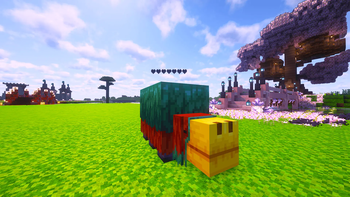
Modern floating health bars for mobs using Minecraft’s TextDisplay system. Lightweight, customizable, and perfect for RPG and PvE servers.

63
Downloads
1
Followers
2 months ago
Updated
📦
2
Versions
game-mechanicspaperpurpurspigot
Download Latestv3.1View on Modrinth

📖About BossBarUltra

⭐ BossBarUltra

Modern floating health bars for mobs

Recommended: Paper / Purpur
Supported Minecraft Versions: 1.20 → 1.21+

BossBarUltra adds clean floating health bars above mobs using Minecraft's TextDisplay system.
It is lightweight, modern, and designed to work best on Paper and Purpur servers.

Perfect for PvE servers, RPG gameplay, custom mobs, and boss encounters.


✨ Features

🟩 Modern Floating Health Bars

  • Uses TextDisplay (Minecraft 1.19.4+)
  • Smooth real-time health updates
  • Follows mobs accurately
  • No vanilla boss bars
  • No scoreboards
  • No shadows or background boxes

❤️ Customizable Bar Styles

Change styles directly from the in-game GUI.

Available Styles

  • Solid → ██████▒▒▒▒
  • Hearts → ❤❤❤❤♡♡♡♡
  • Glitch Mode → Unique glitch-style bar

Customization Options

  • Adjustable bar width
  • Multiple bar colors
  • Optional glowing mode

👁 Display Modes

Control when health bars appear.

  • Look Mode – Visible only when the player looks at the mob
  • Combat Mode – Visible while the mob is in combat
  • Always Mode – Always visible for nearby mobs

Configurable options include:

  • Combat timeout
  • Detection range
  • Update interval

⚙️ In-Game Admin GUI

Use /bb to open the admin GUI.

From the GUI you can:

  • Change display modes
  • Switch bar styles
  • Change bar colors
  • Reload the configuration
  • Send feedback directly from the plugin

All changes apply instantly — no server restart required.


🚀 Performance

BossBarUltra is designed to be lightweight and server-friendly.

  • Very low performance impact
  • No dependencies required
  • Automatic cleanup when mobs die
  • No leftover TextDisplay entities
  • Safe for long-running servers

📥 Installation

  1. Download BossBarUltra.jar
  2. Place it in your /plugins/ folder
  3. Start the server
  4. (Optional) edit config.yml

The default configuration is already optimized.


🕹 Commands & Permissions

Command

  • /bb — Opens the admin settings GUI

Permission

  • bossbarultra.admin (default: OP)

⚙️ Compatibility

  • Minecraft: 1.20 – 1.21+
  • Recommended: Paper / Purpur
  • Spigot: Supported but some features may be limited
  • Dependencies: None

❤️ Support

If you enjoy BossBarUltra, please consider leaving a ⭐.
Feedback helps improve the plugin and future updates.

👥 Team & Contributors

aushaif
aushaifOwner

⚙️ Compatibility

Environment
🖥️ Server-side
Loaders
paperpurpurspigot
Minecraft Versions
1.211.21.11.21.21.21.31.21.41.21.51.21.61.21.7+4 more

🔗 Links

Modrinth Page