Logo
MINECRAFTBIBLE
Items
Items

All game items

Blocks
Blocks

Building blocks

Mobs
Mobs

Creatures & monsters

Biomes
Biomes

World biomes

Structures
Structures

Generated structures

Recipes
Recipes

Crafting guides

Advancements
Advancements

Achievements

Loot Tables
Loot Tables

Drop rates

Tags
Tags

Item groupings

All Versions
View all data →
Capes
Cape ArchiveNEW

Browse rare Minecon capes, OptiFine capes, and custom capes from players worldwide

Browse

Player Database
Player DatabasePopular

Search any player

Skin Browser
Skin Browser

Browse & download skins

Cape Gallery
Cape GalleryNEW

Minecon & OptiFine capes

Seed Vault
Seed Vault

Curated seeds

Learn

Guides
GuidesNew

Tutorials & tips

Blog
Blog

News & updates

Community

Community Hub
Community HubHub

Posts, discussions & more

All Versions
View community →
Seed Analyzer
Seed Analyzer

World seed analysis

Loot Explorer
Loot Explorer

Drop rates

Crafting Calculator
Crafting Calculator

Material planning

Enchant Calculator
Enchant Calculator

Probability math

Redstone Lab
Redstone Lab

Signal timing

Trading Profit
Trading Profit

Villager ROI

All Versions
View all tools →
Mods
Mods

Browse all mods

Plugins
Plugins

Server plugins

Resource Packs
Resource Packs

Textures & sounds

Shaders
Shaders

Visual enhancements

Datapacks
Datapacks

World logic

Scanner
Mod Intelligence

Scan & analyze any mod

All Versions
View all mods →
Loading...
IntroductionIntroductionVersion HistoryVersion HistoryGuidesGuidesBlog & NewsBlog & News
ItemsItemsBlocksBlocksMobsMobsRecipesRecipesBiomesBiomesStructuresStructuresAdvancementsAdvancementsLoot TablesLoot TablesTagsTags
ModsModsPluginsPluginsResource PacksResource PacksShadersShadersDatapacksDatapacks

MinecraftBible

The Ultimate Wiki

Logo
MINECRAFTBIBLE

The ultimate Minecraft reference. Every item, block, mob, and recipe documented with precision.

Community

  • Player Database
  • Skin Browser
  • Cape Gallery
  • Community Hub
  • Seed Vault

Database

  • Items
  • Blocks
  • Mobs
  • Recipes
  • Biomes
  • Structures

Tools

  • Seed Analyzer
  • Mod Intelligence
  • Crafting Calculator
  • Enchant Calculator

Mods & Packs

  • Mods
  • Plugins
  • Resource Packs
  • Shaders
  • Datapacks

© 2026 MinecraftBible. Not affiliated with Mojang or Microsoft.

PrivacyTermsContact
BlockyWhitelist
PluginISC

BlockyWhitelist

A minecraft plugin that makes a discord whitelist possible.

134
Downloads
3
Followers
1 years ago
Updated
📦
2
Versions
managementtechnologyutilitypaperpurpur
Download Latestvv1.1.0View on Modrinth

📖About BlockyWhitelist

BlockyWhitelist Background

🔒 BWL – Discord Whitelist Plugin for Minecraft

BWL is a modern and secure Discord-based whitelist system for Minecraft servers. Seamlessly connect your Discord community with your server access using a sleek and easy-to-use solution. Designed with performance, flexibility, and simplicity in mind, BWL helps server owners maintain a trusted player base without the hassle.

✅ Features:

  • 🔗 Discord Integration – Link Minecraft accounts with Discord users
  • 🛡️ Secure Whitelisting – Only verified Discord members can join
  • ⚙️ Customizable Setup – Supports roles, language editation
  • 🧩 Modern Design – Clean and optimized for all Paper/Purpur servers
  • 📜 Logging & Feedback – Get detailed logs and user-friendly messages

Perfect for private communities, SMPs, and networks that want a smarter way to manage access.

⚙️ Setup Guide

Getting started with BWL is quick and simple. Just follow these steps to link your Discord server with your Minecraft world:

1️⃣ Create Your Discord Bot

  • Head over to the Discord Developer Portal.
  • Click “New Application”, give it a name, and create it.
  • Under the “Bot” tab, click “Add Bot”, then Enable the following Privileged Gateway Intents:
    • ✅ Presence Intent
    • ✅ Server Members Intent
    • ✅ Message Content Intent
  • Copy your Bot Token — you’ll need it shortly.

2️⃣ Add the Bot to Your Server

  • In the Installation > Install Link, select:
    • Discord provided link
    • Permissions: Read Messages, Manage Roles, Send Messages, etc. (as needed)
  • Copy the generated URL, paste it in your browser, and invite the bot to your Discord server.
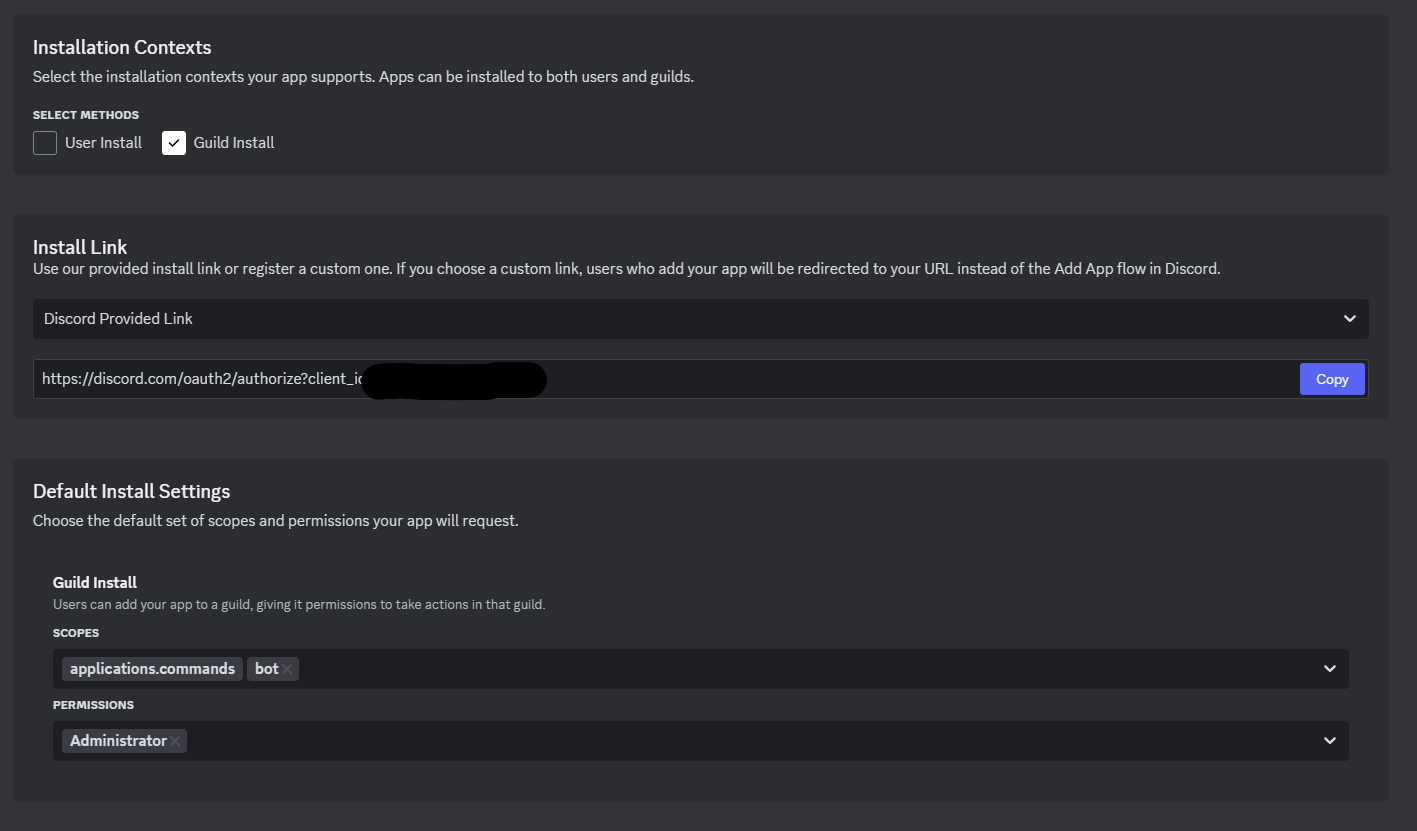
An showing of how it could be

3️⃣ Install BWL on Your Server

  • Download and place the BWL plugin .jar file into your server’s /plugins folder.
  • Restart your server to generate the necessary files.

4️⃣ Connect the Bot In-Game

  • Join your server and run the command:
    /bwl
    
  • This opens the BWL setup menu. Here you can:
    • Paste your Bot Token
    • Enter your Guild ID (your Discord server’s ID)

5️⃣ You're All Set!

From here, customize roles and other options to suit your server. BWL will handle the whitelist based on your setup.

If you want to edit the kick messages or anything else, open up plugins/BlockyWhitelist/languages.json and edit them however you want!

👥 Team & Contributors

Fami6Xx
Fami6XxOwner

⚙️ Compatibility

Environment
🖥️ Server-side
Loaders
paperpurpur
Minecraft Versions
1.141.14.11.14.21.14.31.14.41.151.15.11.15.2+29 more

🔗 Links

Modrinth Page