

PluginLicenseRef-All-Rights-Reserved
BlockRollback
You can roll back changes to blocks or the deletion of entities, and view the history.
202
Downloads
0
Followers
4 months ago
Updated
📦
3
Versions
📖About BlockRollback
BlockRollback
BlockRollback is a lightweight audit and rollback plugin for Bukkit-family 1.21.x servers such as Paper, Spigot, and Purpur.
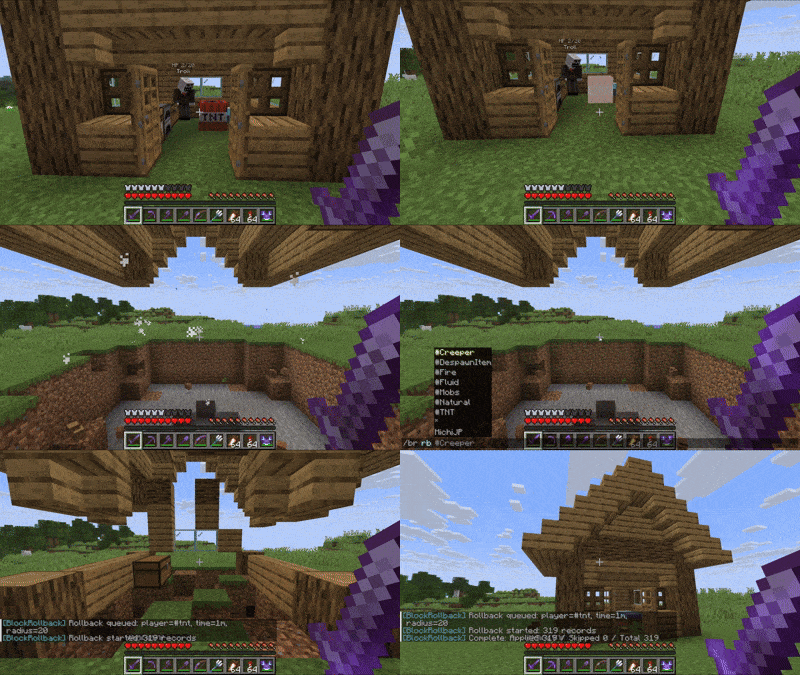
It records player actions, some natural changes, and command-based edits into SQLite so they can later be inspected, looked up, and rolled back with inspect, lookup, and rollback.
You can use /br as an alias for /blockrollback.
Main Features
- Records block placement and breaking, bucket actions, explosions, fire, fluid flow, and natural block updates
- Records container item transactions and block click interactions
- Records block placement and breaking, mob deaths, item despawns, and changes caused by
/filland/kill - Inspect mode lets you check the history of the clicked coordinates in place
- Search logs by player name, special tags, time range, and radius
- Supports rolling back block changes as well as restoring killed mobs and despawned items
- Uses SQLite locally, so no external database server is required
- Supports multilingual messages
Supported Environment
- Bukkit-family 1.21.x
- Based on the Paper API 1.21.4
- Java 21
- Paper, Spigot, Purpur, and compatible loaders
Commands
| Command | Description |
|---|---|
/br inspect [on|off] |
Toggles Inspect mode. While it is on, clicking a block shows the history of that block position. |
/br lookup <player|*|#Mobs|#DespawnItem> <time> [radius] [page] |
Searches logs that match the given conditions. time uses formats such as 30m, 1h, 1d, 1w, and 1y. |
/br rollback <player|*|#Mobs|#DespawnItem> <time> [radius] |
Applies rollbackable records that match the given conditions. |
/br tp <world> <x> <y> <z> |
Teleports you to the coordinates from a lookup result. |
/br cancel |
Cancels the currently running rollback. |
/br status |
Shows database size, log count, write queue status, and rollback progress. |
/br reload |
Reloads config.yml, config.json, and language files. |
/br help |
Shows help. |
Examples
/br inspect on/br lookup Steve 1h 20/br lookup #TNT 1d/br rollback Steve 30m 20/br rollback #Mobs 15m 30/br rollback #DespawnItem 10m 20
How Filters Work
- A player name such as
Stevetargets block-related changes associated with that player *targets every rollbackable record within the scope#Mobstargets mob death records#DespawnItemtargets item despawn records- Special tags such as
#TNT,#Creeper,#Fire,#Fluid, and#Naturalcan also be used for lookup and rollback
What Gets Logged
Rollbackable
- Block placement and breaking
- Bucket placement and pickup
- Destruction caused by explosions
- Burning caused by fire
- Fluid flow
- Natural block changes
- Block changes caused by
/fill - Mob deaths and mob removals caused by
/kill - Item despawns
Audit Only
- Putting items into containers and taking items out
- Left-click and right-click interactions on blocks
Permissions
| Permission | Description | Default |
|---|---|---|
blockrollback.inspect |
Toggle Inspect mode | OP |
blockrollback.lookup |
Run lookup and use /br tp |
OP |
blockrollback.rollback |
Run rollback and cancel | OP |
blockrollback.admin |
Run status and reload | OP |
Configuration
config.yml
Main settings:
| Key | Description |
|---|---|
database-file |
SQLite file name |
log.block-place-break |
Log block placement and breaking |
log.buckets |
Log bucket actions |
log.container-transactions |
Log container transactions |
log.item-despawn |
Log item despawns |
log.mob-kill |
Log mob deaths |
log.interactions |
Log block clicks |
log.explosions |
Log explosions |
log.fire |
Log burning caused by fire |
log.fluid-flow |
Log fluid flow |
log.natural-block-updates |
Log natural block updates |
inspect.use-adjacent-when-holding-block |
When holding a block and right-clicking, inspect the adjacent target position |
rollback.default-radius |
Default radius used when a player omits the radius |
rollback.max-radius |
Maximum rollback radius |
rollback.max-records-per-run |
Maximum records processed in one rollback run |
rollback.apply-per-tick |
Number of records applied per tick |
command-tracking.fill |
Enable /fill tracking |
command-tracking.fill-max-blocks |
Maximum number of blocks tracked for /fill |
command-tracking.kill |
Enable /kill tracking |
command-tracking.kill-max-entities |
Maximum number of entities tracked for /kill |
command-tracking.console-world |
World name used for console-issued commands |
command-tracking.notify-skip |
Notify when tracking is skipped because the target is too large |
config.json
config.json is used to configure the language.
{
  "configVersion": 1,
  "language": "en_us "
}
Supported languages:
ja_jpen_usde_defr_frru_ruzh_cn
The default value on first launch is en_us.
You can also edit the .lang files generated in plugins/BlockRollback/lang/ to create your own translation.
Behavior Notes
- Only one rollback can run at a time
- For
lookupandrollback, radius filtering uses the executor's current position when run by a player - Radius-based
lookupcannot be used from the console - While Inspect mode is enabled, normal block interaction is cancelled so the click can be used for audit display
- A record is skipped if the destination world does not exist or if the target entity is already present
Stored Data
- Logs are stored as SQLite in
plugins/BlockRollback/<database-file> - The table name is
action_logs - Indexes are created for time, player name plus time, and location