Logo
MINECRAFTBIBLE
Items
Items

All game items

Blocks
Blocks

Building blocks

Mobs
Mobs

Creatures & monsters

Biomes
Biomes

World biomes

Structures
Structures

Generated structures

Recipes
Recipes

Crafting guides

Advancements
Advancements

Achievements

Loot Tables
Loot Tables

Drop rates

Tags
Tags

Item groupings

All Versions
View all data →
Capes
Cape ArchiveNEW

Browse rare Minecon capes, OptiFine capes, and custom capes from players worldwide

Browse

Player Database
Player DatabasePopular

Search any player

Skin Browser
Skin Browser

Browse & download skins

Cape Gallery
Cape GalleryNEW

Minecon & OptiFine capes

Seed Vault
Seed Vault

Curated seeds

Learn

Guides
GuidesNew

Tutorials & tips

Blog
Blog

News & updates

Community

Community Hub
Community HubHub

Posts, discussions & more

All Versions
View community →
Seed Analyzer
Seed Analyzer

World seed analysis

Loot Explorer
Loot Explorer

Drop rates

Crafting Calculator
Crafting Calculator

Material planning

Enchant Calculator
Enchant Calculator

Probability math

Redstone Lab
Redstone Lab

Signal timing

Trading Profit
Trading Profit

Villager ROI

All Versions
View all tools →
Mods
Mods

Browse all mods

Plugins
Plugins

Server plugins

Resource Packs
Resource Packs

Textures & sounds

Shaders
Shaders

Visual enhancements

Datapacks
Datapacks

World logic

Scanner
Mod Intelligence

Scan & analyze any mod

All Versions
View all mods →
Loading...
IntroductionIntroductionVersion HistoryVersion HistoryGuidesGuidesBlog & NewsBlog & News
ItemsItemsBlocksBlocksMobsMobsRecipesRecipesBiomesBiomesStructuresStructuresAdvancementsAdvancementsLoot TablesLoot TablesTagsTags
ModsModsPluginsPluginsResource PacksResource PacksShadersShadersDatapacksDatapacks

MinecraftBible

The Ultimate Wiki

Logo
MINECRAFTBIBLE

The ultimate Minecraft reference. Every item, block, mob, and recipe documented with precision.

Community

  • Player Database
  • Skin Browser
  • Cape Gallery
  • Community Hub
  • Seed Vault

Database

  • Items
  • Blocks
  • Mobs
  • Recipes
  • Biomes
  • Structures

Tools

  • Seed Analyzer
  • Mod Intelligence
  • Crafting Calculator
  • Enchant Calculator

Mods & Packs

  • Mods
  • Plugins
  • Resource Packs
  • Shaders
  • Datapacks

© 2026 MinecraftBible. Not affiliated with Mojang or Microsoft.

PrivacyTermsContact
BlockProt
PluginGPL-3.0-only

BlockProt

Bukkit plugin to protect your chests, furnaces and more with a modern GUI approach.

9.6K
Downloads
63
Followers
5 months ago
Updated
📦
16
Versions
managementutilitybukkitpaperpurpurspigot
Download Latestv1.2.6View on Modrinth

📖About BlockProt

BlockProt is a easy-to-use block and chest protection plugin. Players can lock chests, furnaces, doors and much more. Unlike traditional chest lock plugins, this uses a simple GUI with buttons to click. This removes the struggle of crafting signs or remembering commands. Especially for beginners, this plugin is very easy to grasp and use.


Features

  • Protect chests, furnaces, shulker boxes etc.
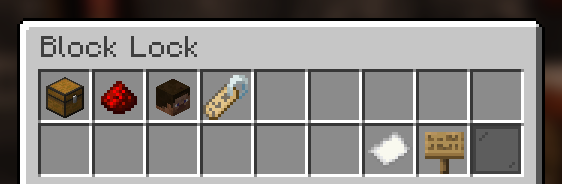
  • Players can configure their blocks with an easy to use GUI.
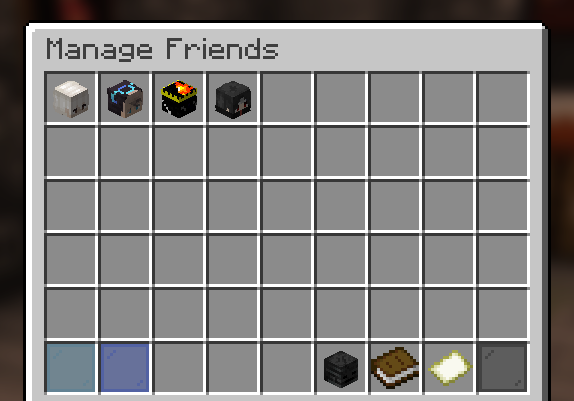
  • Players can add friends to individual blocks and configure what those friends can do.
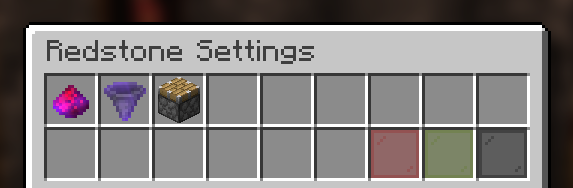
  • Players can configure the redstone protection in the GUI.
  • All protections are saved as UUIDs.
  • OP Users and players with the blockprot.admin permission can remove chests and manage them.
  • Full compatibility with WorldGuard, Towny and PlaceholderAPI!
  • Available in 10 languages!
  • And much more!


Permissions

Permissions are a Bukkit feature and not a custom thing of this plugin! Please refer to the permissions.yml file in your server or find another plugin to manage permissions (these usually have a lot of features and functionality).

  • blockprot.lock: Allows players to lock blocks and access them.
  • blockprot.info: Allows players to see the owner and friends of a locked block.
  • blockprot.admin: Allows players to unlock blocks that they do not own
  • blockprot.bypass: Allows players to bypass any protections, but doesn't allow them to edit blocks.

Translating

If you know a language that isn't supported by this plugin (yet) or found some translation error we'd love if you could translate for us!

You can do so easily by going to gitlocalize or sending me the translations on Discord.

Support

Please do not use reviews or my profile for support, instead use you can file an issue over at GitHub. If you require more support or want to ask questions, please use the Discord server for chatting.

Usage

Once in game, crouch and right click a lockable block with an empty hand and you will see the GUI to lock/unlock blocks. For this to work properly, give the default player group the blockprot.lock permission.
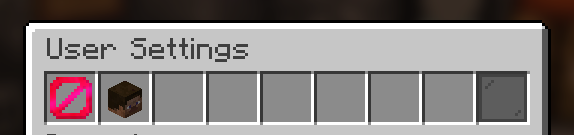
By default, the block gets locked upon placing it., though one can disable this for themselves with the command /blockprot settings. All settings in that command are per-player.
To give yourself the permissions listed above, use Bukkit's permission.yml file or see to some permission management plugin.

This plugin requires at least Spigot. CraftBukkit is not supported and shouldn't be used for non-development purposes anyway.

👥 Team & Contributors

spnda
spndaOwner

⚙️ Compatibility

Environment
🖥️ Server-side
Loaders
bukkitpaperpurpurspigot
Minecraft Versions
1.181.18.11.18.21.191.19.11.19.21.19.31.19.4+18 more

🔗 Links

Modrinth Page