Logo
MINECRAFTBIBLE
Items
Items

All game items

Blocks
Blocks

Building blocks

Mobs
Mobs

Creatures & monsters

Biomes
Biomes

World biomes

Structures
Structures

Generated structures

Recipes
Recipes

Crafting guides

Advancements
Advancements

Achievements

Loot Tables
Loot Tables

Drop rates

Tags
Tags

Item groupings

All Versions
View all data →
Capes
Cape ArchiveNEW

Browse rare Minecon capes, OptiFine capes, and custom capes from players worldwide

Browse

Player Database
Player DatabasePopular

Search any player

Skin Browser
Skin Browser

Browse & download skins

Cape Gallery
Cape GalleryNEW

Minecon & OptiFine capes

Seed Vault
Seed Vault

Curated seeds

Learn

Guides
GuidesNew

Tutorials & tips

Blog
Blog

News & updates

Community

Community Hub
Community HubHub

Posts, discussions & more

All Versions
View community →
Seed Analyzer
Seed Analyzer

World seed analysis

Loot Explorer
Loot Explorer

Drop rates

Crafting Calculator
Crafting Calculator

Material planning

Enchant Calculator
Enchant Calculator

Probability math

Redstone Lab
Redstone Lab

Signal timing

Trading Profit
Trading Profit

Villager ROI

All Versions
View all tools →
Mods
Mods

Browse all mods

Plugins
Plugins

Server plugins

Resource Packs
Resource Packs

Textures & sounds

Shaders
Shaders

Visual enhancements

Datapacks
Datapacks

World logic

Scanner
Mod Intelligence

Scan & analyze any mod

All Versions
View all mods →
Loading...
IntroductionIntroductionVersion HistoryVersion HistoryGuidesGuidesBlog & NewsBlog & News
ItemsItemsBlocksBlocksMobsMobsRecipesRecipesBiomesBiomesStructuresStructuresAdvancementsAdvancementsLoot TablesLoot TablesTagsTags
ModsModsPluginsPluginsResource PacksResource PacksShadersShadersDatapacksDatapacks

MinecraftBible

The Ultimate Wiki

Logo
MINECRAFTBIBLE

The ultimate Minecraft reference. Every item, block, mob, and recipe documented with precision.

Community

  • Skin Browser
  • Cape Gallery
  • Seed Vault
  • Blog
  • Guides

Database

  • Items
  • Blocks
  • Mobs
  • Recipes
  • Biomes
  • Structures

Tools

  • Seed Analyzer
  • Mod Intelligence
  • Crafting Calculator
  • Enchant Calculator

Mods & Packs

  • Mods
  • Plugins
  • Resource Packs
  • Shaders
  • Datapacks

Site & Legal

  • About
  • Authors
  • Editorial Policy
  • Corrections
  • Contact
  • Privacy Policy
  • Terms of Service
  • DMCA
  • Sitemap

© 2026 MinecraftBible. Not affiliated with Mojang or Microsoft.

PrivacyTermsContact
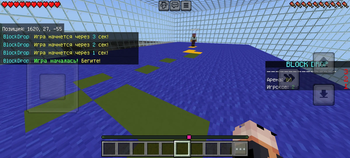
BlockDrop minigames
PluginMIT

BlockDrop minigames

Outrun the fall, outplay them all

17
Downloads
0
Followers
1 months ago
Updated
📦
1
Versions
game-mechanicsminigamesocialpaperspigot
Download Latestv1.0View on Modrinth

📖About BlockDrop minigames

🎲 BlockDrop | The Professional TNT-Run Experience

Platform
Version
Geyser

BlockDrop: Don’t stop, just drop! > A highly optimized, feature-rich mini-game plugin for Minecraft servers. Experience smooth block fading, an anti-camp system, and unmatched performance.


🌟 What is BlockDrop?

BlockDrop is a modern, professional reimagining of the classic TNT-Run mini-game. Instead of blocks vanishing instantly under a player's feet, they dynamically cycle through warning states (Green ➔ Yellow ➔ Red ➔ Air). This introduces an extra layer of strategy, giving players a visual countdown before they fall.

Built from the ground up for high-performance networks, BlockDrop ensures your server maintains a stable 20 TPS, even with dozens of active arenas.


✨ Key Features

  • 🚀 Smart-Batch Restoration Engine: Unlike outdated plugins that clone entire regions (causing heavy lag spikes), BlockDrop tracks only the exact blocks touched during the match and restores them in small, throttled batches (500 blocks per tick) once the game ends.
  • 📱 Flawless GeyserMC Cross-play: Fully tested and verified for Bedrock edition players! Scoreboards, custom interactive GUIs, and inventory states sync perfectly across Java and Bedrock.
  • 🛑 Advanced Anti-Camp System: Players cannot cheat by standing still. The plugin actively tracks player coordinates every few ticks, dropping blocks even if a player refuses to move.
  • 🛡️ Fail-Safe Inventory Backups: Before entering an arena, players' inventories, armor, health, and hunger stats are securely backed up. Everything is perfectly restored when they leave or win, even if the server restarts mid-game.
  • 🛏️ Seamless Staging & Quit GUI: Players are automatically given a custom "Leave Game" bed in their 9th slot while in the lobby. Right-clicking opens an intuitive GUI to gracefully exit using /bd leave.
  • 🌍 100% Configurable: Customize every single message, title, scoreboard line, and countdown duration via config.yml and messages.yml.

🛠️ Setup Guide

  1. Download the BlockDrop.jar and drop it into your server's /plugins folder.
  2. Restart the server to generate configuration files.
  3. Build your arena platform, stand at one corner, and type /bd [ArenaName] pos1.
  4. Go to the opposite diagonal corner of the platform and type /bd [ArenaName] pos2.
  5. Set up your game waypoints by standing on the desired locations and running:
    • /bd [ArenaName] setlobby (Staging area for waiting players)
    • /bd [ArenaName] setspawn (Where players spawn when the match starts)
    • /bd [ArenaName] setreturn (Where players are sent after the game ends)
    • /bd [ArenaName] setspectator (Where eliminated players go to watch)
  6. Give your users the bd.player permission, and you're good to go!

📝 Commands & Permissions

For Players (bd.player - Enabled by default)

  • /bd join [arena] — Teleport to the designated arena lobby.
  • /bd leave — Safely exit the current game and return to the fallback position.

For Admins (bd.admin - Operator only)

  • /bd help — Display the administrative setup helper.
  • /bd create [name] — Register and create a new arena configuration.
  • /bd [name] pos1 / pos2 — Define the block-fading zone boundaries.
  • /bd [name] setlobby / setspawn / setreturn / setspectator — Set game world waypoints.
  • Suppot
  • For assistance, register here https://gemini.google.com/gem/10YndAykjWwhBAfeOVsS33h6YGdtAmHn2?usp=sharing And then follow this link again after registration.

⚙️ Configuration Preview

View config.yml
min-players: 2
countdown-seconds: 30

# Phase durations in seconds
green-duration: 4
yellow-duration: 3
red-duration: 2

# Security settings
pvp-enabled: false
commands-enabled: false

👥 Team & Contributors

g7402180
g7402180Owner

⚙️ Compatibility

Environment
🖥️ Server-side
Loaders
paperspigot
Minecraft Versions
1.131.13.11.13.21.141.14.11.14.21.14.31.14.4+41 more

🔗 Links

Modrinth Page