Logo
MINECRAFTBIBLE
Items
Items

All game items

Blocks
Blocks

Building blocks

Mobs
Mobs

Creatures & monsters

Biomes
Biomes

World biomes

Structures
Structures

Generated structures

Recipes
Recipes

Crafting guides

Advancements
Advancements

Achievements

Loot Tables
Loot Tables

Drop rates

Tags
Tags

Item groupings

All Versions
View all data →
Capes
Cape ArchiveNEW

Browse rare Minecon capes, OptiFine capes, and custom capes from players worldwide

Browse

Player Database
Player DatabasePopular

Search any player

Skin Browser
Skin Browser

Browse & download skins

Cape Gallery
Cape GalleryNEW

Minecon & OptiFine capes

Seed Vault
Seed Vault

Curated seeds

Learn

Guides
GuidesNew

Tutorials & tips

Blog
Blog

News & updates

Community

Community Hub
Community HubHub

Posts, discussions & more

All Versions
View community →
Seed Analyzer
Seed Analyzer

World seed analysis

Loot Explorer
Loot Explorer

Drop rates

Crafting Calculator
Crafting Calculator

Material planning

Enchant Calculator
Enchant Calculator

Probability math

Redstone Lab
Redstone Lab

Signal timing

Trading Profit
Trading Profit

Villager ROI

All Versions
View all tools →
Mods
Mods

Browse all mods

Plugins
Plugins

Server plugins

Resource Packs
Resource Packs

Textures & sounds

Shaders
Shaders

Visual enhancements

Datapacks
Datapacks

World logic

Scanner
Mod Intelligence

Scan & analyze any mod

All Versions
View all mods →
Loading...
IntroductionIntroductionVersion HistoryVersion HistoryGuidesGuidesBlog & NewsBlog & News
ItemsItemsBlocksBlocksMobsMobsRecipesRecipesBiomesBiomesStructuresStructuresAdvancementsAdvancementsLoot TablesLoot TablesTagsTags
ModsModsPluginsPluginsResource PacksResource PacksShadersShadersDatapacksDatapacks

MinecraftBible

The Ultimate Wiki

Logo
MINECRAFTBIBLE

The ultimate Minecraft reference. Every item, block, mob, and recipe documented with precision.

Community

  • Player Database
  • Skin Browser
  • Cape Gallery
  • Community Hub
  • Seed Vault

Database

  • Items
  • Blocks
  • Mobs
  • Recipes
  • Biomes
  • Structures

Tools

  • Seed Analyzer
  • Mod Intelligence
  • Crafting Calculator
  • Enchant Calculator

Mods & Packs

  • Mods
  • Plugins
  • Resource Packs
  • Shaders
  • Datapacks

© 2026 MinecraftBible. Not affiliated with Mojang or Microsoft.

PrivacyTermsContact
BlockBack
PluginGPL-3.0-only

BlockBack

The ultimate QoL plugin that brings natural block restoration to your Minecraft server. With simple right-click actions, players can rebark stripped logs, restore dirt paths, and un-till farmland with ease!

39
Downloads
0
Followers
10 months ago
Updated
📦
1
Versions
equipmentgame-mechanicsutilitypaperpurpurspigot
Download Latestv1.3.0View on Modrinth

📖About BlockBack

🌟 Overview

BlockBack is the ultimate quality-of-life plugin that brings natural block restoration to your Minecraft server. With simple right-click actions, players can rebark stripped logs, restore dirt paths, and un-till farmland - making world management more intuitive and flexible than ever before!

Perfect for survival servers, creative builds, and any community that values player convenience and world aesthetics.


✨ Key Features

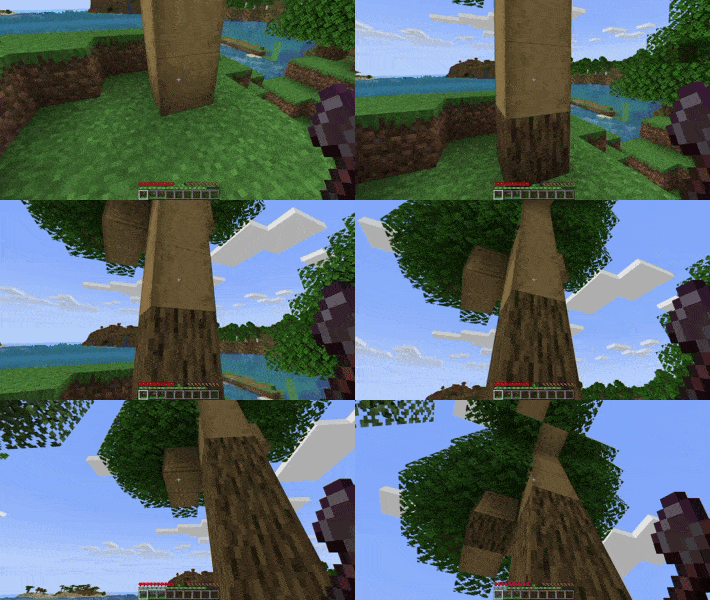
🪓 BarkBack - Log Restoration

  • Right-click stripped logs with an axe to restore their natural bark

  • Preserves log orientation and placement

  • Works with ALL wood types: Oak, Spruce, Birch, Jungle, Acacia, Dark Oak, Mangrove, Cherry, Bamboo, Crimson, and Warped

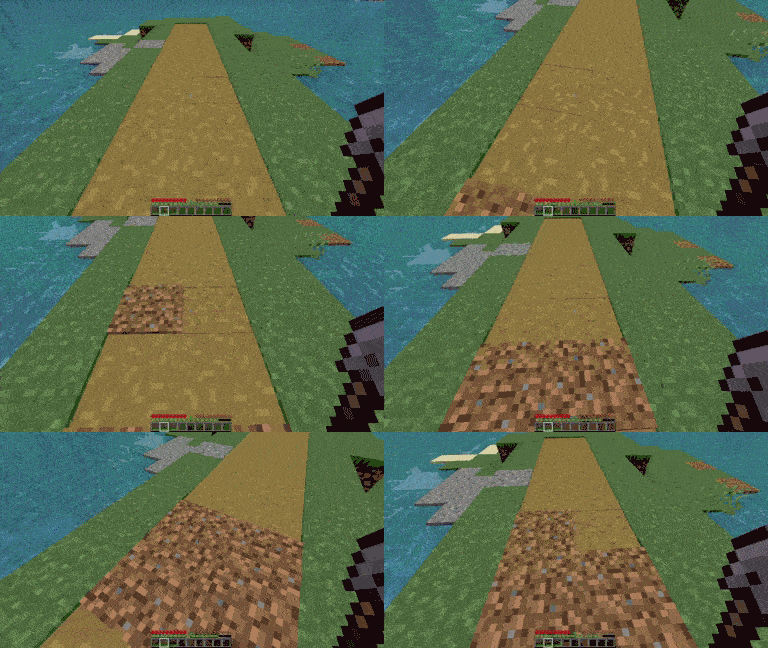
🛤️ PathBack - Path Restoration

  • Right-click dirt paths with a shovel to convert them back to dirt

  • Perfect for undoing accidental path creation

  • Maintains natural terrain appearance

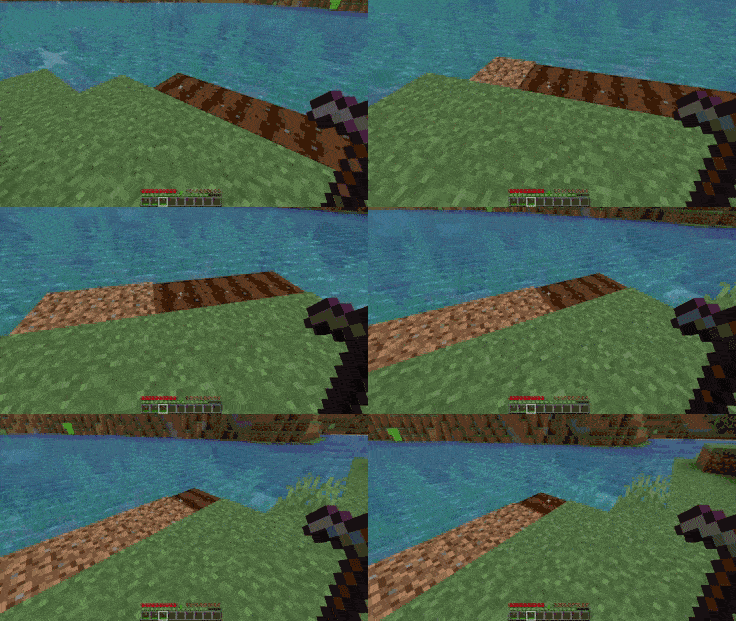
🚜 FarmBack - Farmland Restoration

  • Right-click farmland with a hoe to revert it to regular dirt

  • Essential for changing farm layouts and land management

  • Prevents permanent farmland scarring

🎮 Player Control

  • Individual toggles - Players control each feature independently

  • Persistent settings - Preferences saved across server restarts

  • Permission-based - Full control over who can use what features

🔊 Immersive Experience

  • Custom sound effects for each action

  • Fully configurable audio settings

  • Professional polish that feels like vanilla Minecraft


🚀 Installation

  1. Download the latest BlockBack.jar from the resources section

  2. Place the file in your server's plugins/ directory

  3. Restart your server to generate configuration files

  4. Configure (optional) - Edit sounds.yml to customize audio settings

  5. Enjoy - Players can start using features immediately!


📋 Commands & Usage

Core Commands


/blockback          - View your current feature settings

/barkback           - Toggle BarkBack on/off

/pathback           - Toggle PathBack on/off  

/farmback           - Toggle FarmBack on/off

/blockback reload   - Reload configuration (admin only)

How to Use

  • Rebark logs: Right-click any stripped log while holding an axe

  • Restore paths: Right-click dirt paths while holding a shovel

  • Un-till farmland: Right-click farmland while holding a hoe

It's that simple!


🔒 Permissions

| Permission | Description | Default |

|------------|-------------|---------|

| blockback.use | Access to main command | ✅ Everyone |

| blockback.bark | Use BarkBack feature | ✅ Everyone |

| blockback.path | Use PathBack feature | ✅ Everyone |

| blockback.farm | Use FarmBack feature | ✅ Everyone |

| blockback.reload | Reload configurations | 👑 Operators only |

Default permissions ensure immediate functionality while maintaining admin control

Compatibility

  • Minecraft: 1.21+ (Latest version supported)

  • Java: 21+ required

  • Platforms: Paper, Spigot, and compatible forks


🎯 Why Choose BlockBack?

For Server Owners

  • Zero learning curve - Players understand it instantly

  • Highly configurable - Customize sounds, permissions, and behavior

  • Performance optimized - Won't slow down your server

  • Professional quality - Thoroughly tested and debugged

For Players

  • Intuitive controls - Right-click with the right tool

  • Personal choice - Toggle features on/off as desired

  • Seamless integration - Feels like part of vanilla Minecraft

  • Quality of life - Makes building and terraforming more flexible

For Communities

  • Reduces frustration - No more permanent terrain mistakes

  • Enhances creativity - Easy to experiment and iterate

  • Maintains aesthetics - Keep your world looking natural

  • Improves workflow - Streamlined building processes


🆘 Support

  • Issues: Report bugs or request features on Github

  • Discord: clearpixels#5801


📊 Additional

Requires no additional dependencies. Simply install and enjoy!

Download BlockBack today and give your players the freedom to perfect their world!


BlockBack - Because every block deserves a second chance 🌳

👥 Team & Contributors

sirclearpixels
sirclearpixelsOwner

⚙️ Compatibility

Environment
🖥️ Server-side
Loaders
paperpurpurspigot
Minecraft Versions
1.21.1

🔗 Links

Modrinth Page