

PluginMIT
BiomeMap
Lightweight PaperMC plugin exporting dominant biomes from a selected area to JSON
124
Downloads
0
Followers
2 months ago
Updated
📦
5
Versions
📖About BiomeMap
BiomeMap
Generates a lightweight JSON file mapping each world region to its dominant biome. Ideal for creating stylized biome maps on external web apps.
📋 Overview
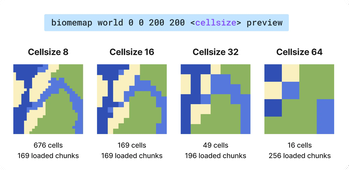
BiomeMap exports the dominant biome of a rectangular selection.
You choose a world and 2 corners (x/z), and the plugin builds a grid of cells over that area.
Then it samples biomes and writes:
- a JSON file
- optionally a PNG preview (
1 pixel = 1 cell)
✨ Features
- Rectangular selection defined by two coordinates (
/biomemap world x1 z1 x2 z2 [cellSize] [preview]) - Cell size with chunk-friendly alignment (
4,8,16,32, ...) - Chunk-based sampling to smooth biome transitions
- Asynchronous processing with frequent progress updates (no server freeze)
- One export at a time (global lock)
- Stop command to cancel running exports cleanly
- Structured JSON output with min/max bounds per cell and namespaced biome IDs
- Optional PNG preview output (
1 pixel = 1 cell) using a biome RGB palette
🚀 Installation
- Install PaperMC server with Java 25+
- Download the latest
biomemap-x.x.x+mcx.x.x.jarfrom the releases page - Drop the jar into your server’s
plugins/folder - Restart the server or run
/reload confirm
🕹 Command Usage
Only one export can run at a time.
Commands
| Command | Description |
|---|---|
/biomemap <world> <x1> <z1> <x2> <z2> [cellSize] [preview] |
Starts a biome export (JSON + optional PNG). |
/biomemap status [map] |
Shows current progress, ETA, outputs. Add map for compact ASCII completion map. |
/biomemap stop |
Stops the current export and removes files from that run in exports/. |
Arguments
| Argument | Required | Description |
|---|---|---|
<world> |
Yes | World name, for example world or world_nether. |
<x1> <z1> |
Yes | First corner of the area. |
<x2> <z2> |
Yes | Opposite corner of the area. |
[cellSize] |
No | Cell size in blocks. Default 16 (common values: 4, 8, 16, 32, 64, ...). |
[preview] |
No | Add preview to generate a PNG (1 pixel = 1 cell). |
📁 Output files
All files are written to plugins/BiomeMap/exports/.
| File | Pattern | Created when |
|---|---|---|
| JSON | <world>_<cellSize>_<index>.json |
Always |
| PNG | <world>_<cellSize>_<index>.png |
Only if preview is used |
Rules:
indexstarts at1and increases if the filename already exists.- If you run
/biomemap stop, files from the canceled export are removed.
⚙️ Configuration
config.yml exposes performance throttles.
| Key | Default | Description |
|---|---|---|
performance.chunks-per-tick |
1 |
How many new chunk jobs are started each tick. Lower = safer, slower. |
performance.max-in-flight |
4 |
Max number of BiomeMap jobs currently in pipeline (queued/running). |
performance.max-concurrent-chunks |
64 |
Max real chunk loads at the same time (main server pressure knob). |
Quick tuning guide:
- If players feel lag, lower
max-concurrent-chunksfirst. - If export feels too slow but server is stable, increase
chunks-per-ticka bit. - Keep
max-in-flight >= chunks-per-tick.
🗺 JSON Format
{
  "cellSize": 16,
  "selectionMin": { "x": -200, "z": -200 },
  "selectionMax": { "x": -50, "z": -20 },
  "gridOrigin": { "x": -208, "z": -208 },
  "width": 10,
  "height": 12,
  "cells": [
    {
      "i": 0,
      "j": 0,
      "bounds": {
        "min": { "x": -208, "z": -208 },
        "max": { "x": -193, "z": -193 }
      },
      "biome": "minecraft:plains"
    },
    {
      "i": 1,
      "j": 0,
      "bounds": {
        "min": { "x": -192, "z": -208 },
        "max": { "x": -177, "z": -193 }
      },
      "biome": "minecraft:forest"
    }
  ]
}
| Field | Type | Description |
|---|---|---|
cellSize |
number |
Cell size in blocks (minimum 4; values above that are aligned to the chunk grid). |
selectionMin/Max |
object |
Raw coordinates provided in the command. |
gridOrigin |
object |
North-west corner of the grid (min X, min Z). |
width, height |
number |
Number of cells on the X and Z axes. |
cells[].bounds.min/max |
object |
Inclusive bounds delimiting the cell. |
cells[].biome |
string |
Namespaced biome ID (e.g. minecraft:savanna). |
Crafted by
 Sukikui