PluginAGPL-3.0-only
BigDoors Physics
Add collisions to the doors created by the BigDoors spigot plugin
7.7K
Downloads
45
Followers
9 months ago
Updated
📦
16
Versions
📖About BigDoors Physics
BigDoors Physics
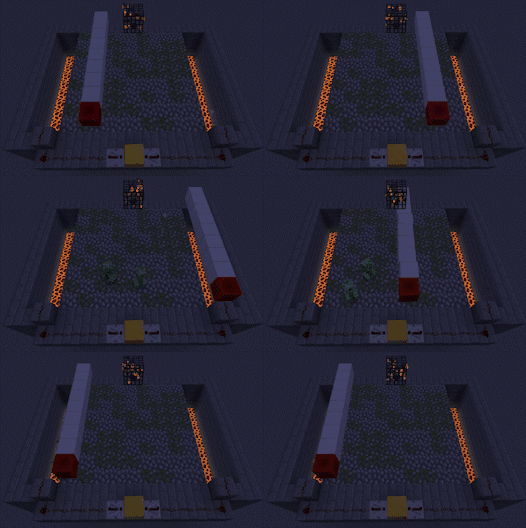
This plugin adds collisions to the spigot plugin BigDoors through several methods.
The Methods
- Shulkers (Default 1.19+)
- Allows off grid collisions
- Requires 2 entities per door block
- Shulker heads are sometimes visible
- Barriers (Default 1.16.5-1.18.2)
- Locked to minecraft grid
- More solid
- Completely invisible
- No extra entities
Dependencies
- Java 11+ (Required)
- BigDoors (Required)
- ProtocolLib (Optional)
- Allows culling of shulkers using packets
Commands and Permissions
| Command | Permission | Default | Description |
|---|---|---|---|
/killbigdoorsphysicsentities |
bigdoorsphysics.admin.killentities |
false |
Kills all entities created by the plugin |
Example Config
# How the plugin should create the colliders
# Valid options: BARRIER, SHULKER, NONE
# Any invalid selection will be set to the default for your version
method:
  door: SHULKER
  drawbridge: SHULKER
  portcullis: SHULKER
  sliding: SHULKER

### Shulker Options

# Make the player move with the shulker, this only has an effect when the shulker and player clip into one another.
# It will not have an effect when the shulker and player are not clipped into each other
# Potential tps impact on larger player and door counts
move-player-with-shulker: true

# Make all non-player entities move with the shulker, this only has an effect when the shulker and entity clip into one another.
# It will not have an effect when the shulker and entity are not clipped into each other
# Larger performance impact than with players, due to the usually larger amount of entities on a server
move-entity-with-shulker: true

# Verify that the moved entity is not clipping into the door when it finishes moving
# If a entity is standing on top of a door when it finishes moving they will be
# teleported up a small amount to prevent them from falling through the door
# This will only apply to entities / players if they are enabled above
# This should have a minimal performance impact
correct-ending-clipping: true

# Hide shulkers that are far away from the player
# NOTE: This requires ProtocolLib to work
cull-distant-shulkers: true

# How many blocks away a shulker needs to be to be culled
# Set to number less than 0 to always cull shulkers
# NOTE: If player interacts will culled shulker it will behave similarly to a ghost block
shulker-cull-distance: 4

# If shulkers should be spawned on the door, or far away
# When this is set to true the shulkers will be spawned near their final locations
# When this is set to false the shulkers will be spawned ~100k blocks above the world height to hide them while they are being set up
# Enabling this can help with compatibility with region plugins (Specifically if you are using regions to control mob spawning)
# By default this is enabled if ProtocolLib is on the server and shulkers will instead be hidden during setup using packets
spawn-shulkers-on-door: true

### Barrier Options

# Use extra packets to hide barriers when they are far away
# This may have a medium performance impact, primarily fps
hide-barriers: true

# Move players who are near the door in accordance with the direction of the door
# This may have a small performance impact, primarily tps
move-player-with-barrier: true

### Other Options

# Whether or not to check for updates via https://modrinth.com/
# Updates will only be checked for on startup
check-for-updates: true
Usage Statistics via bStats