Logo
MINECRAFTBIBLE
Items
Items

All game items

Blocks
Blocks

Building blocks

Mobs
Mobs

Creatures & monsters

Biomes
Biomes

World biomes

Structures
Structures

Generated structures

Recipes
Recipes

Crafting guides

Advancements
Advancements

Achievements

Loot Tables
Loot Tables

Drop rates

Tags
Tags

Item groupings

All Versions
View all data →
Capes
Cape ArchiveNEW

Browse rare Minecon capes, OptiFine capes, and custom capes from players worldwide

Browse

Player Database
Player DatabasePopular

Search any player

Skin Browser
Skin Browser

Browse & download skins

Cape Gallery
Cape GalleryNEW

Minecon & OptiFine capes

Seed Vault
Seed Vault

Curated seeds

Learn

Guides
GuidesNew

Tutorials & tips

Blog
Blog

News & updates

Community

Community Hub
Community HubHub

Posts, discussions & more

All Versions
View community →
Seed Analyzer
Seed Analyzer

World seed analysis

Loot Explorer
Loot Explorer

Drop rates

Crafting Calculator
Crafting Calculator

Material planning

Enchant Calculator
Enchant Calculator

Probability math

Redstone Lab
Redstone Lab

Signal timing

Trading Profit
Trading Profit

Villager ROI

All Versions
View all tools →
Mods
Mods

Browse all mods

Plugins
Plugins

Server plugins

Resource Packs
Resource Packs

Textures & sounds

Shaders
Shaders

Visual enhancements

Datapacks
Datapacks

World logic

Scanner
Mod Intelligence

Scan & analyze any mod

All Versions
View all mods →
Loading...
IntroductionIntroductionVersion HistoryVersion HistoryGuidesGuidesBlog & NewsBlog & News
ItemsItemsBlocksBlocksMobsMobsRecipesRecipesBiomesBiomesStructuresStructuresAdvancementsAdvancementsLoot TablesLoot TablesTagsTags
ModsModsPluginsPluginsResource PacksResource PacksShadersShadersDatapacksDatapacks

MinecraftBible

The Ultimate Wiki

Logo
MINECRAFTBIBLE

The ultimate Minecraft reference. Every item, block, mob, and recipe documented with precision.

Community

  • Skin Browser
  • Cape Gallery
  • Seed Vault
  • Blog
  • Guides

Database

  • Items
  • Blocks
  • Mobs
  • Recipes
  • Biomes
  • Structures

Tools

  • Seed Analyzer
  • Mod Intelligence
  • Crafting Calculator
  • Enchant Calculator

Mods & Packs

  • Mods
  • Plugins
  • Resource Packs
  • Shaders
  • Datapacks

Site & Legal

  • About
  • Authors
  • Editorial Policy
  • Corrections
  • Contact
  • Privacy Policy
  • Terms of Service
  • DMCA
  • Sitemap

© 2026 MinecraftBible. Not affiliated with Mojang or Microsoft.

PrivacyTermsContact
Beacon Strike
PluginMIT

Beacon Strike

Beacon Strike is a defense plguin against hostile mobs.

41
Downloads
1
Followers
4 months ago
Updated
📦
2
Versions
equipmentmagicmobspaper
Download Latestv1.1View on Modrinth

📖About Beacon Strike

⚡ BeaconStrike

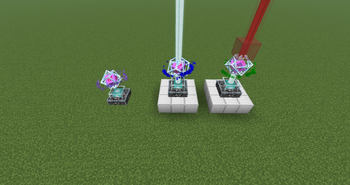
Turn your Beacon into a weapon. Place an End Crystal on top — and watch it hunt.

BeaconStrike is a Minecraft plugin that transforms the humble Beacon into an automated mob-defense turret. Stack an End Crystal on any Beacon, upgrade it with configurable items, and it will fire a sonic boom beam at every nearby hostile mob — automatically.


🎬 How It Works

  1. Place a Beacon anywhere in the world
  2. Put an End Crystal on top of it
  3. Right-click the Beacon to open the upgrade GUI
  4. Upgrade Damage and Range using configurable items
  5. Watch your Beacon shred mobs within range — with particles, sound effects, and a colored beam

✨ Features

  • 🔫 Automated mob turret — targets all hostile mobs in range every tick interval
  • 💥 Sonic boom beam with colored dust particles connecting crystal to mob
  • 🎨 16 beam colors — cycle through all wool/glass colors via the GUI
  • 📈 Upgradeable damage & range — up to a configurable max level
  • 🔮 Orbit particles around the crystal to visualize the active multiblock
  • 👁️ Line-of-sight check — won't fire through too many solid blocks
  • 🔊 Configurable hit sound with adjustable volume
  • 🧱 Break-safe — returns upgrade items when the beacon is broken
  • 💾 Persistent data — upgrade levels and colors survive server restarts
  • 🌐 Fully translatable — every message is editable in config.yml

🧱 Multiblock Setup

   [End Crystal]   ← place on top
   [  Beacon   ]   ← right-click to open GUI

Simply right-click any End Crystal item onto the top of a Beacon. That's it.


🖥️ GUI Overview

Right-click the Beacon to open the upgrade interface:

Slot Item Function
Top row Colored Glass Pane Visual decoration matching beam color
Center Redstone Click to cycle beam color
Left Damage Item Right-click to upgrade / Left-click to downgrade damage
Middle Book Info display
Right Range Item Right-click to upgrade / Left-click to downgrade range

⚙️ Configuration

All settings are in config.yml — including every player-facing message.

max-level: 10
damage-item: FIRE_CHARGE
damage-per-item: 2
range-item: BLAZE_ROD
range-per-item: 5
base-range: 10
base-damage: 1
tick-interval: 20        # 20 ticks = 1 second
beam-y-offset: 1.5
line-of-sight-block-limit: 10
hit-sound: ENTITY_WITHER_DEATH
hit-sound-volume: 0.5
orbit-particles: true

Recommended upgrade items

Purpose Suggestions
Damage FIRE_CHARGE, WITHER_SKELETON_SKULL, NETHER_STAR, DRAGON_EGG
Range BLAZE_ROD, AMETHYST_SHARD, PRISMARINE_CRYSTALS, SCULK

💬 Commands & Permissions

Command Description
/beaconstrike reload Reloads the config without restarting

No permission nodes required by default — open to all operators.


📦 Installation

  1. Download the .jar file
  2. Drop it into your server's /plugins folder
  3. Restart the server
  4. A config.yml will be generated automatically

Requires: Paper/Spigot 1.21+


🐛 Known Limitations

  • End Crystals placed via BeaconStrike are entities, not blocks — they can be destroyed by explosions
  • The plugin targets all vanilla hostile mob types; custom mobs from other plugins are not targeted

📄 License

This project is provided as-is. Feel free to use it on your server or fork it for personal use.


Made by bsxray

👥 Team & Contributors

BSXRay
BSXRayOwner

⚙️ Compatibility

Environment
🖥️ Server-side
Loaders
paper
Minecraft Versions
1.211.21.11.21.21.21.31.21.41.21.51.21.61.21.7+4 more

🔗 Links

Modrinth Page