


BannerForLabyMod
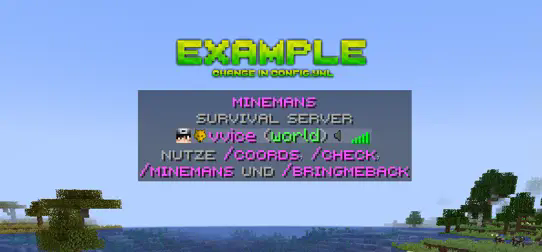
Display a custom banner over the tab, simple and easy (LabyMod 4 required)
📖About BannerForLabyMod
BannerForLabyMod
Display a custom banner over the tab, simple and easy (LabyMod 4 required).
ATTENTIONThe LabyMod API plugin is required for BannerForLabyMod to work, download it together with BannerForLabyMod here. The download should start immediately.
(If you are NOT using PaperMC/Spigot/Bukkit this plugin will not work. Unfortunately, this plugin is not compatible with velocity or bungeecord. Support for proxies is planned for the future)
In addition the aspect ratio of the image must be 5:1 and the recommended resolution is 1280x256 pixels. If you scale the image higher, always keep the ratio 5:1!
Preview
How it works
Every player who uses the client LabyMod 4 will see a banner above the TabList. It's as simple as it sounds. LabyMod is a German Survival/PvP client with over 4 million unique users. Try it out! Go to LabyMod's Website
Features
- High-resolution banners up to 5K
- Easy handling
- Simple config
- No impact on performance
Permissons
No permission is required for the players. All players using the client LabyMod 4 will see the banner.
Bug report & support
If you need help or have a bug please contact me via discord (add hassanbwo). I will guarantee quick help - Thanks for supporting :)
config.yml
Simple config. Just change the link to your own personalized banner link (make sure it is a direct link).
# ==========================================
# BannerForLabyMod – config.yml
# ==========================================
# Here you can change the url of the banner:
# Make sure you use a direct link, where only the picture is opened!
# ==========================================
# When you create a banner:
# Please note the aspect ratio of the image must be 5:1 and the recommended resolution is 1280x256 pixels!
# ==========================================

banner_url: "https://i.ibb.co/7rBhrfn/example.png"