


PluginMIT
BandwidthSaver-PE
A server bandwidth throttling plugin based on PacketEvents. 一个基于 PacketEvents 的节省服务器带宽的插件。
242
Downloads
6
Followers
1 months ago
Updated
📦
23
Versions
📖About BandwidthSaver-PE
BandwidthSaver-PE
Overview | 概述
BandwidthSaver-PE is a high-performance bandwidth throttling plugin built on the PacketEvents framework. Developed by the Mangocraft Code Team, it is a modernized fork of the legacy RIABandwidthSaver by Ghost-chu.
BandwidthSaver-PE 是一个基于 PacketEvents 的高性能节流插件。由 芒果方块的服务器开发制作组 基于 Ghost-chu 的旧版插件RIABandwidthSaver进行修改优化,旨在玩家处于 AFK 状态期间抑制不必要的数据包和区块发送,缓解服务器带宽压力。

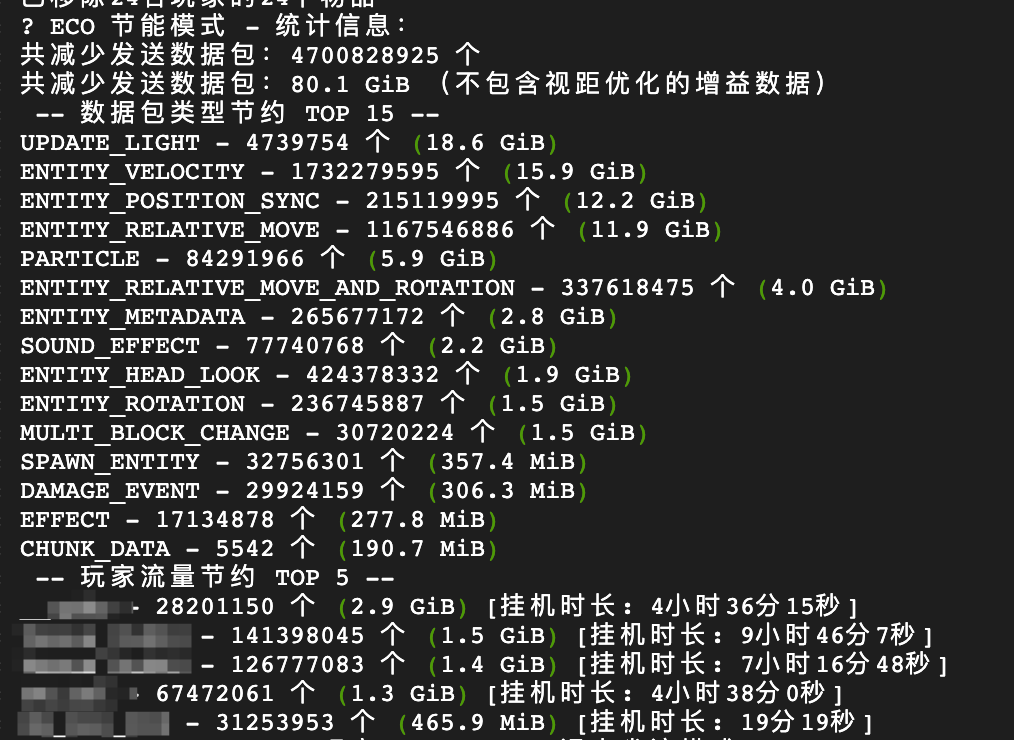
(All text within images can be modified in config.yml. Feel free to translate or customize the content.图片内文字均可在config.yml中修改,可自行翻译或自定义内容)
Improvements | 改进点
- Modern Framework: Switched from ProtocolLib to PacketEvents for superior stability. (前置从 ProtocolLib 改为 PacketEvents,更稳定兼容)
- Refined Logic: Optimized filtering algorithms for higher precision. (优化过滤算法,更准确高效)
- Folia Support: Native compatibility with Folia. (增加对 Folia 服务器的支持)
- AFK Fishing Fix: Added detection and handling for AFK fishing machines. (增加对自动钓鱼机的检测和处理)
- Manual AFK Mode: Added
/afkcommand for manual AFK mode that persists regardless of player movement. (新增/afk命令,提供手动AFK模式,不受玩家移动影响) - Super Bandwidth-Saving Mode: Added
/afk superand/afk super alwaysto completely freeze chunks and entities for maximum bandwidth savings. (新增超级省流模式和默认超级省流挂机偏好,实现最极限的宽带节省) - Safety Refinements: Blocks inventory usage, drops, and interacts in Super AFK to avoid UI desync. Auto-exits on death (
PlayerDeathEvent) to prevent respawn locks. (全面锁定背包、丢弃与物品交互防刷防错乱;死亡立刻解除挂机,防止幽灵生存卡死) - High-Concurrency Lookup: Uses O(1) HashSet for packet whitelisting to minimize CPU cycles on crowded Folia regions. (采用 O(1) HashSet 极速匹配包白名单,降低密集型 Folia 服务器开销)
[!IMPORTANT]
- Dependency: You must install PacketEvents for this plugin to function. (必须安装 PacketEvents 插件)
- Note on Stats: Traffic statistics represent uncompressed data. Actual billed bandwidth may differ due to server-side compression. (统计信息为未压缩流量,实际流量因服务器压缩配置会有所出入)
Features | 功能
1. Dynamic View Distance | 动态视距
- Lowers client-side view distance for AFK players without affecting server-side simulation distance.
- 降低 AFK 玩家的客户端视野距离,不影响服务器模拟距离,减少区块数据传输。
2. AFK Detection | AFK 检测机制
- Perspective-Based: Monitors camera rotation (Default: 300s). 基于视角移动检测(默认 300 秒)。
- Auto-Exit: Automatically restores traffic flow upon taking damage or using teleport commands (
/tp,/spawn,/home, etc.). 受到攻击或使用传送命令时自动退出 AFK 模式。 - Automation Friendly: Compatible with AFK pools and auto-clickers. 支持自动攻击和 AFK 池。
- Manual AFK Mode: Players can use
/afkcommand to enter manual AFK mode that persists regardless of player movement. Use/afkagain or rejoin the game to exit. 手动AFK模式:玩家可使用/afk命令进入手动AFK模式,不受玩家移动影响。再次使用/afk或重新加入游戏可退出。 - Super Bandwidth-Saving Mode: Toggled with
/afk super. Restricts virtually all incoming data packets (except keepalive, bossbar, chat, disconnect, and plugin messages). Forces the client to play in a static, frozen world. Upon exiting, players must reconnect to refresh terrain chunks. 超级省流模式:使用 /afk super 开启。拦截白名单(核心心跳、聊天、通道和断连)外的几乎所有封包。退出后需重连服务器以刷新区块。 - Preferred Auto-Super AFK: Toggled with
/afk super always. Persists insuper-always.ymlso players enter Super AFK automatically instead of normal ECO mode when idle. Note: Auto-entered Super AFK allows players to wake up by head movement or taking damage, while manually activated/afk supercan only be exited via command or reconnect. Under any condition, exiting Super AFK requires reconnecting to properly reload terrain chunks.
默认超级省流偏好:通过/afk super always切换,记录于super-always.yml中。闲置超时后直接进入超级省流而非普通挂机。注意:超时自动进入的超级省流模式允许玩家通过晃动视角或受到伤害自动唤醒,而手动输入的/afk super则必须通过再次输入指令或重新登入退出。无论以何种方式退出超级省流,均需重连服务器以重载区块。
3. Packet Filtering | 数据包过滤详情
- Cancelled (100% Suppression) | 取消发送:
- Animations, Block break, Sounds, Particles, Explosions, Time sync, Light updates, TAB list headers/footers, World events, Potion effects, Map data, etc.
- 动画、方块破坏、声音、粒子、爆炸、时间同步、光照更新、TAB 列表、世界事件、药水效果、地图数据等。
- Throttled (Reduced Rate) | 频率削减:
- 2% Pass Rate: Entity movement, Position, Velocity, Experience orbs. (实体移动/位置/速度、经验球)
- 5% Pass Rate: Entity metadata. (实体元数据)
- 20% Pass Rate: Head orientation. (实体头部朝向)
- Special Handling for AFK Fishing | 自动钓鱼机特殊处理:
- When a player holds a fishing rod, certain packets (sound effects, entity velocity/movement) are allowed to pass through to support fishing activities.
- 当玩家手持钓鱼竿时,某些数据包(声音效果、实体速度/移动)会被允许通过,以支持钓鱼活动。
Commands & Permissions | 命令与权限
| Command | Description |
|---|---|
/bandwidthsaver |
View bandwidth saving stats (查看流量节省统计) |
/bandwidthsaver unfiltered |
View raw consumption (查看实际消耗统计) |
/bandwidthsaver reload |
Reload configuration (重载配置) |
/bandwidthsaver admin add/remove <player> |
Add or remove a player from auto Super AFK list (将玩家加入或移出自动超级省流名单) |
/afk |
Toggle manual AFK mode (切换手动AFK模式) |
/afk super |
Toggle manual Super AFK mode (切换手动超级省流模式) |
/afk super always |
Toggle preferred automatic Super AFK mode (切换超时自动进入超级省流偏好) |
| Permission | Description |
|---|---|
bandwidthsaver.bypass |
Bypass AFK detection (绕过 AFK 检测) |
bandwidthsaver.admin |
Access admin commands (管理员权限) |
Configuration | 配置文件
# Calculate all packets (required for /bandwidthsaver unfiltered stats)
# 计算所有数据包(即启用 /bandwidthsaver unfiltered 的统计信息)
calcAllPackets: false
# Dynamically modify player view distance when AFK
# 是否在挂机时动态修改玩家视距
modifyPlayerViewDistance: false
# AFK perspective detection threshold in seconds (default: 300s / 5 mins)
# 视角检测 AFK 阈值(秒),默认为 300 秒(5 分钟)
afkPerspectiveThresholdSeconds: 300
# Whether to intercept TAB list related packets (default: true)
# Set to false if you notice the TAB list not updating, Ping not refreshing, or title display errors.
# 是否拦截 TAB 列表相关数据包 (默认为 true)
# 如果发现 TAB 列表不刷新、延迟 (Ping) 不更新或头衔显示错误,请将其设为 false
intercept-tab-list: true
# Whether to intercept chunk and light packets
# Enabling this saves a massive amount of bandwidth, but exiting AFK might result in void chunks
# that require the player to reconnect to load properly, affecting player experience.
# 是否拦截区块和光照数据包
# 开启后可极大幅度节省流量,但退出 AFK 时可能产生只能重进才能加载的虚空区块,比较影响玩家体验
intercept-chunk-packets: false
# Whether to be compatible with dynamic view distance plugins like PVDC when force-refreshing chunks on exiting AFK (Valid only if the above option is true)
# When enabled, it delays for 2 seconds waiting for PVDC to calculate view distance, then does a "+1" view distance pull to prevent view distance from being locked.
# 退出 AFK 强制刷新区块时,是否兼容 PVDC 等动态视距插件 (仅在开启上一项时有效)
# 开启后,会延迟 2 秒等待 PVDC 结算视距,然后再进行"+1"的视距拉扯刷新,防止视距被锁死
compatible-with-pvdc: false
# ==========================================
# Target World Settings (Whitelist Mechanism) / 作用世界设置(白名单机制)
# ==========================================
# Players will only enter bandwidth saving mode in the worlds listed below.
# Worlds not in the list, such as lobbies or minigames, will automatically have the bandwidth saver disabled.
# 只有在以下列表中的世界,玩家才会进入省流模式。
# 像大厅 (lobby)、小游戏 (minigames) 等未在列表里的世界,会自动禁用省流功能。
enabled-worlds:
  - "world"
  - "world_nether"
  - "world_the_end"
# Debug mode switch. When enabled, it outputs intelligent filtering zone information in the console.
# 调试模式开关,开启后会在控制台输出智能过滤区域信息
debug: false
# ==========================================
# Language & Messages Settings / 语言与提示信息设置
# ==========================================
# You can translate or customize all messages sent to players below.
# 你可以在下方翻译或自定义所有发送给玩家的提示信息。
message:
  playerEcoEnable: '§a🍃 ECO 节能模式已启用,限制数据传输,可能会看着卡顿,实际正常,不会影响机器运行'
  playerEcoDisable: '§8🍃 ECO 节能模式已停用,数据传输将恢复正常'
  playerSuperEcoEnable: '§c⚠️ [超级省流模式已启用] 仅限挂机,不能进行任何操作/有视角要求的行为,退出后需重连以刷新区块。'
  playerSuperEcoDisable: '§c⚠️ 您已退出超级省流模式!为了恢复周围区块和实体的正常加载,请重新进入服务器。'
  superEcoDisable_special: '§e检测到特殊状态 (睡觉/飞行/世界切换),已自动退出超级省流模式。为了恢复地形加载,建议重新进入服务器!'
  ecoDisable_special: '§e检测到特殊状态 (睡觉/飞行),已自动关闭省流模式。'
  superEcoDisable_death: '§c您已在挂机期间死亡,超级省流模式已自动解除!为了重新加载周围区块,请重新连接服务器。'
  ecoDisable_death: '§e您已在挂机期间死亡,已为您自动退出手动 AFK 模式。'
  superEcoDisable_teleport: '§e检测到传送,已为您自动退出超级省流模式。为了恢复地形加载,建议重新进入服务器!'
  ecoDisable_teleport: '§e检测到传送,已为您自动退出手动 AFK 模式以加载地形。'
  superEcoDisable_glide: '§e检测到展开鞘翅,已自动退出超级省流模式。为了恢复地形加载,建议重新进入服务器!'
  ecoDisable_glide: '§e检测到展开鞘翅,已自动退出省流模式。'
  player_only: '§c此命令只能由玩家执行!'
  superAlways_disabled: '§e已关闭自动超级省流挂机状态!当您达到设定的挂机时间时,将进入普通挂机模式。'
  superAlways_enabled: '§a已开启自动超级省流挂机状态!当您达到设定的挂机时间时,将直接进入超级省流模式。'
  superAlways_confirm1: '§c⚠️ [进入确认] 您即将开启默认超级省流挂机偏好!'
  superAlways_confirm2: '§e在超级省流模式下,所有需要挂机玩家物理操作(如点击攻击、手动使用/放置方块等)的挂机机器均无法工作。'
  superAlways_confirm3: '§e此模式仅适用于纯被动型机器(如刷铁机、农作物机、全自动刷怪塔等)。'
  superAlways_confirm4: '§e且每次挂机唤醒均需重新登入服务器刷新区块。'
  superAlways_confirm5: '§b若您确认要默认启用该模式,请在 3 分钟内再次输入指令: §a/afk super always'
  superEco_exit: '§a您已退出超级省流模式!'
  superEco_confirm1: '§c⚠️ [进入确认] 您即将进入手动超级省流挂机模式!'
  superEco_confirm2: '§e在此模式下,任何需要您物理操作(如点击攻击、手动使用/放置方块等)的挂机机器均无法正常工作。'
  superEco_confirm3: '§e此模式仅适用于纯被动型机器(如刷铁机、农作物机、全自动刷怪塔等)。'
  superEco_confirm4: '§e且退出后必须重新进入服务器才能加载刷新周围地形区块。'
  superEco_confirm5: '§b若您确认要开启,请在 3 分钟内再次输入指令进行二次确认: §a/afk super'
  eco_exit: '§a您已退出手动 AFK 模式!'
  eco_enter: '§e您已进入手动 AFK 模式!再次输入/afk 退出此模式。'
  no_permission: '§cYou don''t have permission to use this command!'
  admin_player_not_found: '§c未找到玩家或该玩家从未进入过服务器:%player%'
  admin_already_in_list: '§e玩家 %player% 已经在自动超级省流挂机列表中了!'
  admin_added_to_list: '§a已将玩家 %player% 添加到自动超级省流挂机列表中!'
  admin_target_added: '§a管理员已将您添加到自动超级省流挂机列表中!'
  admin_not_in_list: '§e玩家 %player% 不在自动超级省流挂机列表中!'
  admin_removed_from_list: '§a已将玩家 %player% 从自动超级省流挂机列表中移除!'
  admin_target_removed: '§e管理员已将您从自动超级省流挂机列表中移除!'
  admin_usage: '§c未知操作,请使用 /bandwidthsaver admin add/remove <player>'
  stats_eco_title: '§a🍃 ECO 节能模式 - 统计信息:'
  stats_eco_packets: '§e共减少发送数据包:§b%count% 个'
  stats_eco_bytes: '§e共减少发送数据包:§b%size% (不包含视距优化的增益数据)'
  stats_eco_top_types: '§e -- 数据包类型节约 TOP 15 --'
  stats_eco_top_players: '§e -- 玩家流量节约 TOP 5 --'
  stats_uneco_title: '§a🍃 UN-ECO - 数据总计 - 统计信息:'
  stats_uneco_packets: '§e共发送数据包:§b%count% 个'
  stats_uneco_bytes: '§e共发送数据包:§b%size%'
  stats_uneco_top_types: '§e -- 数据包类型 TOP 15 --'
  stats_uneco_top_players: '§e -- 玩家流量 TOP 5 --'
  reload_success: '§a🍃 ECO - 配置文件已重载'
  stats_eco_type_item: '§7%type% - %count% 个 (%size%)'
  stats_eco_player_item: '§7%player% - %count% 个 (%size%)§a [挂机时长: %time%]'
  stats_uneco_player_item: '§7%player% - %count% 个 (%size%)'
# ==========================================
# BossBar Settings / Boss栏设置
# ==========================================
# You can customize the bossbar display here.
# 你可以在下方自定义上方 Boss 栏的显示。
bossbar:
  eco-enabled-title: "<green><bold>🍃 ECO 节能模式</bold> <gray>|</gray> <yellow>⬇ 已暂停高频数据传输</yellow> <gray>|</gray> <white>↔ 轻晃视角以恢复</white>"
  eco-enabled-health: 1.0
  eco-enabled-color: "YELLOW" # YELLOW, BLUE, RED, GREEN, PINK, WHITE, PURPLE, or ORANGE
  eco-enabled-overlay: "PROGRESS" # PROGRESS, NOTCHED_6, NOTCHED_10, NOTCHED_12, or NOTCHED_20
  super-eco-enabled-title: "<red><bold>⚡ SUPER ECO 超级省流模式</bold> <gray>|</gray> <yellow>🔒 数据拦截最大化</yellow> <gray>|</gray> <white>⚠️ 退出后需重连刷新区块</white>"
  super-eco-enabled-health: 1.0
  super-eco-enabled-color: "RED"
  super-eco-enabled-overlay: "PROGRESS"