Logo
MINECRAFTBIBLE
Items
Items

All game items

Blocks
Blocks

Building blocks

Mobs
Mobs

Creatures & monsters

Biomes
Biomes

World biomes

Structures
Structures

Generated structures

Recipes
Recipes

Crafting guides

Advancements
Advancements

Achievements

Loot Tables
Loot Tables

Drop rates

Tags
Tags

Item groupings

All Versions
View all data →
Capes
Cape ArchiveNEW

Browse rare Minecon capes, OptiFine capes, and custom capes from players worldwide

Browse

Player Database
Player DatabasePopular

Search any player

Skin Browser
Skin Browser

Browse & download skins

Cape Gallery
Cape GalleryNEW

Minecon & OptiFine capes

Seed Vault
Seed Vault

Curated seeds

Learn

Guides
GuidesNew

Tutorials & tips

Blog
Blog

News & updates

Community

Community Hub
Community HubHub

Posts, discussions & more

All Versions
View community →
Seed Analyzer
Seed Analyzer

World seed analysis

Loot Explorer
Loot Explorer

Drop rates

Crafting Calculator
Crafting Calculator

Material planning

Enchant Calculator
Enchant Calculator

Probability math

Redstone Lab
Redstone Lab

Signal timing

Trading Profit
Trading Profit

Villager ROI

All Versions
View all tools →
Mods
Mods

Browse all mods

Plugins
Plugins

Server plugins

Resource Packs
Resource Packs

Textures & sounds

Shaders
Shaders

Visual enhancements

Datapacks
Datapacks

World logic

Scanner
Mod Intelligence

Scan & analyze any mod

All Versions
View all mods →
Loading...
IntroductionIntroductionVersion HistoryVersion HistoryGuidesGuidesBlog & NewsBlog & News
ItemsItemsBlocksBlocksMobsMobsRecipesRecipesBiomesBiomesStructuresStructuresAdvancementsAdvancementsLoot TablesLoot TablesTagsTags
ModsModsPluginsPluginsResource PacksResource PacksShadersShadersDatapacksDatapacks

MinecraftBible

The Ultimate Wiki

Logo
MINECRAFTBIBLE

The ultimate Minecraft reference. Every item, block, mob, and recipe documented with precision.

Community

  • Skin Browser
  • Cape Gallery
  • Seed Vault
  • Blog
  • Guides

Database

  • Items
  • Blocks
  • Mobs
  • Recipes
  • Biomes
  • Structures

Tools

  • Seed Analyzer
  • Mod Intelligence
  • Crafting Calculator
  • Enchant Calculator

Mods & Packs

  • Mods
  • Plugins
  • Resource Packs
  • Shaders
  • Datapacks

Site & Legal

  • About
  • Authors
  • Editorial Policy
  • Corrections
  • Contact
  • Privacy Policy
  • Terms of Service
  • DMCA
  • Sitemap

© 2026 MinecraftBible. Not affiliated with Mojang or Microsoft.

PrivacyTermsContact
Ban Mace
PluginCC0-1.0

Ban Mace

A small flexible plugin adding the possibility of unusual bans

754
Downloads
3
Followers
5 months ago
Updated
📦
12
Versions
game-mechanicssocialbukkitpaperspigot
Download Latestv1.13.0View on Modrinth

📖About Ban Mace

paper


BanMace header

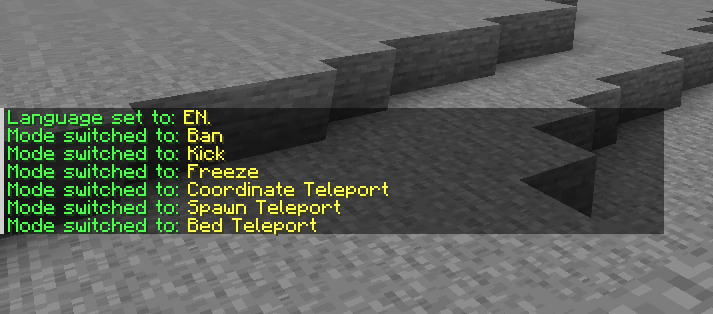
English

about

BanMace is a powerful administrative tool for Minecraft servers, disguised as a mystical weapon. It provides server staff with a range of intuitive player management functions, from teleportation to punishment, all accessible through a single, versatile item. The plugin features two convenient ways to switch between modes: a quick right-click cycle and an immersive radial menu.
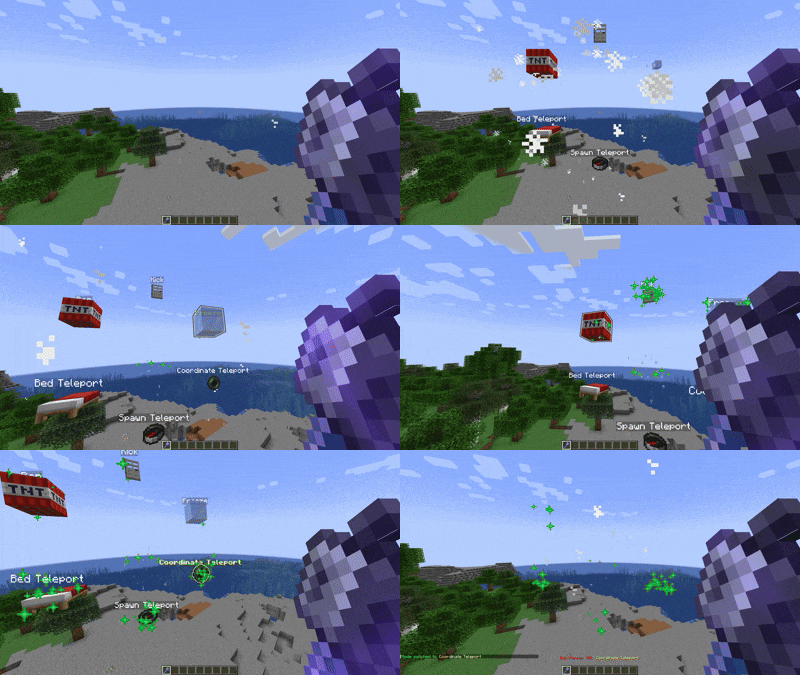

Radial Menu Showcase

features

BanMace offers several modes, each with a unique function:

  • SPAWN: Teleports the target player to the world's spawn point.
  • BED: Teleports the target to their personal bed. If no bed is set, they are sent to the world spawn.
  • COORDINATE TELEPORT: Teleports the target to specific coordinates stored within the mace. Use /bm-tpcoordinates to set them.
  • FREEZE: Immobilizes a player, encasing them in ice for a short duration.
  • KICK: Instantly kicks the player from the server.
  • BAN: Temporarily bans the player from the server.
  • BALLOON: Launches the player into the air with colorful balloon effects for a fun and playful moderation approach.

En showcase

Mode Switching

You can switch between modes in two ways:

  1. Right-Click: Quickly cycle through the available modes.
  2. Radial Menu (Press F): Hold the BanMace and press your "Swap-Hand" key (default: F) to open an immersive radial menu for easy mode selection.

Customization and Settings

A comprehensive in-game GUI allows you to customize almost every aspect of the plugin.

  • /bm-settings: Opens the main settings menu.

  • Customize the BanMace's item type.
  • Configure particles, sounds, and message display styles (chat, actionbar, or title).
  • Manage Discord integration, language settings, and more.

commands

Command Description Permission
/bm-give Gives the user a Ban Mace. banmace.give
/bm-settings Opens the settings GUI. banmace.settings
/bm-tpcoordinates <x> <y> <z> Sets the target coordinates for the mace. banmace.tpcoordinates
/bm-setlanguage <lang> Changes the plugin's language. banmace.setlanguage
/bm-changeview <mode> Changes the message display mode. banmace.changeview

Installation

  1. Download the latest version of the BanMace plugin.
  2. Place the .jar file into the plugins folder of your Spigot/Paper server.
  3. Restart or reload the server.

Notes

  • The plugin is designed for Paper and its forks for best performance and compatibility.
  • Ensure the main world is available for teleportation functions to work correctly.
  • Default configuration and language files (message_en.yml, message_ru.yml) are generated on the first run.

Contact

If you have any questions, suggestions, or issues, please open an issue on the GitHub Issues page.

Boosty


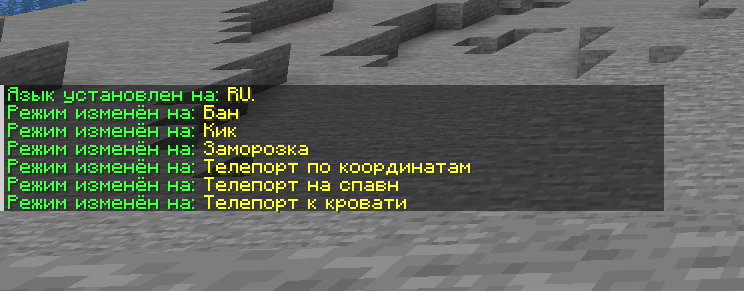
Russian | Русский

aboutRU

BanMace — это мощный административный инструмент для серверов Minecraft, замаскированный под мистическое оружие. Он предоставляет персоналу сервера ряд интуитивно понятных функций для управления игроками, от телепортации до наказаний, доступных через один универсальный предмет. Плагин предлагает два удобных способа переключения режимов: быстрое переключение по правому клику и иммерсивное радиальное меню.

Демонстрация Радиального Меню

funcRU

BanMace предлагает несколько режимов, каждый с уникальной функцией:

  • СПАВН: Телепортирует игрока на точку спавна мира.
  • КРОВАТЬ: Телепортирует игрока к его личной кровати. Если кровать не установлена, игрок отправляется на спавн мира.
  • ТЕЛЕПОРТ ПО КООРДИНАТАМ: Телепортирует игрока на определённые координаты, сохранённые в булаве. Используйте /bm-tpcoordinates для их установки.
  • ЗАМОРОЗКА: Обездвиживает игрока, заключая его в ледяную глыбу на короткое время.
  • КИК: Моментально кикает игрока с сервера.
  • БАН: Временно банит игрока на сервере.
  • ШАРЫ: Запускает игрока в воздух с красочными эффектами шаров для веселого и игривого подхода к модерации.

Ru showcase

Переключение Режимов

Вы можете переключаться между режимами двумя способами:

  1. Правый клик: Быстрое циклическое переключение между доступными режимами.
  2. Радиальное меню (нажмите F): Удерживая BanMace, нажмите клавишу смены предмета в руках (по умолчанию F), чтобы открыть удобное радиальное меню для выбора режима.

Кастомизация и Настройки

Комплексный внутриигровой интерфейс позволяет настроить практически каждый аспект плагина.

  • /bm-settings: Открывает главное меню настроек.

  • Настраивайте тип предмета булавы.
  • Настраивайте частицы, звуки и стиль отображения сообщений (чат, actionbar или title).
  • Управляйте интеграцией с Discord, настройками языка и многим другим.

comRU

Команда Описание Право
/bm-give Выдаёт игроку Булаву Бана. banmace.give
/bm-settings Открывает GUI с настройками. banmace.settings
/bm-tpcoordinates <x> <y> <z> Устанавливает целевые координаты в булаве. banmace.tpcoordinates
/bm-setlanguage <язык> Изменяет язык плагина. banmace.setlanguage
/bm-changeview <режим> Изменяет режим отображения сообщений. banmace.changeview

Установка

  1. Скачайте последнюю версию плагина BanMace.
  2. Поместите .jar файл в папку plugins вашего сервера Spigot/Paper.
  3. Перезагрузите сервер.

Примечания

  • Плагин разработан для Paper и его форков для наилучшей производительности и совместимости.
  • Убедитесь, что основной мир доступен на сервере для корректной работы функций телепортации.
  • Файлы конфигурации и языковые файлы по умолчанию (message_en.yml, message_ru.yml) создаются при первом запуске.

Контакты

Если у вас есть вопросы, предложения или вы нашли ошибку, пожалуйста, создайте обращение на странице GitHub Issues.

Boosty

👥 Team & Contributors

Nakolotnik
NakolotnikOwner

⚙️ Compatibility

Environment
🖥️ Server-side
Loaders
bukkitpaperspigot
Minecraft Versions
1.21.8

🔗 Links

Modrinth Page