Logo
MINECRAFTBIBLE
Items
Items

All game items

Blocks
Blocks

Building blocks

Mobs
Mobs

Creatures & monsters

Biomes
Biomes

World biomes

Structures
Structures

Generated structures

Recipes
Recipes

Crafting guides

Advancements
Advancements

Achievements

Loot Tables
Loot Tables

Drop rates

Tags
Tags

Item groupings

All Versions
View all data →
Capes
Cape ArchiveNEW

Browse rare Minecon capes, OptiFine capes, and custom capes from players worldwide

Browse

Player Database
Player DatabasePopular

Search any player

Skin Browser
Skin Browser

Browse & download skins

Cape Gallery
Cape GalleryNEW

Minecon & OptiFine capes

Seed Vault
Seed Vault

Curated seeds

Learn

Guides
GuidesNew

Tutorials & tips

Blog
Blog

News & updates

Community

Community Hub
Community HubHub

Posts, discussions & more

All Versions
View community →
Seed Analyzer
Seed Analyzer

World seed analysis

Loot Explorer
Loot Explorer

Drop rates

Crafting Calculator
Crafting Calculator

Material planning

Enchant Calculator
Enchant Calculator

Probability math

Redstone Lab
Redstone Lab

Signal timing

Trading Profit
Trading Profit

Villager ROI

All Versions
View all tools →
Mods
Mods

Browse all mods

Plugins
Plugins

Server plugins

Resource Packs
Resource Packs

Textures & sounds

Shaders
Shaders

Visual enhancements

Datapacks
Datapacks

World logic

Scanner
Mod Intelligence

Scan & analyze any mod

All Versions
View all mods →
Loading...
IntroductionIntroductionVersion HistoryVersion HistoryGuidesGuidesBlog & NewsBlog & News
ItemsItemsBlocksBlocksMobsMobsRecipesRecipesBiomesBiomesStructuresStructuresAdvancementsAdvancementsLoot TablesLoot TablesTagsTags
ModsModsPluginsPluginsResource PacksResource PacksShadersShadersDatapacksDatapacks

MinecraftBible

The Ultimate Wiki

Logo
MINECRAFTBIBLE

The ultimate Minecraft reference. Every item, block, mob, and recipe documented with precision.

Community

  • Skin Browser
  • Cape Gallery
  • Seed Vault
  • Blog
  • Guides

Database

  • Items
  • Blocks
  • Mobs
  • Recipes
  • Biomes
  • Structures

Tools

  • Seed Analyzer
  • Mod Intelligence
  • Crafting Calculator
  • Enchant Calculator

Mods & Packs

  • Mods
  • Plugins
  • Resource Packs
  • Shaders
  • Datapacks

Site & Legal

  • About
  • Authors
  • Editorial Policy
  • Corrections
  • Contact
  • Privacy Policy
  • Terms of Service
  • DMCA
  • Sitemap

© 2026 MinecraftBible. Not affiliated with Mojang or Microsoft.

PrivacyTermsContact
Backuper
PluginMIT

Backuper

Simple backup plugin for Paper/Folia with FTP/GOOGLE DRIVE/SFTP support

24.3K
Downloads
92
Followers
3 months ago
Updated
📦
30
Versions
managementstorageutilityfoliapaperpurpur
Download Latestv4.0.3View on Modrinth

📖About Backuper

Backuper

Simple backup plugin for Paper/Folia with FTP/SFTP/Google Drive support.

GitHub Downloads (all assets, all releases)
Modrinth Downloads
Hangar Downloads

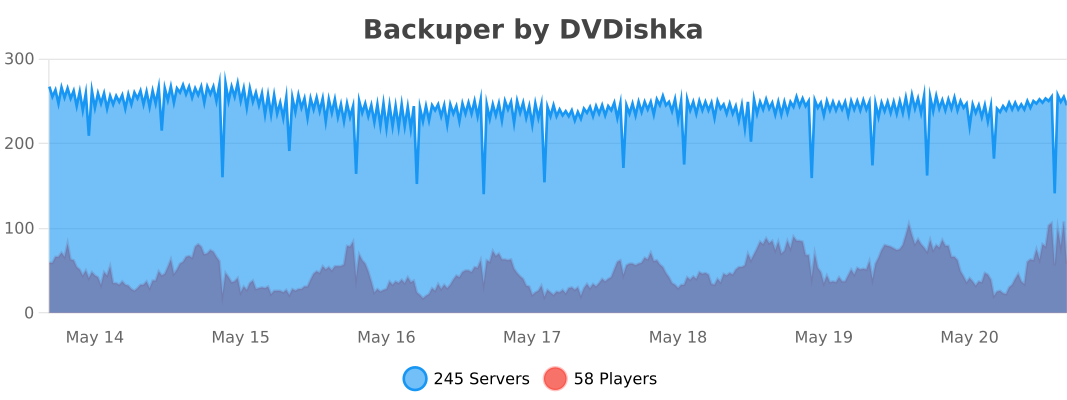
bStats Graph Data


🔗 Pages 🔗

  • 📖 Wiki
  • Backuper
  • GitHub
  • Modrinth
  • Hangar

⭐ Key Features ⭐

  • Multiple Storage Types (Local/SFTP/FTP/Google Drive)
  • Automatic backups with customizable schedule
  • Backups Management
  • Archieving or storing backup as a folder
  • Flexible Configuration
  • Async to server thread and multithreaded
  • Player Notifications

🚀 Quick Start 🚀

  1. Install the plugin in your plugins folder
  2. Configure storage settings in plugins/Backuper/config.yml
  3. Set backup schedule and preferences
  4. For cloud storage (Google Drive), link your account using commands

⚙️ Basic Configuration ⚙️

After installing the plugin, configure the main settings in plugins/Backuper/config.yml:

Backup Settings

backup:
  autoBackup: true
  autoBackupPeriod: 1440
  autoBackupCron: ''
  • autoBackup - Enable/disable automatic backups
  • autoBackupPeriod - Backup interval in minutes (1440 = 24 hours). Used only when autoBackupCron is empty
  • autoBackupCron - Backup schedule (CronMaker for custom schedules). If specified, this value is used instead of autoBackupPeriod

Local Storage

storages:
  local:
    type: local
    enabled: true
    autoBackup: true
    
    backupsFolder: ./plugins/Backuper/Backups
    
    maxBackupsNumber: 10
    maxBackupsWeight: 0
    
    zipArchive: true
    zipCompressionLevel: 5
  • enabled - Enable/disable this storage
  • autoBackup - Save automatic backups to this storage
  • backupsFolder - Directory where backups will be stored
  • maxBackupsNumber - Maximum number of backups to keep (0 = unlimited)
  • maxBackupsWeight - Maximum total size in MB (0 = unlimited)
  • zipArchive - Store as ZIP files or folders
  • zipCompressionLevel - Compression level (0-9)

For detailed configuration and remote storage options (FTP/SFTP/Google Drive), see Configuration


💾 Storage Types 💾

  • Local - Store backups on the same server
  • FTP - Upload backups to FTP servers
  • SFTP - Secure file transfer via SSH
  • Google Drive - Cloud storage with OAuth authentication

📚 Documentation 📚

⚙️ Configuration ⚙️

See Configuration

💻 Commands 💻

See Commands

🔐 Permissions 🔐

See Permissions System


🔄 Version Compatibility 🔄

Version Numbering (X.Y.Z(A))

  • X - Breaking changes without backward compatibility
  • Y - Significant changes with backward compatibility
  • Z - Minor changes and improvements
  • A - Bugfixes or security/stability improvements (hotfixes)

Major Version Changes

  • 1.x.x → 2.x.x: Complete permission and command system overhaul
  • 2.x.x → 3.x.x: Storage-specific permissions and required storage specification in commands
  • 3.x.x → 4.x.x: Storage Type replaced with Storage Id, support for multiple storages of the same type, and reworked permissions system

📝 Notes 📝

  • Please report any issues to GitHub
  • RESTART option may not work well, so it's better to use STOP with a loop in your start script (start script auto restart ON)

👥 Team & Contributors

DVDishka
DVDishkaOwner

⚙️ Compatibility

Environment
🖥️ Server-side
Loaders
foliapaperpurpur
Minecraft Versions
1.20.61.211.21.11.21.21.21.31.21.41.21.51.21.6+5 more

🔗 Links

Modrinth Page