Logo
MINECRAFTBIBLE
Items
Items

All game items

Blocks
Blocks

Building blocks

Mobs
Mobs

Creatures & monsters

Biomes
Biomes

World biomes

Structures
Structures

Generated structures

Recipes
Recipes

Crafting guides

Advancements
Advancements

Achievements

Loot Tables
Loot Tables

Drop rates

Tags
Tags

Item groupings

All Versions
View all data →
Capes
Cape ArchiveNEW

Browse rare Minecon capes, OptiFine capes, and custom capes from players worldwide

Browse

Player Database
Player DatabasePopular

Search any player

Skin Browser
Skin Browser

Browse & download skins

Cape Gallery
Cape GalleryNEW

Minecon & OptiFine capes

Seed Vault
Seed Vault

Curated seeds

Learn

Guides
GuidesNew

Tutorials & tips

Blog
Blog

News & updates

Community

Community Hub
Community HubHub

Posts, discussions & more

All Versions
View community →
Seed Analyzer
Seed Analyzer

World seed analysis

Loot Explorer
Loot Explorer

Drop rates

Crafting Calculator
Crafting Calculator

Material planning

Enchant Calculator
Enchant Calculator

Probability math

Redstone Lab
Redstone Lab

Signal timing

Trading Profit
Trading Profit

Villager ROI

All Versions
View all tools →
Mods
Mods

Browse all mods

Plugins
Plugins

Server plugins

Resource Packs
Resource Packs

Textures & sounds

Shaders
Shaders

Visual enhancements

Datapacks
Datapacks

World logic

Scanner
Mod Intelligence

Scan & analyze any mod

All Versions
View all mods →
Loading...
IntroductionIntroductionVersion HistoryVersion HistoryGuidesGuidesBlog & NewsBlog & News
ItemsItemsBlocksBlocksMobsMobsRecipesRecipesBiomesBiomesStructuresStructuresAdvancementsAdvancementsLoot TablesLoot TablesTagsTags
ModsModsPluginsPluginsResource PacksResource PacksShadersShadersDatapacksDatapacks

MinecraftBible

The Ultimate Wiki

Logo
MINECRAFTBIBLE

The ultimate Minecraft reference. Every item, block, mob, and recipe documented with precision.

Community

  • Player Database
  • Skin Browser
  • Cape Gallery
  • Community Hub
  • Seed Vault

Database

  • Items
  • Blocks
  • Mobs
  • Recipes
  • Biomes
  • Structures

Tools

  • Seed Analyzer
  • Mod Intelligence
  • Crafting Calculator
  • Enchant Calculator

Mods & Packs

  • Mods
  • Plugins
  • Resource Packs
  • Shaders
  • Datapacks

© 2026 MinecraftBible. Not affiliated with Mojang or Microsoft.

PrivacyTermsContact
AutoCrop
PluginLicenseRef-All-Rights-Reserved

AutoCrop

Simply activate it, and your garden will thrive without your involvement.

458
Downloads
4
Followers
9 months ago
Updated
📦
6
Versions
adventurefoodgame-mechanicsbukkitpaperpurpurspigot
Download Latestv1.1.6View on Modrinth

📖About AutoCrop

AutoCrop Plugin

The AutoCrop plugin is a powerful and intuitive tool designed to automate the tedious process of sowing and harvesting crops. With this plugin, players can streamline their farming operations and focus on enjoying other aspects of gameplay. It automatically prepares the land, plants seeds, and harvests ripe crops, storing them neatly in the farm inventory.
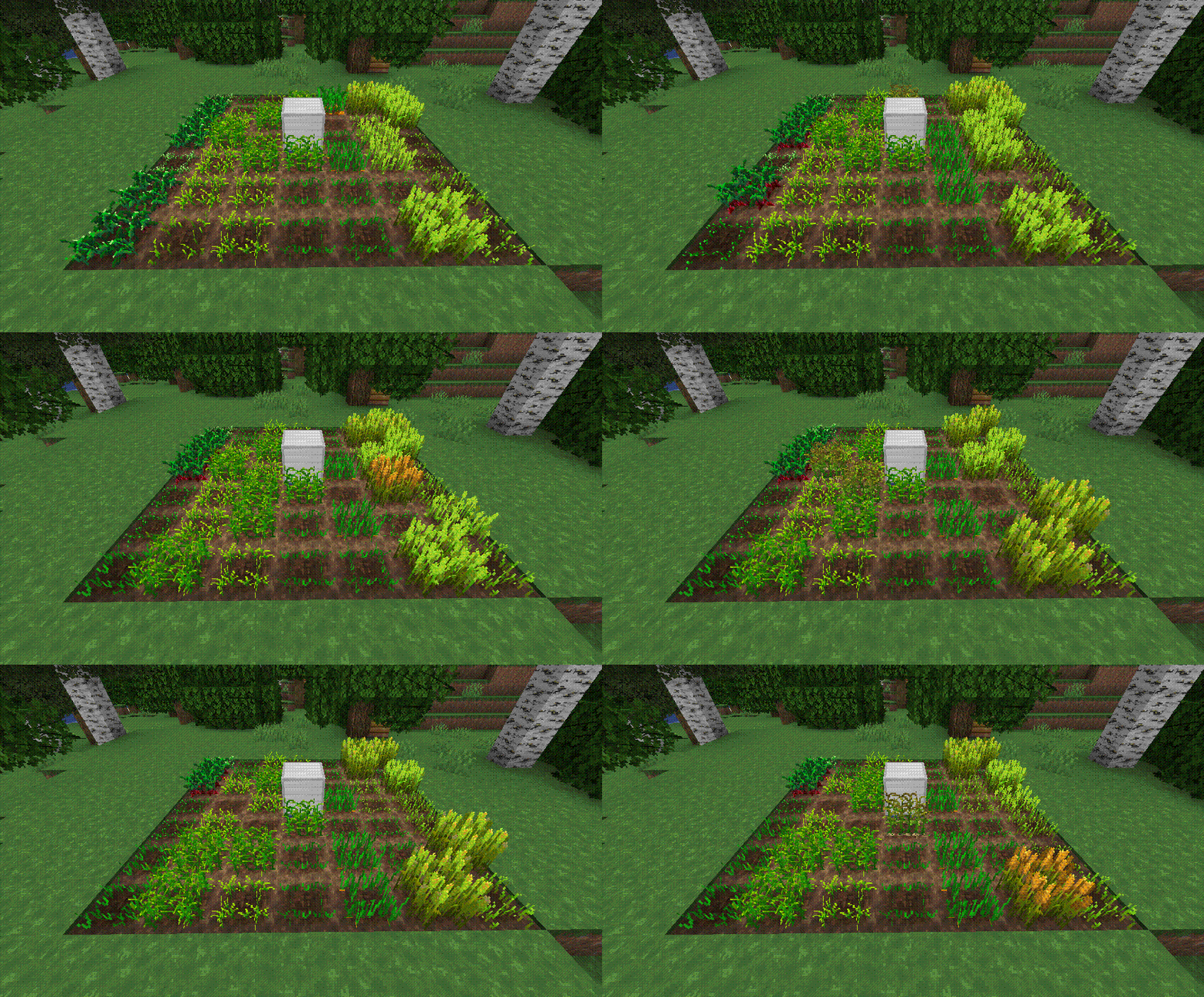
AutoCrop Plugin in Action


Getting Started

Follow these simple steps to set up and start using the AutoCrop plugin:

  1. Craft a Farm Block
    Gather the necessary materials and craft a farm block. The exact recipe may vary depending on your server's configuration or modpack.

  2. Place the Farm Block
    Install the farm block on your chosen plot of land. Ensure the location is suitable for farming activities.

  3. Start the Farm
    Open the farm block menu and activate the AutoCrop feature. The farm block will automatically prepare the land for sowing if it’s placed on dirt. If placed on another block type, ensure you add dirt blocks to the farm’s inventory.

  4. Plant the Seeds
    Add the seeds you wish to grow into the farm block inventory. The plugin currently supports crops like wheat, potatoes, carrots, and beetroot, with more planned in future updates.


Modes

The AutoCrop plugin includes two modes, each requiring specific materials for proper operation:

  1. Seed Mode

    • Requires: Dirt blocks, seeds (e.g., wheat, carrot, potato, beetroot).
      This mode automates the planting and harvesting of standard crops.
  2. Cactus Mode

    • Requires: Sand blocks, cactus.
      This mode automates the growth and harvesting of cactus plants.

Supported Crops

  1. Potatoes
  2. Beetroot
  3. Wheat
  4. Carrots
  5. Cactus

More crops coming soon!


Permissions

  • autocrop.admin - Allows access to administrator commands.
  • autocrop.use (default: true) - Allows players to use the AutoCrop functionality.

Commands

  • /autocrop admin getcropblock - Obtain a farm block.
  • /autocrop admin reload - Reload the plugin configuration.

Continuous Development

AutoCrop is not just a plugin; it’s an evolving project! Regular updates are released to add new features, improve performance, and enhance the overall user experience. Stay tuned for exciting updates to make your farming more enjoyable!

Support the developers by buying them a coffee! Your contributions help them continue delivering quality tools for the gaming community.

Join the Discord

👥 Team & Contributors

imperialroma10
imperialroma10Owner

⚙️ Compatibility

Environment
🖥️ Server-side
Loaders
bukkitpaperpurpurspigot
Minecraft Versions
1.161.16.11.16.21.16.31.16.41.16.51.171.17.1+27 more

🔗 Links

Modrinth Page