

PluginGPL-3.0-or-later
Auto Broadcaster
AutoBroadcaster is a lightweight and feature-rich PaperMC plugin that automates server announcements. It allows you to schedule broadcasts at specific intervals or at exact server times.
89
Downloads
2
Followers
3 weeks ago
Updated
📦
3
Versions
📖About Auto Broadcaster
AutoBroadcaster
AutoBroadcaster is a lightweight and feature-rich PaperMC plugin that automates server announcements. It allows you to schedule broadcasts at specific intervals or at exact server times.
Features
- Interval Messages: Broadcast messages sequentially or randomly at a set interval (e.g., every 5 minutes).
- Scheduled Messages: Broadcast specific messages at an exact server time (e.g., daily at 14:00 or 20:30).
- In-Game Management: Add, remove, list, and reload messages and configurations directly from the game without needing to edit files manually.
- Modern Formatting: Fully supports Paper's MiniMessage formatting out of the box (e.g.,
<red>Hello</red>), while seamlessly falling back to legacy color codes (e.g.,&cHello) if preferred.
Commands & Usage
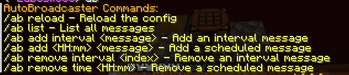
The main command is /autobroadcaster (aliases: /abroadcaster, /ab).
All commands require the autobroadcaster.admin permission.
| Command | Description | Example |
|---|---|---|
/ab reload |
Reloads the configuration from disk and restarts the timers. | /ab reload |
/ab list |
Displays all currently active interval and scheduled messages along with their IDs/Indices. | /ab list |
/ab add interval <message> |
Adds a new interval message to the rotation. | /ab add interval <green>Join our Discord!</green> |
/ab add <HH:mm> <message> |
Adds a new scheduled message at the specified time. | /ab add 14:30 <gold>Daily event starting!</gold> |
/ab remove interval <index> |
Removes an interval message by its index (use /ab list to find the index). |
/ab remove interval 1 |
/ab remove time <HH:mm> |
Removes a scheduled message for that specific time. | /ab remove time 14:30 |
Permissions
autobroadcaster.admin- Grants full access to all plugin commands. Defaults to server Operators (op).
Configuration (config.yml)
You can configure the plugin directly via the config.yml file located in plugins/AutoBroadcaster/config.yml.
# AutoBroadcaster Configuration

# The prefix for all plugin messages
prefix: "<gray>[<gradient:#ff0000:#ff7f00>AutoBroadcaster</gradient>] <reset>"

# Messages that are broadcasted at a specific interval.
# interval_seconds: How often in seconds the messages should be broadcasted.
# random_order: If true, picks a random message. If false, goes in order.
interval_messages:
  enabled: true
  interval_seconds: 300
  random_order: false
  messages:
    - "<green>Welcome to our server!</green> Remember to read the rules."
    - "Join our discord at <aqua><click:open_url:'https://discord.gg/example'>discord.gg/example</click></aqua>"

# Messages that are broadcasted at specific server times (HH:MM).
# Make sure the time matches the server's time zone.
scheduled_messages:
  enabled: true
  messages:
    "12:00": "<gold>It is noon! Don't forget to grab your daily rewards!</gold>"
    "20:00": "<light_purple>Evening event is starting now!</light_purple>"
Compilation / Building
This plugin targets PaperMC 26.1.2.build.69-stable and requires Java 25 to compile and run.
To build it yourself:
- Clone the repository.
- Ensure you have a Java 25 JDK installed.
- Run
./gradlew build. - The
.jarwill be generated inbuild/libs/.