

AuricNetwork - Network no proxy
A network without a proxy? A FREE network? YES! Enjoy a free network without a proxy and without a multiverse.
📖About AuricNetwork - Network no proxy
🌟 AuricNetwork – Zero-Proxy Network System
A free network? No proxy? No multiple worlds overloading the server's RAM? Yes, it's possible with AuricNetwork.
AuricNetwork lets you build a Minecraft server network without any proxy (BungeeCord, Velocity). It uses Paper's native Player#transfer (1.21+).
⚠️ Requirement: On each target server, set accepts-transfers=true in server.properties.
Core Features
- Direct server transfers – No single point of failure, lower latency.
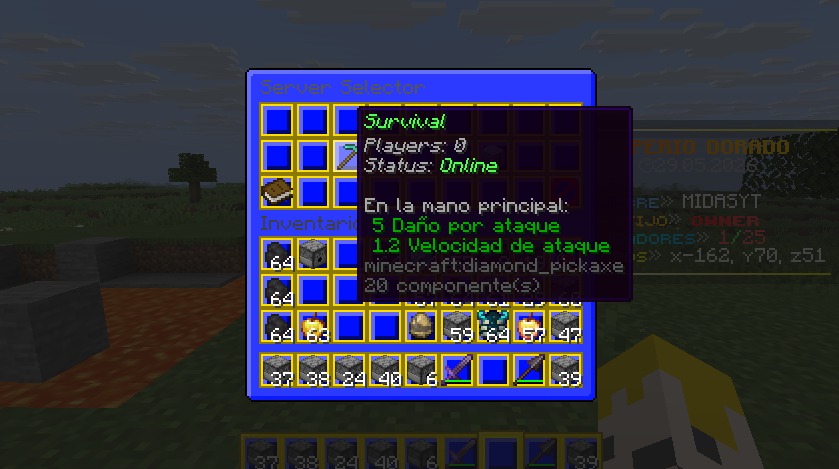
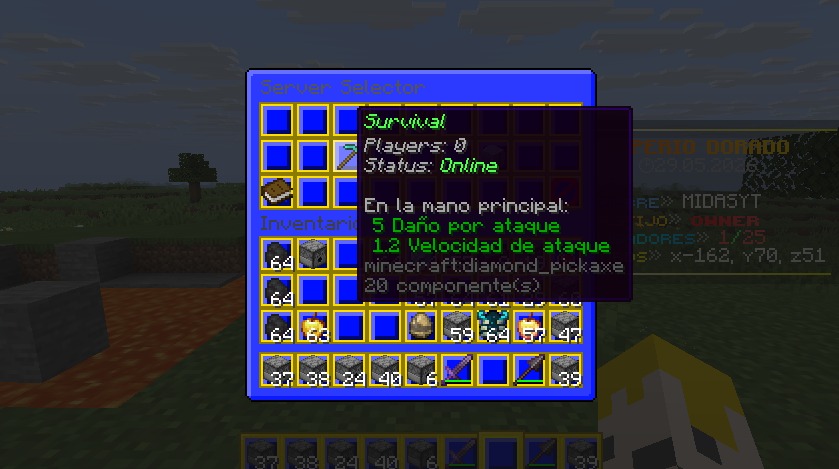
- Graphical server selector – Fully configurable chest GUI with placeholders
%online_<server>%and%status_<server>%. - Rank-based welcome system – Title, subtitle, chat message, action bar, sound, fireworks and a damage-free lightning strike on join, all tied to numeric rank permissions.
- Configurable hotbar – Give players custom items on join with click actions (transfer, command, open menu, sound, message...) and protection against dropping, moving, picking up or swapping them.
- Named announcements – Broadcast a specific announcement on demand by its id, with per-id permissions and tab-completion.
- Maintenance mode – Take any server out of rotation; transfer attempts are rejected with a message instead of failing silently.
- Party system – Invite, accept, kick and disband; when the leader transfers servers, the whole party follows automatically.
- Rescue server (fallback) – On graceful shutdown, all players are auto-transferred to a configured rescue server, with an optional fallback list. Console shows how many were moved.
- Multi-lobby balancing –
/lobbypicks a server from a list, either at random or always the one with the fewest players. - Join & respawn spawns – Set teleport locations for join and respawn events.
- Live server status – Pulls real-time online players and online/offline/full status from
api.mcsrvstat.us. - Network placeholders – Works with or without PlaceholderAPI, exposing online counts, server status, queue position and party info as
%auricnetwork_*%/%an_*%.
Commands
/auricnetwork reload– Reload config. (auricnetwork.command.reload)/auricnetwork status– List every server's live status. (auricnetwork.command.status)/auricnetwork announce <id>– Broadcast a named announcement. (auricnetwork.command.announce or auricnetwork.command.announce.<id>)/auricnetwork menu– Open server selector GUI. (auricnetwork.command.menu)/auricnetwork setjoinspawn– Set join spawn at your location. (auricnetwork.command.setjoinspawn)/auricnetwork setrespawnspawn– Set respawn spawn. (auricnetwork.command.setrespawnspawn)/server <name> [player]– Transfer to another server, or send another player. (auricnetwork.command.server / auricnetwork.command.server-others)/spawn [join|respawn]– Teleport to spawn. (auricnetwork.command.spawn)/lobbyor/hub– Go to lobby (supports random or least-players balancing). (auricnetwork.command.lobby)/party <invite|accept|deny|leave|kick|list|disband>– Manage your party. (auricnetwork.command.party)
Every subcommand above also works directly under /auricnetwork (e.g. /auricnetwork server survival).
Permissions
auricnetwork.admin– Parent node for every administrative permission: reload, announce, status, set spawns, server-others.auricnetwork.command.server/auricnetwork.command.server-others– Transfer yourself, or transfer other players.auricnetwork.command.menu– Open the server selector GUI.auricnetwork.command.spawn– Parent node forauricnetwork.command.spawn.joinandauricnetwork.command.spawn.respawn.auricnetwork.command.lobby– Use/lobby//hub.auricnetwork.command.party– Parent node forinvite,accept,deny,leave,kick,listanddisband, each with its own individual permission.auricnetwork.command.announce– Broadcast any announcement, orauricnetwork.command.announce.<id>for a single one.auricnetwork.welcome.<number>– Unlocks the welcome rank with that exact numeric key in the config.auricnetwork.queue.<number>– Queue priority; any number works, the highest one wins.
Every command permission is split as granularly as possible, so you can remove access to one specific feature without affecting the rest.
💡 You can use a database connected to each server to maintain, for example, ranges between servers.
💡 Since a proxy is not being used, the plugins must be installed on all servers; they will not be transferred between them.
🌐 My Socials (Spanish Content / Contenido en Español)