

Aurelium
A complete Paper economy solution featuring a customizable web-based Market, Player Auction House, and unique Spawner trading. It includes a custom currency and auto-installs Vault for an instant, plug-and-play experience.
📖About Aurelium
Aurelium
Experimental Web Features
The web dashboard is in active development. Expect potential bugs or instability if you enableweb.enabled. The core in-game economy, GUI markets, and auction house are stable.
A comprehensive, standalone economy plugin for Minecraft Paper.
Compatibility: Paper, Purpur, Pufferfish, Leaves
Table of Contents
Features
Economy
- Multi-Currency - Define multiple currencies (e.g., Aurels, Dollars, Euros) with unique symbols and starting balances
- Per-Item Currency - Assign specific currencies to individual market items
- Vault Support - Fully compatible with Vault-dependent plugins (ShopGUI+, Essentials, etc.)
- Database - SQLite or MySQL storage with automatic migration
- Offline Earnings - Get paid for auction sales even when offline
Server Market
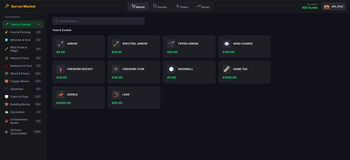
A server-owned shop with dynamic pricing and three interface modes:
- Classic - Traditional chest-based inventory GUI
- Modern - Styled chest GUI with MiniMessage gradient titles, glass-pane borders, formatted lore
- Web - Browser dashboard (see Web Dashboard)
Pricing Mechanics:
- Prices automatically rise on buys (Demand) and fall on sells (Supply)
- Anti-Exploit: Sell price can never exceed Buy price
- Price Floor: Can't drop below 20% of base (configurable)
- Price Ceiling: Can't rise above 500% of base (configurable)
- Natural Recovery: Prices passively drift toward base value every 10 minutes
Quality of Life:
- Live UI updates every 1 second while a menu is open
- Page indicator books showing current page (e.g., "Page 1 of 5")
- Compass search button to find any item
- Market Crash Alerts for bargain-priced high-value items
- Smart inventory: purchases fill partial stacks first
Performance:
- Viewer-Only Refresh: logic dormant unless a player has a menu open
- Batched Disk I/O: transaction data saved in background batches
- O(1) Data Access: local caching for near-zero CPU impact
- Massive Catalog: all building blocks + 60+ mob spawners
Auction House
A fully self-contained player-driven exchange:
- 100% GUI Driven: sell items, place bids, make private offers via in-menu buttons
- Safety Confirmations: dedicated confirmation screen before deducting funds
- Manage Offers:
/ah offersto Accept or Decline incoming deals - Live Updates: GUI refreshes instantly for all players on buys, bids, cancels; timers update every second
- Auto-Refunds: outbid? Money instantly returned
Buy Orders
A global request system for offline purchasing:
- Request any item (including 120+ enchanted books and ingots) at your price
- Other players browse and fulfill orders from their inventory
- Escrow System: money held safely, refunded on cancel
- Offline Collections: fulfilled items go to
/ah collectbin; notified on login - Buyer Notifications: real-time when filled, or on next login
Custom Item Detection
Automatically discovers custom items from popular third-party plugins:
- Auto-Scan on Startup - runs once, detects all custom items
- Supported Plugins (zero hard dependencies, all via reflection):
- ItemsAdder, Oraxen, MMOItems, MythicMobs, ExecutableItems, Nexo, SX-Item
- Discovered items written to
config.ymlunderdiscovered-items: - Persisted in
custom_itemsdatabase table (schema v2, auto-migrates) - No supported plugins installed? Scanner silently skips with zero overhead
Web Dashboard
A modern, responsive web app with nearly 100% uptime:
- Server Market - purchase items from the web, delivered instantly in-game

- Auction House - place bids and buyout items (BIN) from the browser

- Buy Orders - fulfill player buy orders from your online inventory

- Price Tracker - interactive chart with 7-day history, bezier curves, gradient fills, hover tooltips


Web Features:
- Live Sync: in-game changes reflect instantly on the web and vice-versa
- Prices recorded every 10 minutes, stored for 7 days
- Cloud Mode: optional cloud hosting via Render
- Multi-Currency UI: custom currency symbols synced from
config.yml - Icon Fallbacks: seamless fallback for older MC versions
- Secure Sessions:
/webin-game generates a time-limited link (rolling 1-hour timeout) - Tab Sleep Mode: no network/CPU when tab is inactive; instant wake on return
- RAM Optimized: per-server memory under 1MB via raw JSON string caching
- Activation Queue: fair waitlist when cloud server hits its 500MB limit
Commands
Player Commands
| Command | Description | Permission |
|---|---|---|
/bal [player] [currency] |
Check your own or another player's balance | aureleconomy.bal |
/pay <player> <amount> [currency] |
Pay another player | aureleconomy.pay |
/market |
Open the in-game server market | aureleconomy.market |
/sell |
Sell items from your inventory | aureleconomy.sell |
/stocks |
View market trends | aureleconomy.stocks |
/web |
Generate a secure link to the browser dashboard | aureleconomy.web |
/ah |
Open the Auction House | aureleconomy.ah |
/ah sell <price> [duration] [currency] |
List held item as BIN. Duration: e.g. 1h, 7d |
aureleconomy.ah |
/ah bid <price> [duration] |
List held item for auction. Duration: e.g. 1h, 7d |
aureleconomy.ah |
/ah offer <id> <qty> |
Send a private offer for an auction item | aureleconomy.ah |
/ah offers |
Manage incoming private offers | aureleconomy.ah |
/ah collect |
Collect expired/purchased items | aureleconomy.ah |
/ah search <query> |
Open a filtered Auction House view | aureleconomy.ah |
/orders |
Open the Buy Orders GUI | aureleconomy.orders |
/orders create <item> <amount> <price> [currency] |
Place a buy order | aureleconomy.orders |
/orders fill <id> [amount] |
Fulfill an order from your inventory | aureleconomy.orders |
/orders cancel <id> |
Cancel your order and get a refund | aureleconomy.orders |
/orders my |
List your active buy orders | aureleconomy.orders |
/orders search <query> |
Search active orders by item name | aureleconomy.orders |
Admin Commands
| Command | Description | Permission |
|---|---|---|
/eco <give|take|set> <player> <amount> [currency] |
Modify player balances | aureleconomy.admin |
/customitems scan |
Force rescan all supported custom item plugins | aureleconomy.admin |
/customitems list |
View all discovered custom items | aureleconomy.admin |
/customitems info <id> |
Show details for a specific custom item | aureleconomy.admin |
/customitems reload |
Reload config overrides from disk | aureleconomy.admin |
/customitems toggle <id> |
Enable or disable a discovered item in the market | aureleconomy.admin |
/customitems price <id> <buy> [sell] |
Set buy/sell prices for a discovered item | aureleconomy.admin |
Permissions
| Permission | Description | Default |
|---|---|---|
aureleconomy.bal |
Check balance | Everyone |
aureleconomy.pay |
Pay players | Everyone |
aureleconomy.market |
Use the market | Everyone |
aureleconomy.sell |
Use /sell | Everyone |
aureleconomy.ah |
Use the auction house | Everyone |
aureleconomy.orders |
Use buy orders | Everyone |
aureleconomy.stocks |
View market trends | Everyone |
aureleconomy.web |
Use /web | Everyone |
aureleconomy.admin |
Admin commands (eco, customitems) | OP only |
Setup
- Download the latest
Aurelium.jar - Place it in your server's
plugins/folder - Restart the server
- If Vault is not detected, Aurelium automatically extracts and installs it on first run
Configuration
Database
database:
  type: sqlite          # sqlite or mysql
  file: "database.db"   # SQLite only
  mysql:                # MySQL only
    host: "localhost"
    port: 3306
    database: "aurelium"
    username: "root"
    password: "password"
Economy
economy:
  default-currency: "Aurels"
  currencies:
    Aurels:
      symbol: "₳"
      starting-balance: 100.0
  max-balance: -1       # -1 = unlimited
  min-pay-amount: 0.01
Market Items
Control every price directly:
market-items:
  DIAMOND:
    buy: 5000.0    # Cost to buy from server
    sell: 0.0      # 0.0 = selling disabled
  DIRT:
    buy: 1.0
    sell: 0.5      # Players can sell for 0.5
  BEDROCK:
    buy: -1.0      # -1.0 = buying disabled
Market Settings
market:
  enabled: true
  gui-mode: modern              # "classic" or "modern"
  dynamic-pricing: true
  price-increase-per-buy: 0.001 # +0.1% per buy
  price-decrease-per-sell: 0.001 # -0.1% per sell
  default-sell-ratio: 0.5
  price-floor: 0.2              # Can't drop below 20% of base
  price-ceiling: 5.0            # Can't rise above 500% of base
  price-recovery:
    enabled: true
    rate: 0.01                  # 1% of gap per cycle
    interval-minutes: 10
Auction House
auction-house:
  enabled: true
  default-duration: 86400       # 24 hours (seconds)
  max-duration: 604800          # 7 days max
  listing-fee-percent: 2.0
  sales-tax-percent: 5.0
  max-listings-per-player: -1   # -1 = unlimited
  min-listing-price: 1.0
Buy Orders
buy-orders:
  enabled: true
  max-active-orders-per-player: 10
  min-price-per-piece: 0.1
  max-order-value: -1           # -1 = unlimited
  creation-fee-percent: 2.0
  sales-tax-percent: 5.0
Web Dashboard
web:
  enabled: true
  port: 8585
  # Session timeout: rolling 1 hour of inactivity (hardcoded)
Network Syncing (MySQL Required)
Aurelium supports cross-server synchronization for BungeeCord and Velocity networks.
MySQL is required for synchronization. SQLite does not support cross-server data sharing. Point all backend servers to the same MySQL database:
- Global Balances - player balances refreshed on join across the network
- Global Auction House - active auctions and collection bin shared across all linked servers
- Per-Server Markets - dynamic prices stored in each server's local
config.yml, allowing different economies per server while players keep the same wallet
Language
A messages.yml file is generated on startup.
- Translate: Change any message to your language
- Color Codes: Use MiniMessage formatting (e.g.,
<green>) or legacy&codes
FAQ
"Unknown Command" - If /market or /eco says "Unknown command", the plugin failed to load.
- Check server console/logs for errors
- Ensure you have
Aurelium.jarinplugins/ - Ensure you are running Paper (or compatible forks: Purpur, Pufferfish, Leaves)
"No Permission" - You need OP (/op <player>) or the aureleconomy.admin permission node. Standard player commands are enabled for everyone by default.
Still not working? - Open an issue on GitHub with your server version, error logs, and steps to reproduce.